by vuecwiz
Compact the Border theme with aligned tabs and a status-bar menu for Ribbon actions.
Border Theme Compacted
English | 简体中文
A lightweight desktop-only plugin for the Obsidian Border theme. It combines a compact workspace layout with a pop-up Ribbon menu, without requiring a separate CSS snippet.
Demos
1. Original Border theme vs. compact layout
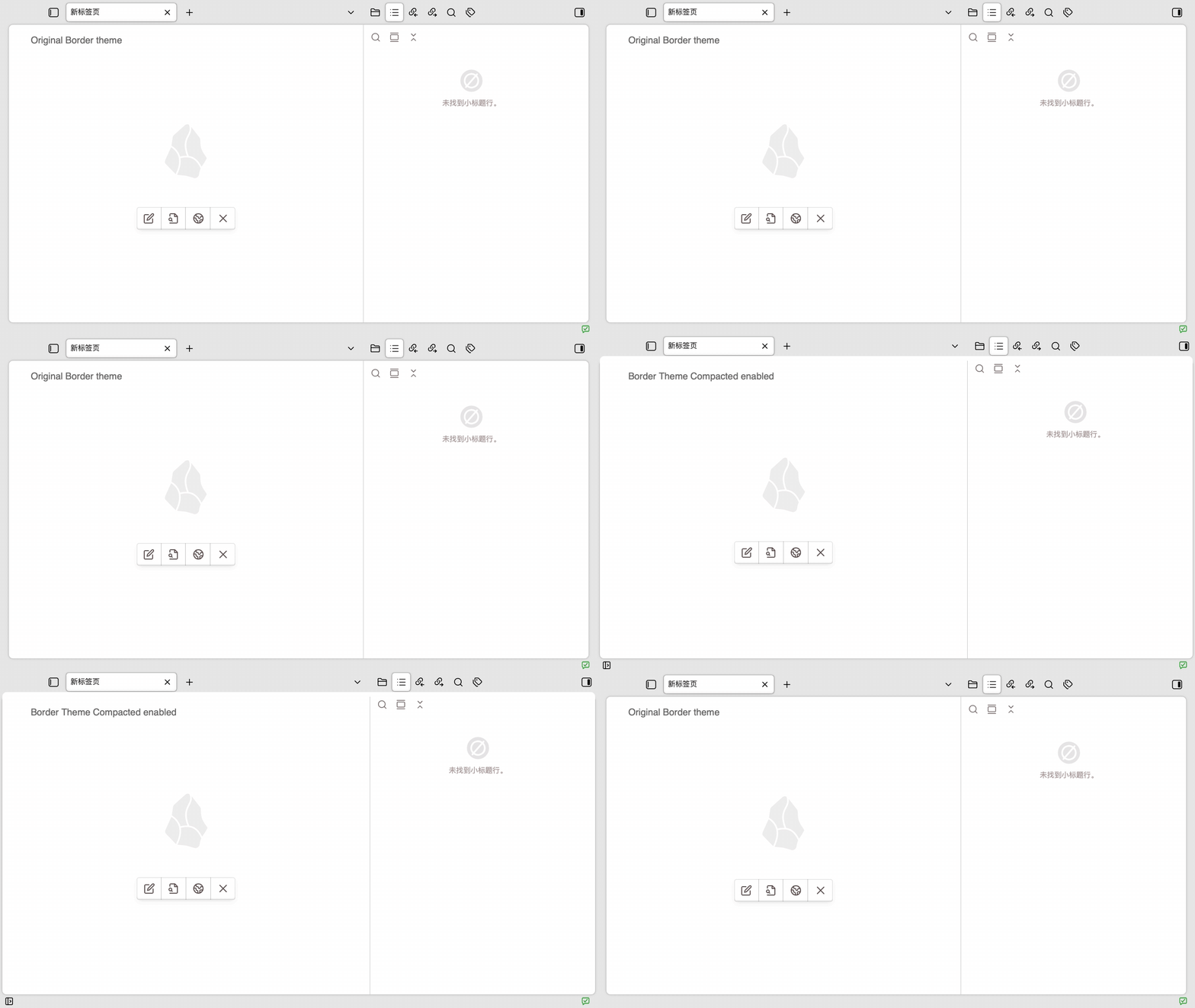
The animation alternates about every two seconds between the original Border layout and the compact layout provided by this plugin.
2. Ribbon controls
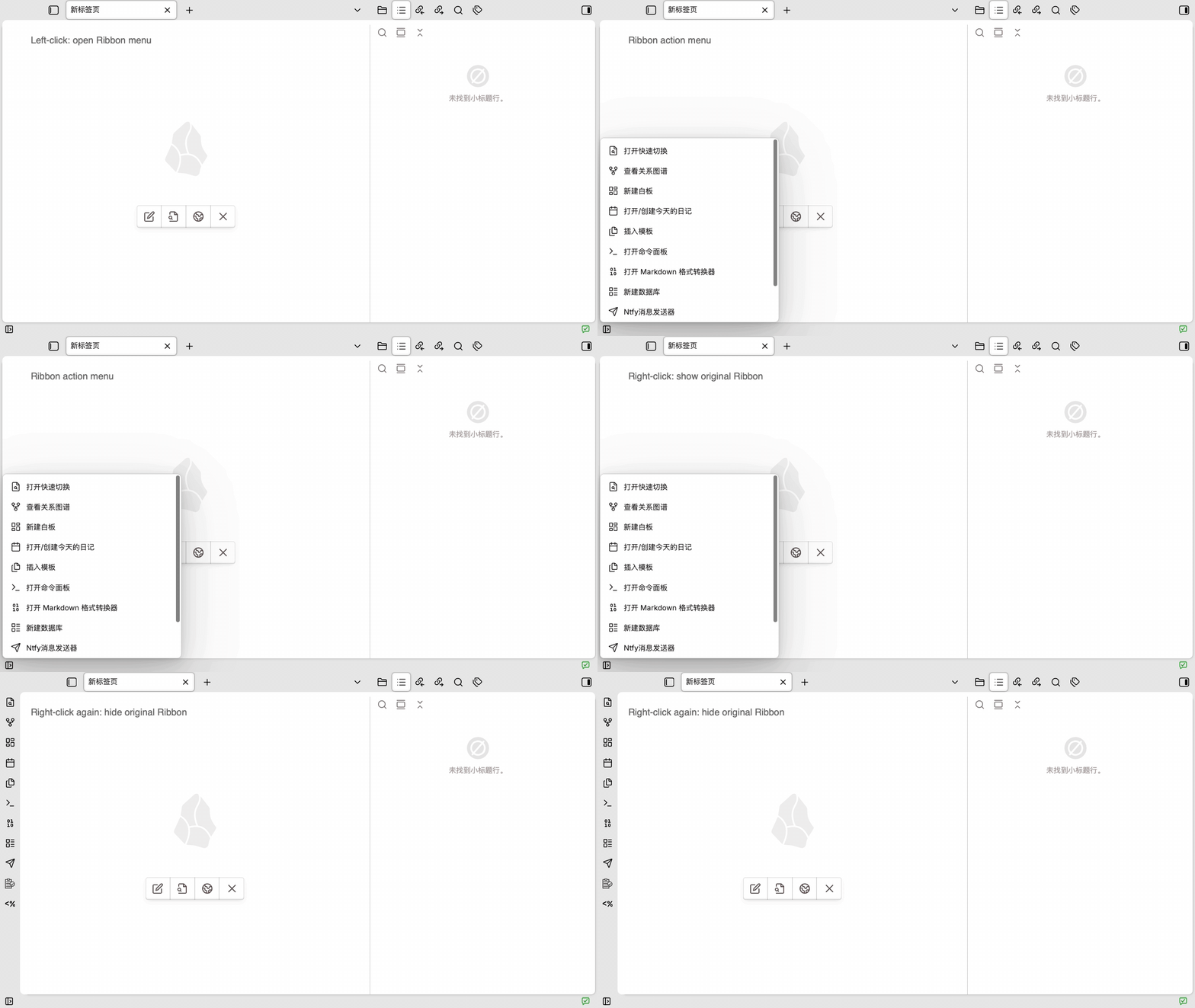
The animation shows how to open the pop-up Ribbon menu with a left-click, use its actions, show the compact original Ribbon with a right-click, and hide it with another right-click.
Features
- Reduces the outer workspace spacing from about 16px to 4px.
- Uses a 36px title-bar grid with 32px tabs and buttons.
- Aligns editor tabs, sidebar tabs, sidebar toggle buttons, the tab list, and the new-tab button.
- Aligns native window controls with the 36px compact title bar: 36px-tall controls on Windows and vertically centered traffic lights on macOS.
- Compacts the original Ribbon to 36px wide with 32px action buttons.
- Prevents Border's shadow frame from briefly flashing when the Ribbon is shown or hidden.
- Prevents editor and sidebar tab rows from shifting upward after a tab is dragged.
- Adds a 24px Ribbon control button to the lower-left status bar.
- Displays currently available Ribbon actions in a scrollable pop-up menu.
- Shows or hides Obsidian's original Ribbon by right-clicking the status-bar button.
Theme detection
At runtime, the plugin checks:
this.app.customCss?.theme === "Border";
Only when the active community theme is Border does the plugin add the border-theme-compacted-theme class to body. Every interface override in styles.css is scoped to that class.
When another theme is selected, the plugin removes the class, closes the pop-up menu, hides its status-bar button, and restores the selected theme's own layout.
On macOS, the plugin temporarily adjusts Electron's native traffic-light Y position while Border is active and restores the original position when the theme changes or the plugin unloads. On Windows, the equivalent vertical alignment is handled entirely by theme-scoped CSS while preserving Border's original button width and icon layout.
Usage
- Left-click the status-bar button to open or close the Ribbon action menu.
- Click a menu item to run its corresponding original Ribbon command.
- Right-click the status-bar button to show or hide Obsidian's original Ribbon.
- Press
Escor click outside the menu to close it.
The status-bar button remains visible while the original Ribbon is open, so you can right-click it again to hide the Ribbon.
Installation
Copy these three runtime files to:
<vault>/.obsidian/plugins/border-theme-compacted/
├── main.js
├── manifest.json
└── styles.css
Reload Obsidian, enable Border Theme Compacted under Community plugins, and select Border under Appearance → Themes.
Development
This project has no npm dependencies, TypeScript, or build step. Edit main.js and styles.css directly, then reload the plugin:
obsidian vault=vanotes-test plugin:reload id=border-theme-compacted
Minimal syntax check:
node --check main.js
Files
main.js       Plugin logic and directly executable source
styles.css    Compact Border layout and Ribbon menu styles
manifest.json Obsidian plugin manifest
README.md     English usage and development guide
README_CN.md  Chinese usage and development guide
LICENSE       MIT license
assets/       GIF demos used by the READMEs
Compatibility
- Obsidian 1.12.7 or later
- Desktop only
- Border theme
Window-control alignment is platform-specific. The Windows buttons use Obsidian DOM selectors; macOS uses Electron's desktop-only window-button API with a guarded fallback when the API is unavailable.
The plugin relies on the DOM structure of Border and Obsidian desktop. Future theme or Obsidian updates may require adjustments to its CSS selectors.
License
For plugin developers
Search results and similarity scores are powered by semantic analysis of your plugin's README. If your plugin isn't appearing for searches you'd expect, try updating your README to clearly describe your plugin's purpose, features, and use cases.