Ribbon Drawers
Organise Obsidian's ribbon into collapsible folders.
| Before | After |
|---|---|
 |  |
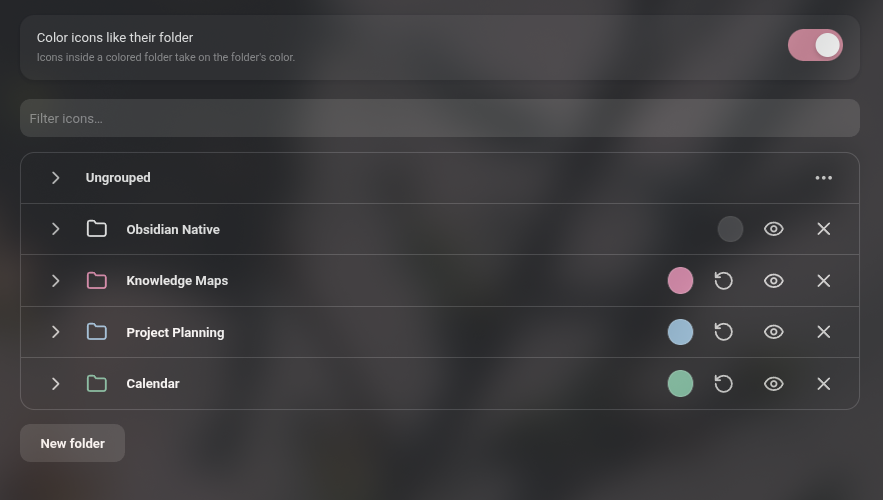
Features
- Group ribbon icons into folders.
- Give each folder an optional color.
- Drag icons directly in the ribbon to reorder them, move them between folders or out of a folder
- Hide any icon, or a whole folder, from the ribbon.
Usage
Open Settings -> Interface -> Ribbon menu configuration, or right-click an empty part of the ribbon and choose Organise ribbon… There you can create, rename, color, hide and delete folders, and drag icons and folders into place.
While the plugin is enabled it manages the ribbon's order and visibility in place of Obsidian's built-in ribbon settings. Disabling it leaves the ribbon in the order you arranged, without folders.
IMPORTANT FOR REVIEW: This plugin overrides Obsidian's native functionality
Compatibility
Desktop only. Requires Obsidian 1.13 or later.
Installation
Install Ribbon Drawers from Settings -> Community plugins -> Browse, then enable it.
To install manually:
Copy main.js, manifest.json and styles.css from the latest release into <vault>/.obsidian/plugins/ribbon-drawers/.
For plugin developers
Search results and similarity scores are powered by semantic analysis of your plugin's README. If your plugin isn't appearing for searches you'd expect, try updating your README to clearly describe your plugin's purpose, features, and use cases.