Codeblock Template
approvedby sylcool
Reuse content within code blocks, with the ability to use variables.
★ 16 stars↓ 3,575 downloadsUpdated 3y agoMIT
Obsidian-Codeblock-Template
一个可以把 Code Block 的内容在任何笔记中重复利用Obsidian模板插件!
- 模板变量:可根据传入的变量改变模板内容。 —— 2023年6月3日
- 批量匿名变量:可传入以
,分隔的多个值,避免为过多变量取名。(类似CSV语法) —— 2023年6月4日 - array循环变量:值为
[1,2,3,4]的array类型,可循环显示该行的内容。 —— 2023年6月12日 - 输入提示:在需要插入模板的地方输入
...或 ```pack-view,按下空格就可以自动补全完整的模板。 —— 2023年6月14日
安装
目前这个插件还没上传到 Obsidian 插件库,还需要手动安装。
- 通过右方 release latest 下载
main.js和manifest.json。 - 在你的插件目录(.obsidian/plugins)新建文件夹
codeblock-template,并将 main.js 和 manifes.json 文件放入此文件夹即可。
使用
设置
设置模板存放路径,默认路径为根目录的templates。

基本使用
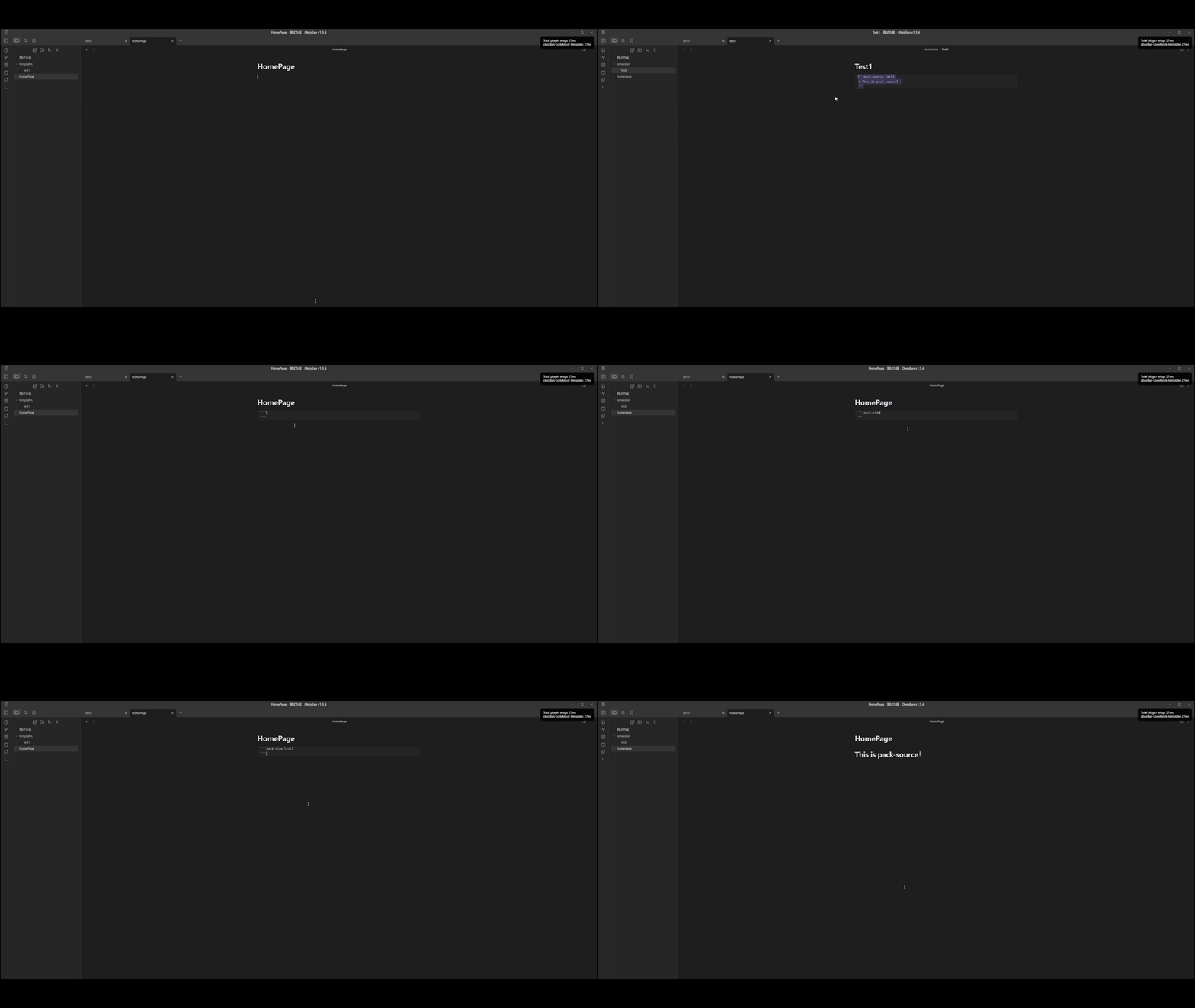
创建模板
```pack-source a
# This is pack-source!
```
注意:要在设置中Template Source Path指定的路径下创建才有效。
使用模板
```pack-view a

```
插值
可以在创建模板时使用$.{}来定义变量,在使用时传入变量。
```pack-source test1
Hello $.{name}!
```
通过key = value或key = "value"来定义变量。模板可以重复利用。
注意:为了方便存储,key 要符合标识符定义规则1
```pack-view test1
name = "Super10"
```

---

```pack-view test1
name = "Sylcool"
```

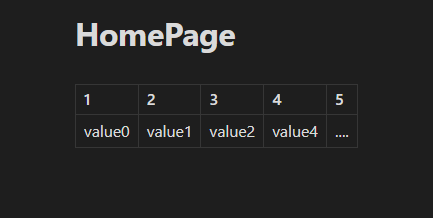
匿名变量
匿名变量的前缀支持通过设置自定义,默认是anonymous_var_。
注意:为了方便存储,key 要符合标识符定义规则1
定义模板
```pack-source test_anonymous
| 1                   | 2                   | 3                   | 4                   | 5                   |
| ------------------- | ------------------- | ------------------- | ------------------- | ------------------- |
| $.{anonymous_var_0} | $.{anonymous_var_1} | $.{anonymous_var_2} | $.{anonymous_var_3} | $.{anonymous_var_4} |
```
使用模板
```pack-view test_anonymous
value0,value1,value2,value4,....
```
循环变量
定义
```pack-source test_loop
List:
1. $.{a}
```
使用
```pack-view test_loop
a = [A,B,C,D]
```

配合其他插件使用
dataview
````pack-source dv
```dataview
LIST FROM "$.{path}"
```
````
tasks
````pack-source tasks
```tasks
not done
due after $.{date}
```
````
预计开发
- 读取本地 JSON、CSV 数据
Footnotes
For plugin developers
Search results and similarity scores are powered by semantic analysis of your plugin's README. If your plugin isn't appearing for searches you'd expect, try updating your README to clearly describe your plugin's purpose, features, and use cases.