SnippetBase
pendingby Matthew Briel
Vault-wide database UI for fenced code snippets: search, filter, preview, copy.
SnippetBase
A vault-wide database UI for fenced code snippets in Obsidian. Build and maintain a personal code library directly in your notes.
Search, filter, and copy code snippets instantly - perfect for developers who collect code examples, configurations, and reusable patterns across their knowledge base.
What you can do in 10 seconds:
- Open SnippetBase from the ribbon or command palette
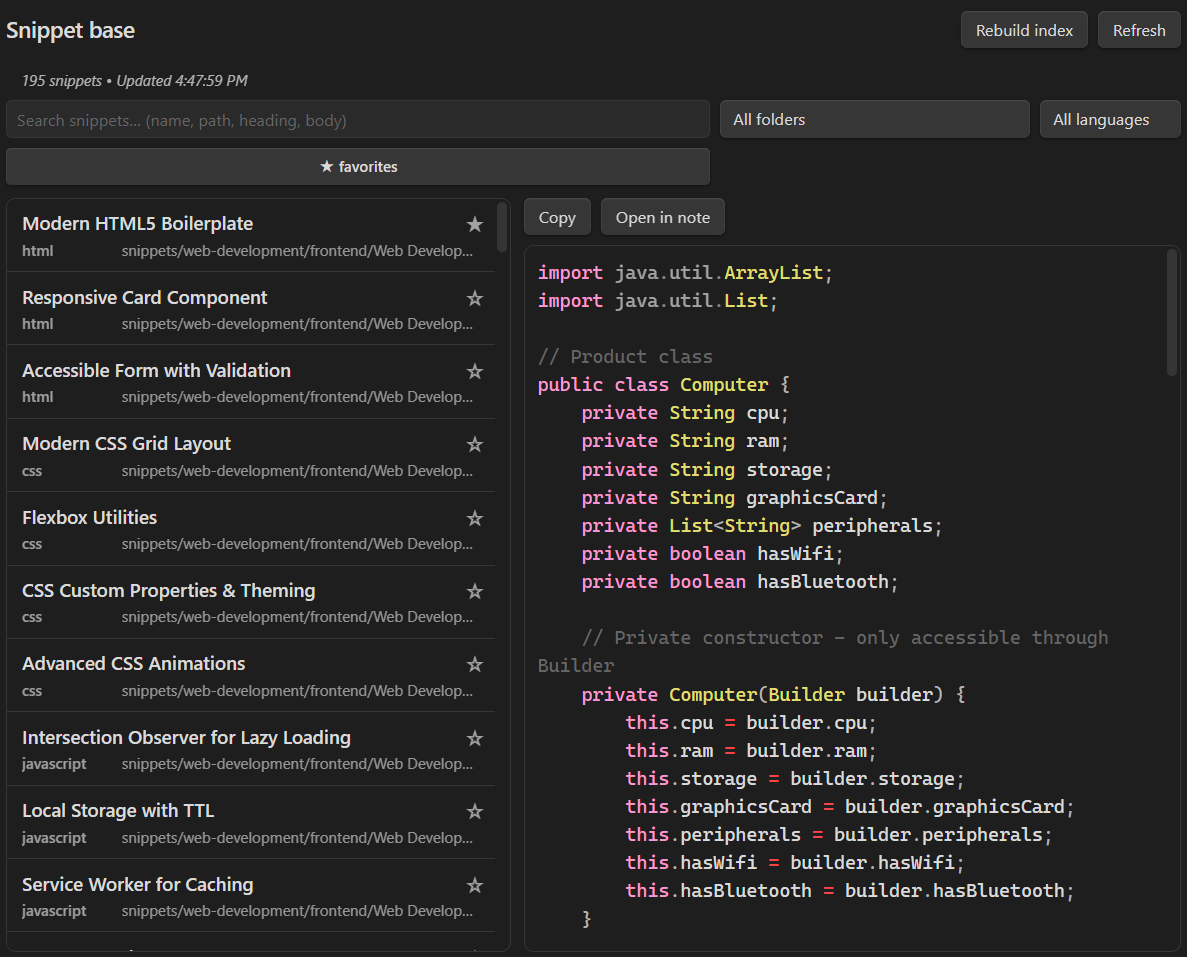
- See all your fenced code snippets in one searchable list
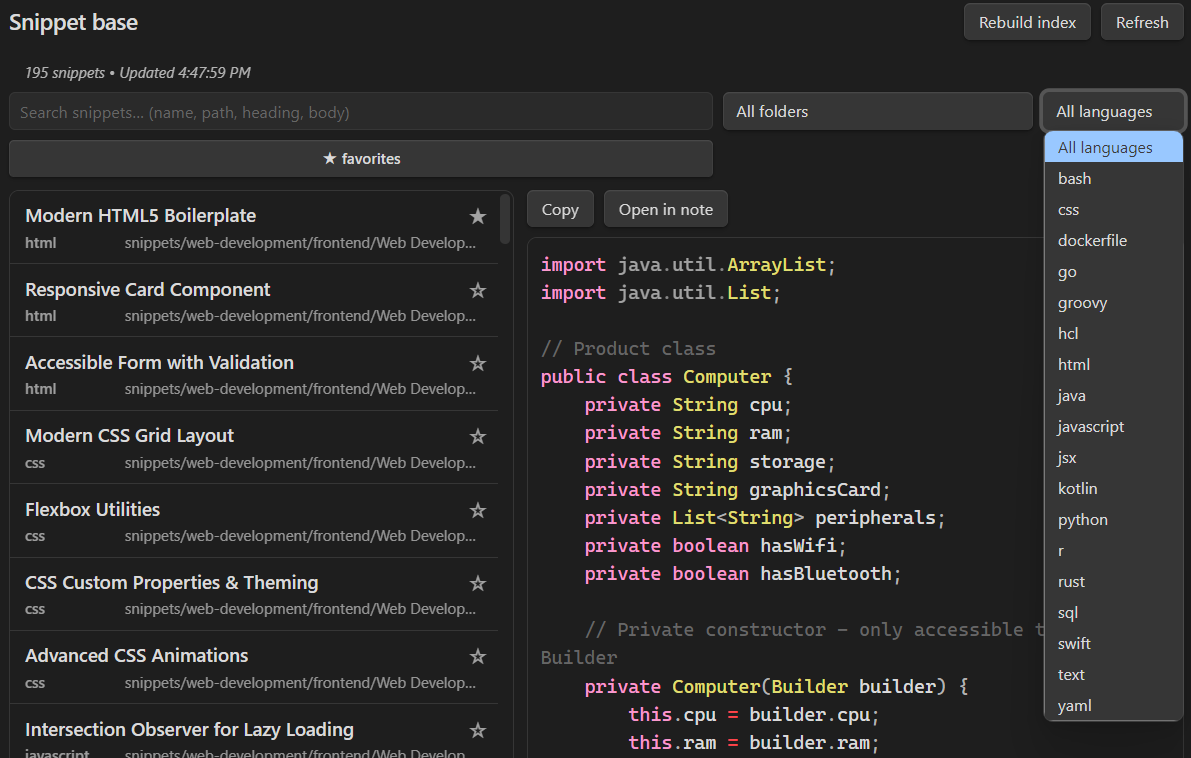
- Filter by language, folder, or mark favorites
- Preview syntax-highlighted code and copy to clipboard
Features
- Search & Filter: Find snippets by content, language, or folder
- Live Preview: Syntax-highlighted code preview with copy functionality
- Favorites: Mark and filter favorite snippets
- Incremental Indexing: Automatically updates when you modify markdown files
- Multiple Views: Open in tab or right sidebar
- Fast Performance: Optimized for large vaults with hundreds of snippets
- Template Placeholders: Fill in dynamic values when copying snippets
Template Placeholders
SnippetBase supports dynamic templating with placeholders that get filled in when you copy snippets. Use the "Copy (fill…)" command or button to open the placeholder modal.
Placeholder Types
Text Placeholders
{{name}}                    # Simple text input
{{name=John Doe}}          # Text with default value
Select Placeholders
{{language:JavaScript|Python|TypeScript}}  # Dropdown selection
{{priority:high|medium|low}}              # Choose from options
Date Placeholders
{{date:today}}             # Today's date (YYYY-MM-DD)
{{date:today+7d}}          # 7 days from today
{{date:today-1w}}          # 1 week ago
{{date:2025-12-21}}        # Specific date
{{date:2025-12-21+1m}}     # Specific date + 1 month
Date Expressions
Date placeholders support complex expressions:
- Base dates:
todayorYYYY-MM-DDformat - Offsets:
+or-followed by number and unit - Units:
d(days),w(weeks),m(months),y(years) - Examples:
today+7d- 7 days from today2025-12-21-1m+3d- Dec 21, 2025 minus 1 month plus 3 daystoday+1y-6m- Today plus 1 year minus 6 months
Usage in Snippets
// Example: Function template
function {{name}}({{params}}) {
  {{body}}
}

// Example: API endpoint with date
const API_URL = '/api/v1/reports/{{date:today-30d}}/{{language}}';

// Example: Configuration with selection
module.exports = {
  language: '{{language:JavaScript|Python|TypeScript}}',
  priority: '{{priority:high|medium|low}}',
  author: '{{author=Your Name}}',
  created: '{{date:today}}'
};
Screenshots
Main interface with snippet list and syntax-highlighted preview
Filter controls and search functionality
How it works
SnippetBase automatically indexes all fenced code blocks from your markdown files and maintains a searchable database. When you modify, rename, or delete notes, the index updates incrementally to stay current.
All data is stored locally in your vault under .obsidian/plugins/snippetbase/ - nothing is sent to external servers.
Known limitations
- Search uses substring matching (not fuzzy search)
- Preview truncates snippets longer than 200 lines
- Code fences without language tags are treated as plain text
- Desktop-only (not available on mobile)
Installation
Install via Community Plugins (once listed)
- Open Settings → Community plugins
- Browse and install "SnippetBase"
- Enable the plugin
Manual install from Releases (current)
- Download the latest release from GitHub Releases
- Extract the files to your vault's
.obsidian/plugins/snippetbase/folder - Reload Obsidian and enable "SnippetBase" in Settings → Community plugins
Usage
Opening SnippetBase
- Ribbon Icon: Click the code icon in the left sidebar
- Command Palette: Search for "SnippetBase: Open"
- Commands:
Open in new tab- Opens in a new tabOpen in right sidebar- Opens in right sidebar
Features
- Search: Type in the search box to filter snippets by content
- Language Filter: Filter by programming language (JavaScript, Python, etc.)
- Folder Filter: Filter by vault folder location
- Favorites: Click the star icon to favorite/unfavorite snippets
- Copy: Click the copy button to copy snippet content to clipboard
- Copy (fill…): Fill template placeholders with custom values before copying
- Preview: Click any snippet to see full syntax-highlighted preview
Commands
SnippetBase: Rebuild snippet index- Manually rebuild the snippet databaseSnippetBase: Copy (fill…)- Copy selected snippet with placeholder filling
Privacy
SnippetBase is designed with privacy as a core principle:
- No network required: Works completely offline - no internet connection needed
- No telemetry or data collection: Nothing is sent to external servers
- Local storage only: All data stays in your vault's
.obsidian/plugins/snippetbase/folder - No external dependencies: Uses only built-in Obsidian APIs
FAQ
Can it paste into my terminal automatically?
No, SnippetBase copies to your clipboard for manual pasting. This gives you control over where and how you use the code.
Does it edit my notes?
No, SnippetBase only reads your markdown files to index code snippets - it never modifies your notes.
Where is data stored?
Everything is stored locally in your vault under .obsidian/plugins/snippetbase/.
Changelog
0.1.2
- Added template placeholders with dynamic value filling
- Support for text, select, and date placeholder types
- Date expressions with complex math (today+7d, 2025-12-21+1m, etc.)
- Placeholder history and auto-fill functionality
0.1.0
- Initial release with core functionality
- Search and filter snippets by content, language, and folder
- Live syntax-highlighted preview
- Favorites system
- Incremental indexing on file changes
- Copy snippets to clipboard
- Multiple view modes (tab/sidebar)
Development
This plugin is built with TypeScript and uses the Obsidian Plugin API.
Setup
npm install
npm run dev  # Watch mode
npm run build  # Production build
Architecture
src/main.ts- Plugin lifecycle and event handlingsrc/snippetBase/indexer.ts- Snippet parsing and indexingsrc/ui/SnippetBaseView.ts- Main UI componentsrc/settings.ts- Settings and configuration
Support
For maintainers: see RELEASING.md for release instructions.
If you find this plugin useful, consider:
- Starring the repository on GitHub
- Contributing improvements via pull requests
- Buying me a coffee if you'd like to support development
License
MIT License - see LICENSE file for details
For plugin developers
Search results and similarity scores are powered by semantic analysis of your plugin's README. If your plugin isn't appearing for searches you'd expect, try updating your README to clearly describe your plugin's purpose, features, and use cases.