Colorful Note Background
approvedby andresgongora
Forked from Colorful Note Borders
Set note background based on file location or frontmatter metadata.
Colorful Note Background
Apply colored backgrounds to notes based on folder location or frontmatter metadata.
About
This plugin is a fork of obsidian-colorful-note-borders by rusi. I am very thankful to the original author for creating such a useful foundation.
Key difference: While the original plugin applies colored borders, this version uses subtle background colors instead—providing a less intrusive visual distinction.
Preview

Installation
From Community Plugins
- Open Settings → Community plugins.
- Disable Safe mode if prompted.
- Click Browse and search for "Colorful Note Background".
- Install and enable the plugin.
Using BRAT
- Install BRAT from Community Plugins.
- Run command: BRAT: Add a beta plugin for testing.
- Enter:
https://github.com/andresgongora/obsidian-colorful-note-background. - Enable the plugin in Settings → Community plugins.
How It Works
The plugin applies background colors to notes based on configurable rules:
- Folder rules: Match notes by folder name anywhere in the path
- Frontmatter rules: Match notes by metadata key-value pairs (e.g.,
category: private)
Rules are evaluated in order—the first matching rule applies.
Configuration
For best result, use subtle colors with low alpha values to avoid overpowering note content. This can guide you through your vault by letting you subtly recognize note types without distractions.
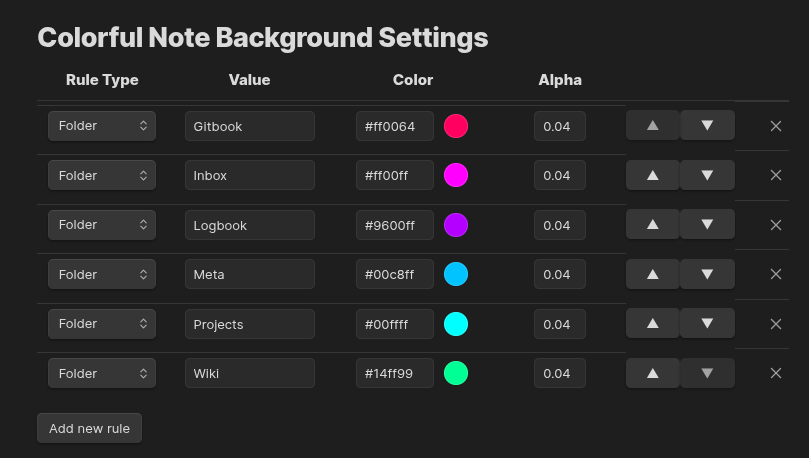
Go to Settings → Colorful Note Background to manage rules. Each rule has:
| Field | Description |
|---|---|
| Type | Folder or Frontmatter |
| Value | Folder name or key: value for frontmatter |
| Color | Background color (hex) |
| Alpha | Transparency (0–1, recommended: 0.04) |
Use the arrow buttons to reorder rules (priority) or the × to remove them.
License
MIT License. See LICENSE for details.
For plugin developers
Search results and similarity scores are powered by semantic analysis of your plugin's README. If your plugin isn't appearing for searches you'd expect, try updating your README to clearly describe your plugin's purpose, features, and use cases.