by jase
Tag a node as a database, queue or service, and your Obsidian diagrams draw it with the right colour and shape, all in your theme’s palette.
Consistent System Design
Draw system design diagrams in Obsidian with consistent, theme-aware components. Tag a node with its role and it gets that role's colour and shape. Colours, shapes and borders are all adjustable, and you can add roles of your own.
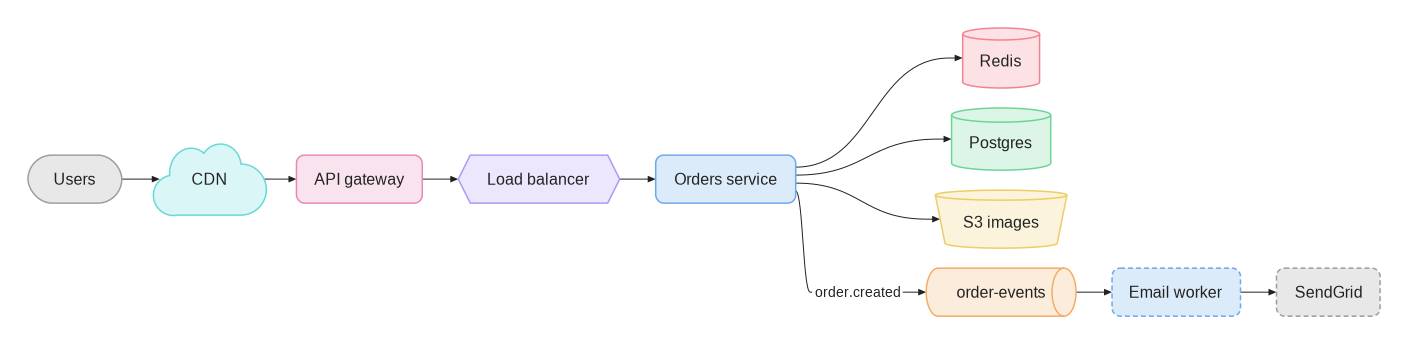
That diagram is just this, with no styling of its own:
```mermaid
flowchart LR
U[Users]:::client --> CDN[CDN]:::cdn --> GW[API gateway]:::gateway --> LB[Load balancer]:::lb
LB --> API[Orders service]:::service
API --> R[Redis]:::cache
API --> PG[Postgres]:::db
API --> S3[S3 images]:::storage
API -->|order.created| Q[order-events]:::queue --> W[Email worker]:::worker --> SG[SendGrid]:::external
```
The plugin also stops Obsidian from turning wide left-to-right diagrams into top-down ones.
Requires Obsidian 1.15 or later, which draws diagrams with Pele.
Components
| Class | For | Look | Automatic shape |
|---|---|---|---|
client | users, browsers, mobile apps | grey | pill |
cdn | CDN, edge | cyan | cloud |
gateway | API gateway | pink | box |
lb | load balancer | purple | hexagon |
service | app or API service | blue | box |
worker | async worker, background job | blue, dashed border | box |
db | database | green | cylinder |
cache | Redis, Memcached | red | cylinder |
queue | queue or stream (Kafka, SQS) | orange | horizontal cylinder |
storage | object or blob storage | yellow | bucket |
external | third-party service | grey, dashed border | box |
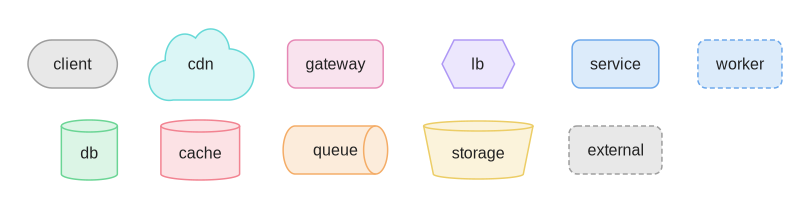
Colours come from your theme's --color-* variables, so they follow light and dark mode and theme changes.
You can also tag nodes with a class statement:
class PG,Orders db
Automatic shapes
A tagged node gets its role's shape only when you haven't given it one: PG[Postgres]:::db and PG:::db become cylinders. A shape you write yourself always wins, so PG{{Postgres}}:::db stays a hexagon.
To skip one diagram, add this line to it:
%% csd: no-shapes
To turn the feature off everywhere, use Settings → Consistent System Design → Automatic shapes.
How it works: before Pele draws a flowchart, the plugin appends a line such as PG@{ shape: cyl } for each tagged node without a shape. Your note is never changed.
Labels that contain brackets need quotes, as they always do in Mermaid syntax: PG["Postgres (main)"]:::db.
Customising
Settings page
Settings → Consistent System Design has everything, with no other plugin needed:
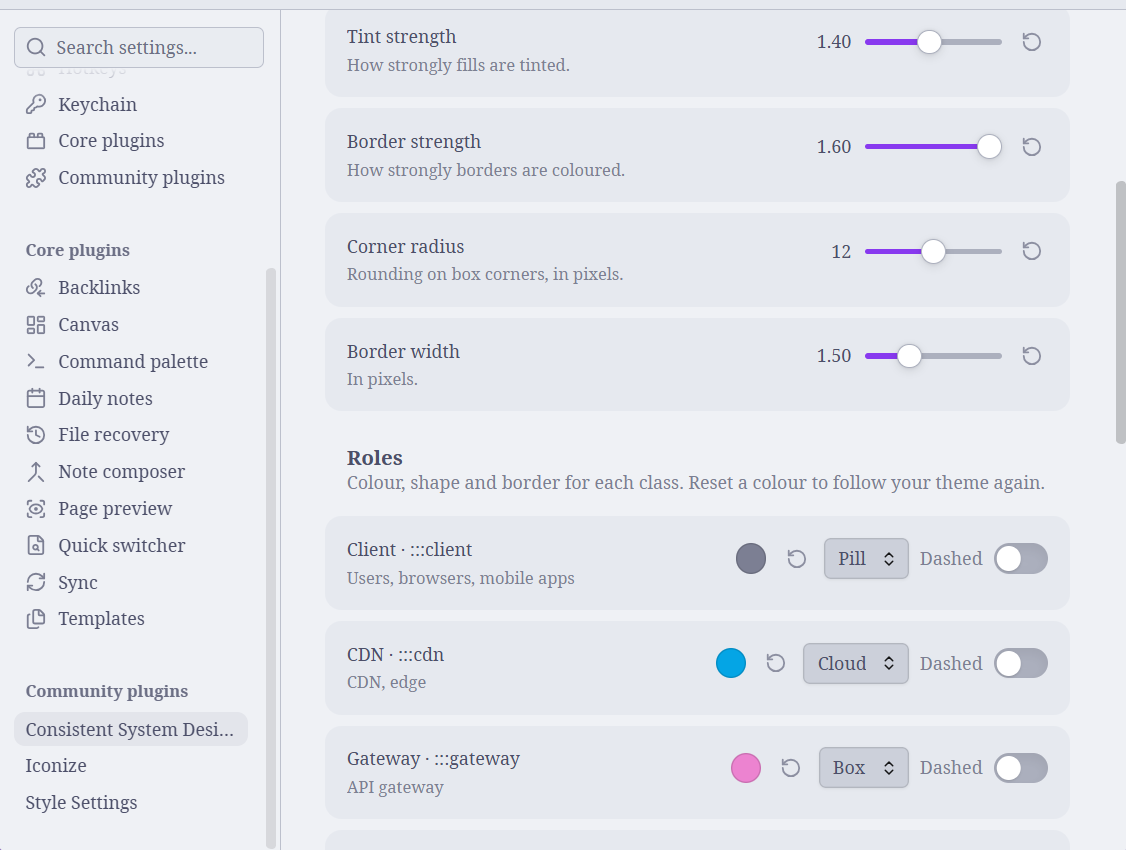
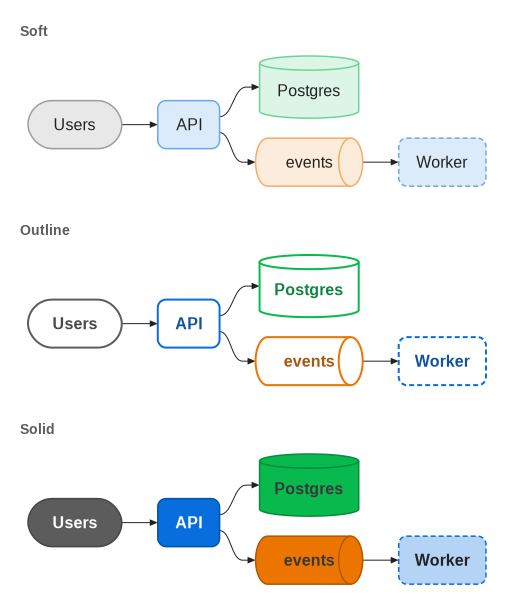
- Look: Soft (tinted fill, the default), Outline (coloured border and text) or Solid (filled with the role colour; text turns dark or light to suit each colour).
- Sliders: tint strength, border strength, corner radius and border width.
- Roles: for each built-in role, a colour, a shape and a dashed-border toggle. Reset a colour to follow your theme again.
- Custom roles: add your own classes, such as
search,authorml-model, each with a colour, shape and border. Use them like the built-in ones:Index[Search]:::search. - Reset styling puts the look, sliders and built-in roles back to their defaults and keeps your custom roles.
Colour changes apply straight away. Shape changes show the next time a note is opened. Settings are saved per vault.
The three looks:
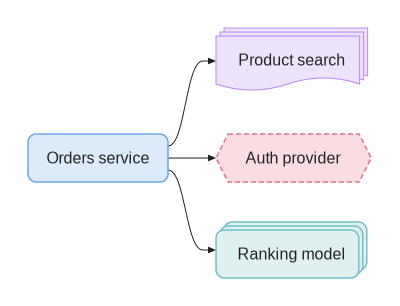
Custom roles search (stacked documents), auth (dashed hexagon) and ml-model (stacked boxes):
Style Settings
With the Style Settings plugin, Style Settings → Consistent System Design offers the look, the four sliders and a colour per built-in role, each with separate light and dark values. If the same thing is set in both places, the plugin's own settings page wins.
CSS snippet
Every value is a CSS variable you can override in your own snippet:
body {
  --csd-db-color: teal;        /* any role: --csd-<role>-color */
  --csd-worker-dash: none;     /* any role: --csd-<role>-dash, e.g. "5 3" */
  --csd-fill-scale: 1.5;       /* tint strength, 1 = default */
  --csd-stroke-scale: 1;       /* border strength, 1 = default */
  --csd-radius: 4px;
  --csd-border-width: 2px;
}
Custom roles have the same variables: --csd-search-color, --csd-search-dash.
Order of precedence: the plugin's settings page, then Style Settings, then your snippet, then the defaults.
Keep diagram direction
When a left-to-right diagram is wider than the note, Pele redraws it top-down. With this setting on (the default), the diagram keeps the direction you wrote and is scaled down to fit. Turn it off in Settings → Consistent System Design.
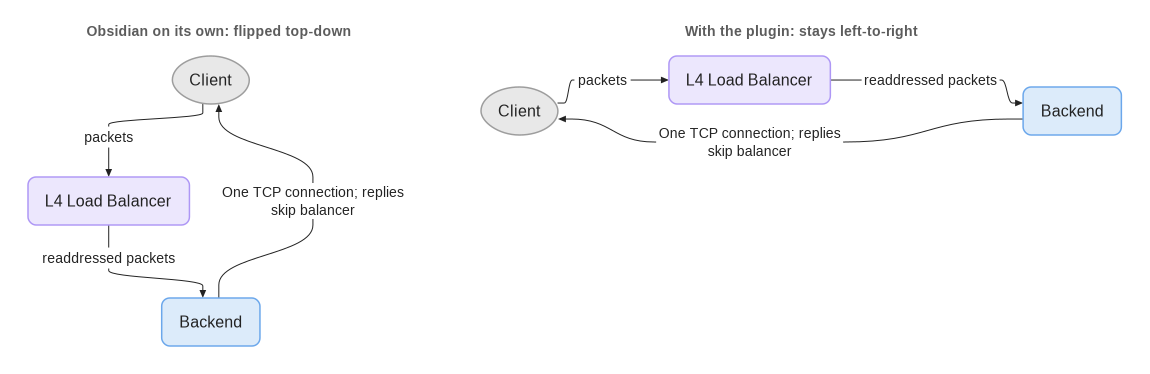
How it works: Obsidian draws each diagram by calling Pele's mount(). The plugin wraps that call and passes Pele's own autoDirection: false option. It restores Pele when the plugin is disabled. If a future Obsidian version draws diagrams differently, this setting stops having an effect, but your diagrams keep working.
Compatibility
- Diagrams that don't use these classes look exactly as before.
- Colours set inside a diagram with
classDeforstylewin over the plugin's colours. - Works alongside other plugins that wrap Pele, such as Mermaid Flow Enhancer.
Privacy
The plugin makes no network requests and collects no data.
Installing manually
Download main.js, manifest.json and styles.css from the latest release into <vault>/.obsidian/plugins/consistent-system-design/, then enable the plugin in Settings → Community plugins.
License
For plugin developers
Search results and similarity scores are powered by semantic analysis of your plugin's README. If your plugin isn't appearing for searches you'd expect, try updating your README to clearly describe your plugin's purpose, features, and use cases.