Contextual Sidecar
approvedby matthewturk
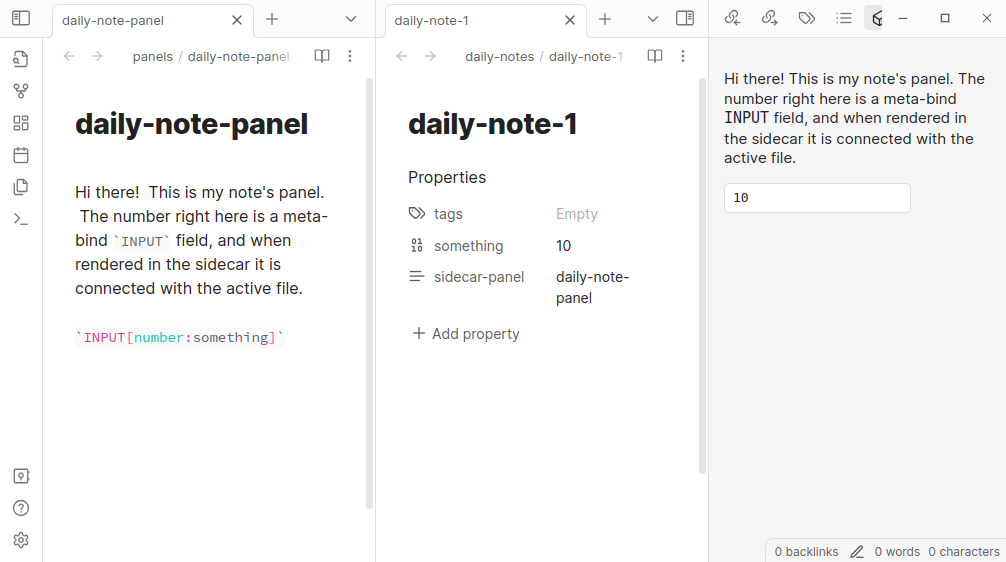
Add a context-dependent sidecar panel.
Sidecar Contextual Panel for Obsidian
This is a plugin that enables you to display a contextual sidebar for given
files, based on the content of a sidebar-panel frontmatter property.
These files are rendered as though they are coming from the file in which the
property is set; this enables you to use plugins such as
obsidian-meta-bind
to create INPUT fields that bind to the parent, rather than to the panel
source itself.
One use case, which motivated me to make this, was that I often want to have different contextual buttons or metadata input lists that display to the side, so that while I am editing a file I don't have to scroll to the top to change, for instance, the attendees of a meeting. Or, so that I can have some buttons that say things like "Add another TODO" or something like that.
This uses the how to release your Obsidian Plugin workflow.
How to Use
There are two ways to associate a sidecar panel with a file. The first is to
set the property sidecar-panel in a file (perhaps in a template!) to enable
it. The second is to add a mapping between a tag (such as #daily-note) and a
sidecar panel file (such as daily-note-editor.md). The mapping between tags
and panel files can be done in the Settings for the sidecar panel. When a
file with that set is open and focused, the right leaf will include that sidecar
panel.
For instance, if you have mysidecar.md in your Vault with this content:
`INPUT[number:somenumber]`

`INPUT[list:somelist]`
And then another file, example.md, with the property sidecar-panel set to
[[mysidecar.md]], when you open it the sidecar panel would display that set of
widgets which -- crucially! -- will modify example.md rather than
mysidecar.md. Now you have a widget that'll be visible all the time, settable
on a per-file basis, to keep handy buttons and other things visible.
Multiple Panel Files
It's possible to set multiple cascading files, such that you have multiple
concatenated into one sidecar. This can be done through multiple tag maps or
through having a tag map and a sidecar-panel property. These will be
concatenated and shown in order of the tag maps and then the sidecar-panel
file.
Embedding Fun Buttons
Using
obsidian-meta-bind,
you can embed notes. For instance, I have this in a latex-editor file which I
apply to any file with the tag #latex:
label: Export to PDF
icon: ""
hidden: false
class: ""
tooltip: ""
id: ""
style: primary
actions:
  - type: inlineJS
    code: >
      const sidecar = app.plugins.plugins["contextual-sidecar"];
      const pandoc = app.plugins.plugins["obsidian-pandoc"];
      const currentFile = await sidecar.getCurrentFile();
      const fullPath = app.vault.adapter.getFullPath(currentFile.path);
      const v = await pandoc.startPandocExport(fullPath, "pdf", "pdf", "PDF", currentFile);
This puts a button up on in my sidecar panel that exports to PDF. Handy! (Probably worth noting that this specific button requires a change I've issued a pull request for.)
Roadmap
- Add support for metadatamenu
fileClasses to applysidecar-panelattributes across queries. - Add per-tag support, so that not all files have to have their properties modified to benefit.
- Add a default sidecar file and allow it to always be used even if others are to be applied.
- Better support changes in properties and sidecar files for open files.
Version History
- 0.2.3 -- First release in the plugin list!
- 0.2.4 -- Add a default panel file and a toggle to always apply it.
- 0.3.0 -- Added a
getCurrentFilefunction for use in embedded widgets. - 0.3.2 -- Added a new folder mapping function
License
This template is available under the MIT License. Feel free to modify and use it to create your own Obsidian plugins.
Funding
If you find this plugin useful, please consider donating to the Cystic Fibrosis Foundation.
For plugin developers
Search results and similarity scores are powered by semantic analysis of your plugin's README. If your plugin isn't appearing for searches you'd expect, try updating your README to clearly describe your plugin's purpose, features, and use cases.