deepseek-ai-assistant
approvedby mali-i
Help you to study with ai-prompting
DeepSeek AI Assistant for Obsidian
中文
概述
DeepSeek AI Assistant 是一款辅助 Obsidian 用户进行 Prompt 管理与知识积累的工具。它旨在帮助用户记录提问过程,将零散的 AI 对话转化为可追溯的知识资产。
主要功能
Prompts 管理与检索:构建您的知识资产
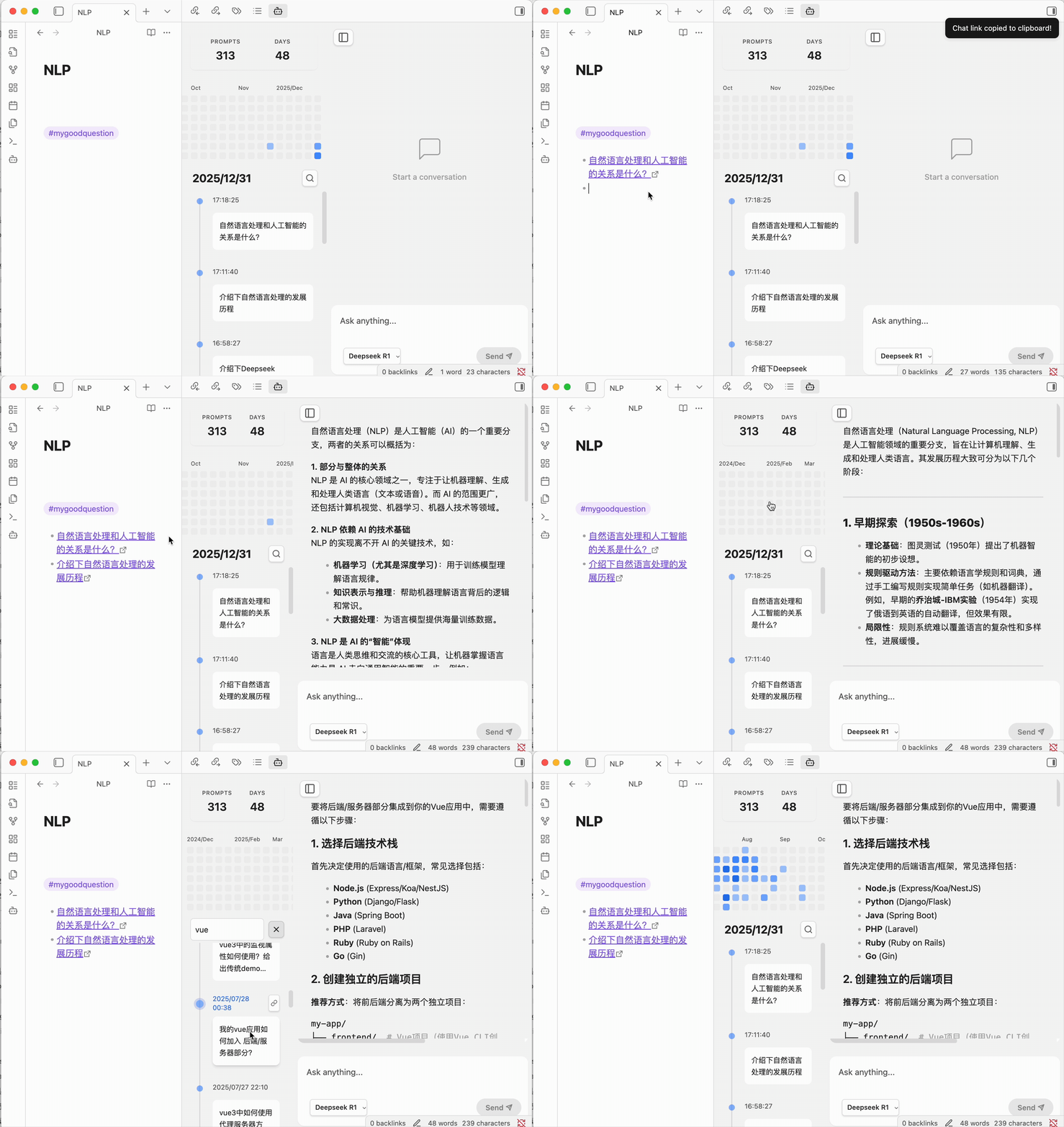
插件不仅仅是记录,更是对思维的沉淀。通过关键词筛选功能,您可以瞬间过往记录中找回曾经的灵感或复杂的解决方案。这种“即时复用”的能力,让每一条 Prompt 都不再是消耗品,而是转化为您个人知识库中可随时调用的知识资产。
Timeline 历史时间轴
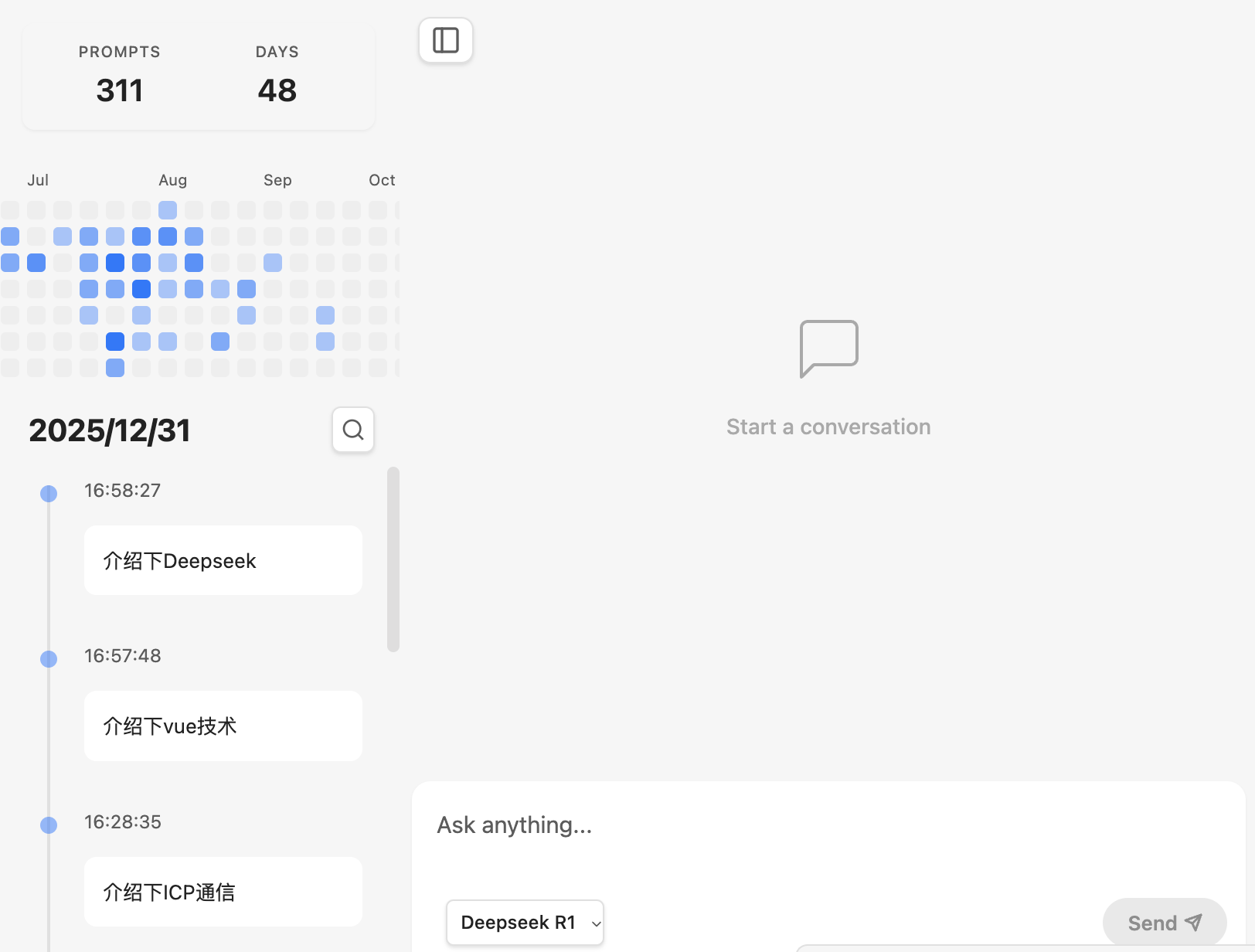
侧边栏内置了直观的 Timeline 视图,按日期对您的提问进行分类展示。您可以轻松回溯到特定的一天,查看当时的思考脉络。这种基于时间的组织方式,帮助您发现自己学习兴趣的迁移和思维深度的演进。
对话追溯与链接
支持为每一条 Prompt 生成专用链接。您可以将链接以 [问题描述](obsidian://deepseek-ai-assistant?id=...) 的格式保存至笔记中。在整理笔记时,点击链接即可回溯当时的 AI 回答。
提问统计
内置热力图功能,展示近期的提问频率。这可以作为一种轻量级的学习轨迹参考,帮助您了解自己的关注点变化。
基础对话支持
集成 DeepSeek V3 与 R1 模型,支持流式输出,提供基础的 Markdown 渲染,方便将内容复制到笔记中。
支持自定义大模型服务商
兼容 OpenAI 格式的 API,您可以配置任意支持 OpenAI 格式的大模型服务商(如 DeepSeek, OpenAI, Claude via proxy 等),自定义 Base URL 和模型名称。
多轮对话能力
能够@自己的历史对话,作为新对话的上下文
配置和使用说明
- 在插件设置中选择服务商(默认 DeepSeek 或 Custom)。
- 填入您的 API Key。如果是自定义服务商,还需填写 Base URL 和 Model ID。
- 确保您的账户中有足够的 Token 余额。
- 通过侧边栏图标或命令面板 "Open deepseek-ai-assistant" 打开界面。
- API KEY 以及所有数据保存在您的本地
data.json文件中。
支持与赞助
如果您觉得这个插件对您的学习有所帮助,欢迎请作者喝杯咖啡!
English
Overview
DeepSeek AI Assistant is a tool designed to help Obsidian users manage prompts and accumulate knowledge. It aims to assist users in recording their inquiry process, transforming scattered AI conversations into traceable knowledge assets.
Features
Prompts Management & Search: Building Your Knowledge Assets
The plugin is more than just a logger; it's a repository for your thoughts. With powerful keyword filtering, you can instantly retrieve past inspirations or complex solutions from historical records. This "instant reuse" capability transforms every prompt from a one-time interaction into a digital asset that can be invoked at any time within your personal knowledge base.
Timeline View
The sidebar features an intuitive Timeline view that categorizes and displays your prompts by date. You can easily travel back to a specific day to review your train of thought. This time-based organization helps you discover shifts in your learning interests and the evolution of your thinking depth.
Traceability & Links
Supports generating dedicated links for each prompt. You can save links in your notes using the [Question Description](obsidian://deepseek-ai-assistant?id=...) format. While organizing notes, click the link to trace back to the AI's response at that time.
Inquiry Statistics
Includes a heatmap feature to display recent inquiry frequency. This serves as a lightweight reference for your learning trajectory, helping you understand changes in your focus.
Basic Chat Support
Integrates DeepSeek V3 and R1 models, supports streaming output, and provides basic Markdown rendering for easy copying into your notes.
Custom LLM Provider Support
Compatible with OpenAI format APIs. You can configure any LLM provider that supports the OpenAI format (e.g., DeepSeek, OpenAI, etc.) by customizing the Base URL and Model ID.
Multi-turn Conversations
You can @mention your own historical conversations and use them as context for a new conversation.
Configuration
- Select the provider in the plugin settings (default DeepSeek or Custom).
- Enter your API Key. If using a custom provider, also enter the Base URL and Model ID.
- Ensure your account has sufficient token balance.
- Open the interface via the ribbon icon or the command palette ("Open deepseek-ai-assistant").
- Your API KEY and all data are stored locally in your
data.jsonfile.
Support & Sponsoring
If you find this plugin helpful, feel free to buy the author a coffee!
For plugin developers
Search results and similarity scores are powered by semantic analysis of your plugin's README. If your plugin isn't appearing for searches you'd expect, try updating your README to clearly describe your plugin's purpose, features, and use cases.