draw.io Blocks
approvedby dy
Edit and render draw.io diagrams directly inside Markdown code blocks using either the hosted diagrams.net editor or an optional offline editor. - This plugin has not been manually reviewed by Obsidian staff.
draw.io Blocks
Edit and render draw.io diagrams directly inside Markdown code blocks using either the hosted diagrams.net editor or an optional offline editor.
Supports desktop and mobile.
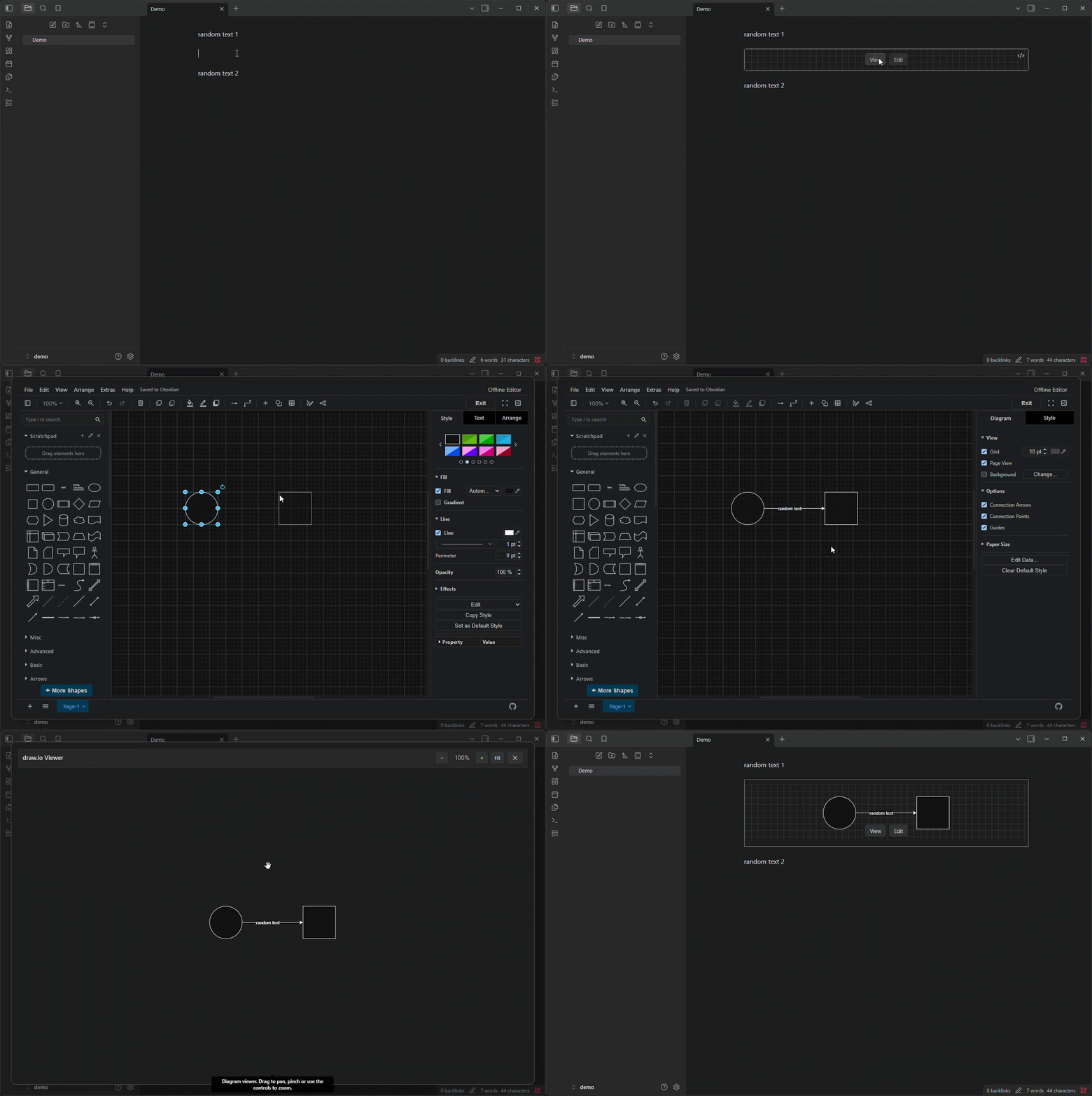
Features
- Renders
drawiocode blocks as SVG previews - Shows selectable page tabs for multi-page diagrams
- Opens a read-only diagram viewer in a modal or new tab, with controls for zooming and panning
- Opens the diagram editor in a modal or new tab
- Autosaves changes to the original Markdown block
- Supports Obsidian light and dark themes
- Supports online and offline editing
- Optionally shows a preview grid and configurable border
- Optionally stores diagrams as compressed XML
Requirements
Requires Obsidian 1.13.0 or later.
An internet connection is required for the hosted editor or to download the offline editor. After downloading, the editor and previews work without an internet connection.
Installation
Install draw.io Blocks from Settings → Community plugins → Browse.
For manual installation, copy main.js, manifest.json, and styles.css into:
<vault>/.obsidian/plugins/drawio-blocks/
Then reload Obsidian and enable the plugin.
Usage
Create an empty drawio code block:
```drawio

```
Use the control bar above each preview to view the diagram with the eye button or edit it with the pencil button. Both open in a modal by default, but each can be configured to open in a tab. Editor changes are saved automatically.
Multi-page diagrams show page tabs beside the view and edit controls. Use the arrow buttons to navigate overflowing tabs. The viewer and editor open on the selected page, and image actions use that page, while XML and DRAWIO exports preserve the complete diagram.
In the viewer, drag or swipe to pan; pinch, use the mouse wheel, or select − and + to zoom. Select Fit to reset the diagram. Select XML to inspect and copy the exact read-only diagram source, then Canvas to return to the preview. Select Edit to replace the current viewer modal or tab with the editor in the same place.
Open the preview context menu by right-clicking on desktop, pressing and holding on mobile, or using the Context Menu key or Shift+F10. From the menu, you can view or edit in a modal or tab, copy the image or XML, save as PNG, JPG, or DRAWIO, or delete the diagram after confirmation.
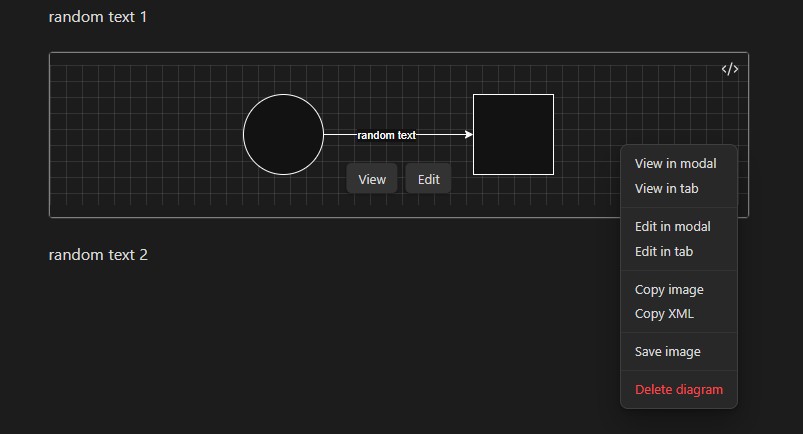
Opening a .drawio file displays the diagram viewer instead of raw XML. The same draw.io actions are available by right-clicking its viewer or its file in the File explorer.
Settings
Offline mode
Switch to local editor displays the draw.io version pinned to the current plugin release. Enable it to download and use the offline editor. Disable it to return to the hosted editor and remove the downloaded files.
Preview actions
View button and Edit button independently choose whether the preview buttons open in a modal or a tab. The explicit modal and tab actions remain available from the preview context menu.
Diagram appearance and storage
Preview border color sets the border color around SVG previews.
Show preview grid displays a grid behind SVG previews without changing the saved diagram.
Compress XML reduces Markdown block size, but makes the contents less readable and produces less useful Git diffs. Existing diagrams are converted the next time they are opened and saved.
Advanced
Reset editor preferences clears preferences stored by the editor. The reset takes effect the next time the editor is opened.
Reset plugin settings restores all draw.io Blocks options to their defaults and removes the downloaded local editor.
Privacy and security
In online mode, the editor and preview renderer are loaded from https://embed.diagrams.net, and diagram XML is passed to the hosted iframe through the diagrams.net embed protocol.
In offline mode, diagram XML stays in the local iframe. The downloaded editor comes from the official draw.io GitHub release and is verified against a pinned SHA-256 checksum before installation.
For more information, visit draw.io's security documentation and privacy policy.
Development
Requires Node.js 20 or newer.
npm ci
npm run dev
Before releasing:
npm run format
npm run format:check
npm run lint
npm run build
Release
Update the version, commit the changes, create a matching Git tag, and push both:
npm version <version> --no-git-tag-version

git add -A
git commit -m "<message>"

git tag <version>
git push
git push origin <version>
Attribution
This plugin can download draw.io under the Apache License 2.0 and uses fflate under the MIT License.
This plugin is not affiliated with or endorsed by diagrams.net.
For plugin developers
Search results and similarity scores are powered by semantic analysis of your plugin's README. If your plugin isn't appearing for searches you'd expect, try updating your README to clearly describe your plugin's purpose, features, and use cases.