EpXsC Syntax




An Obsidian plugin for EpXsC (Expaulxsirian Construct), a fictional conlang used in a novel. It provides syntax highlighting, hover glosses and linting for EpXsC fenced code blocks.
This plugin is for a fictional language only. It is not related to any real-world language. It is also an experiment for a future corpus/glossary toolchain.
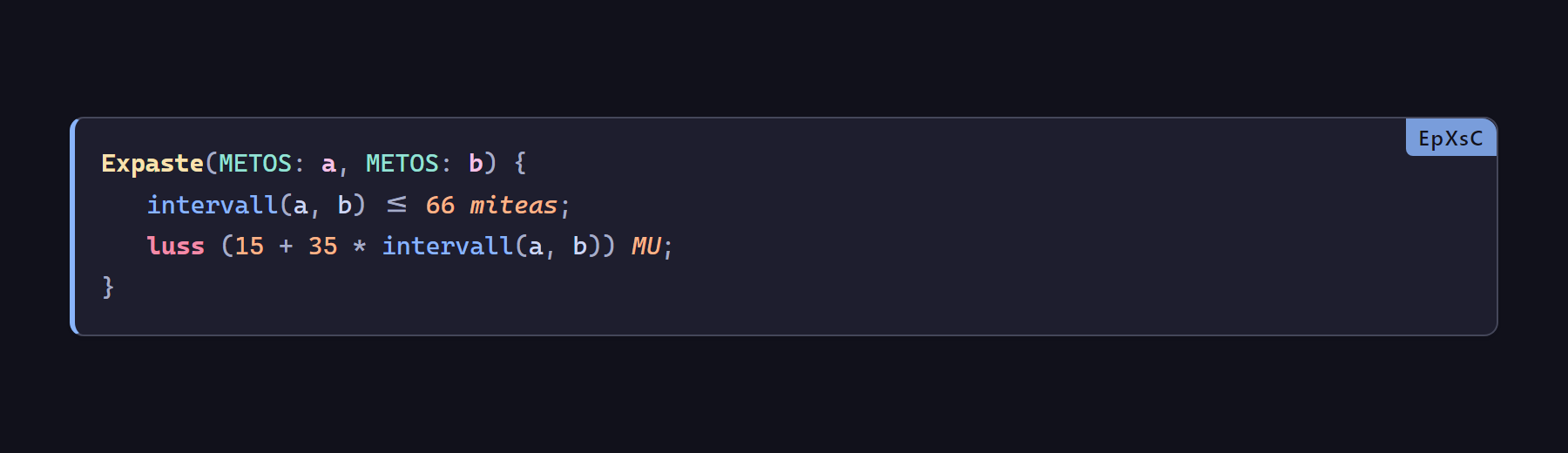
Rendered by the plugin in Obsidian: token colors, frame and language tag.
The code samples below are source examples. In Obsidian, the plugin renders them with the same frame and colors; the community page does not load plugin styles.
Features
- Syntax highlighting for
EpXsC,EpXsTandEpXsGfenced blocks; language names are case-insensitive. - Hover glosses on tokens: part of speech, meaning and abbreviation from the vault dictionary.
- Linting with one command: bracket matching, clause order, unit compatibility,
constarewrites, axis arity and more. - Vault data first: reads the dictionary / grammar / rank / root files from the vault; falls back to a built-in snapshot when they are absent.
- Reading view + Live Preview: both render; click a rendered block to go back to source editing.
- Mobile friendly: narrow screens keep the frame, translation and gloss lines readable.
- Optional CSS snippet for users who only want the visual style.
- Optional model-assisted translation: when enabled, an OpenAI-compatible local endpoint can translate untranslated T blocks and draft an EpXs reference from Chinese. Off by default.
- Reusable core: tokenizer, grammar, parsers and linter are Obsidian-free and can be consumed by CLI or other editors.
Installation
Community plugins
- Open Obsidian → Settings → Community plugins, turn off Restricted mode.
- Click Browse, search for EpXsC Syntax.
- Install → Enable.
styles.cssloads with the plugin; no extra CSS snippet is required.
BRAT
Add the repository Shir0Tak1na/EpXsC-Syntax, then enable the plugin.
Manual installation
- Download
main.js,manifest.jsonandstyles.cssfrom a Release. - Put them in
<vault>/.obsidian/plugins/epxsc-syntax/. - Restart Obsidian → Settings → Community plugins → enable EpXsC Syntax.
Usage
Fenced blocks
| Language | Purpose |
|---|---|
EpXsC | Spell/technique body: coloring, glosses and linting |
EpXsT | Sentence pairs: source and translation laid out per block |
EpXsG | Grammar annotation: part-of-speech/constituent labels under each word |
EpXsC / epxsc / EPXSC are equivalent; the same applies to EpXsT and EpXsG.
For EpXsT, the translation must be inside the same block: one source line followed by a translation line starting with > (or a line containing CJK characters).
Tallse aris agrus nec manis humal.
> The fields must stay moist when plowing.
EpXsG annotates each word with its part of speech, followed by the translation.
Translations can also carry BCP-47 language tags. Only the translation matching the current Obsidian language is shown; untagged > lines remain the default translation. A missing translation renders 尚未翻译 / Untranslated.
Tallse aris agrus nec manis humal.
> (zh-CN) 凡耕田,必须保持湿润。
> (en) Fields must stay moist when plowing.
Language, fallback language, and custom lexicons are configured in Settings → EpXsC Syntax.
Translation is opt-in and off by default. When enabled, T-block source sentences are sent to the configured OpenAI-compatible endpoint; no other vault content is sent. API keys are stored in the plugin settings file, so do not use a high-privilege long-lived token. Secret Storage is not implemented in this version; this is a known limitation.
Optional local-model translation
Open Settings → EpXsC Syntax → 翻译. Enable automatic translation only when needed, then configure an OpenAI-compatible endpoint (for example Ollama at http://127.0.0.1:11434/v1, model qwen2.5:7b). The plugin does not install or start a model server. Model output is a reference only; it is never written into Markdown. The 从中文生成 EpXs 参考 command uses the same endpoint and validates unknown words and lint before allowing insertion.
Hover
In Reading view and Live Preview, hover a token to see its category and meaning. On mobile, touch-hover works without double-clicking the block.
Commands
Search EpXsC in the command palette:
| Command | Action |
|---|---|
| 检查当前笔记的 EpXsC 代码块 | Open the lint panel; click a result to jump to the line |
| 重新载入词表与释义 | Reload dictionary/grammar/rank data after vault edits |
| EpXsC 自检(视图/token/颜色/样式表) | Diagnose missing colors or hover |
| EpXsC 诊断报告 | Write a diagnostic report to the vault root |
| 重载 EpXsC 插件 | Reminder to disable/enable the plugin in settings |
Dictionaries
At startup the plugin reads these sources when present:
| Path | Provides |
|---|---|
世界设定集/地域文化图鉴/语言/述无空语/述无空语词典.md | Part of speech, meaning, abbreviation |
世界设定集/地域文化图鉴/语言/述无空语/述无空语术式语法.md | Filter keys, unit tables |
世界设定集/设定概念集合/维度/维度模型.md | Rank/ dimension mapping |
世界设定集/地域文化图鉴/语言/述无空语/词库/词根表/ | Root volumes (whole directory) |
世界设定集/设定概念集合/魔法/ | Spell declaration registry (whole directory) |
Edit DICT_PATH, SYNTAX_PATH, RANK_PATH, ROOTS_DIR and SPELL_DIR in src/adapter/config.js for a different vault layout, then run npm run build.
When a source is unavailable, the plugin uses data/builtin-lexicon.json (schemaVersion 1). The snapshot is canonicalized and validated by scripts/generate-lexicon.mjs --check.
Customization
Colors are CSS variables in styles.css: --epx-comment, --epx-decl, --epx-keyword, --epx-type, --epx-verb and others. Change the variables instead of editing main.js.
For colors only, put snippets/EpXsC-Highlight.css into <vault>/.obsidian/snippets/ and enable it under Appearance → CSS snippets. The snippet provides the frame/static style, not token coloring.
Compatibility
- Minimum Obsidian 1.4.0; desktop and mobile are supported.
- Reading view and Live Preview are supported. In Live Preview, placing the cursor inside a block shows the source; this is Obsidian's default behavior.
- Blocks longer than 50 lines keep the plain code-block appearance and skip token coloring for performance.
- The outer frame is added as the
pre.epx-preclass by the plugin; it no longer depends on:has(). - The plugin makes no network requests and does not modify notes.
Core API
The pure core does not import Obsidian, DOM or vault APIs:
const core = require('./src/core');

const dict = core.parseDictionary(text);
const grammar = core.buildGrammar(lists, keys);
const html = core.tokenize(source, grammar);
const spells = core.collectSpells(source, new Map(), 'file.md');
const issues = core.lint(source, { info, units, keys, spells, path });
Stable aliases: extractBlocks, parseDictionary, buildGrammar, tokenize, lint.
CLI
The same core is available without Obsidian:
node bin/epxsc.mjs tokenize note.md
node bin/epxsc.mjs lint note.md --dictionary path/to/dictionary.md --syntax path/to/syntax.md
See docs/CLI.md for commands, JSON output and exit codes.
Development
Source lives in src/; the root main.js is an esbuild bundle — do not edit it by hand.
npm install       # install esbuild
npm run build     # src/main.js -> main.js
npm run check     # manifest / syntax / CSS / lexicon canonical form
npm test          # behavior tests + tokenizer/parser/lint/markup fixtures
| Path | Purpose |
|---|---|
src/main.js | Build entry; requires the adapter only |
src/adapter/plugin.js | Obsidian adapter: lifecycle, DOM, hover, commands, processors |
src/adapter/config.js | Vault source paths and highlight limit |
src/core/ | Pure language logic: grammar / tokenizer / markup / lint / spells / fences |
src/core/index.js | Stable core entry and aliases |
src/data/parsers.js | Dictionary / roots / ranks / filter keys / units parsing |
src/data/lexicon.js | Built-in snapshot schema gate |
data/builtin-lexicon.json | Canonical built-in lexicon snapshot |
styles.css | Token colors, code-block frame, T/G layout |
snippets/EpXsC-Highlight.css | Standalone color snippet |
manifest.json / versions.json | Plugin metadata and version map |
docs/ARCHITECTURE.md | Actual Core / Adapter / Data layers |
docs/ROADMAP.md | Architecture-review execution plan |
docs/RELEASING.md | Release policy: at most one GitHub Release per day |
Local debugging: put the repository in <vault>/.obsidian/plugins/epxsc-syntax/, run npm run build, then disable/enable the plugin in Obsidian. A Release contains exactly main.js, manifest.json and styles.css.
Release notes
CHANGELOG.md · ROADMAP.md · GitHub Releases · Release policy: at most one Release per day.
License

For plugin developers
Search results and similarity scores are powered by semantic analysis of your plugin's README. If your plugin isn't appearing for searches you'd expect, try updating your README to clearly describe your plugin's purpose, features, and use cases.