Excalink
approvedby Aditya Kumar
Suggests and links the named frames and groups inside your Excalidraw drawings when typing [[filename# in the editor - This plugin has not been manually reviewed by Obsidian staff.
Excalink
Suggests and links the named frames and groups inside your
Excalidraw drawings
as you type [[filename# in the editor.
Demo
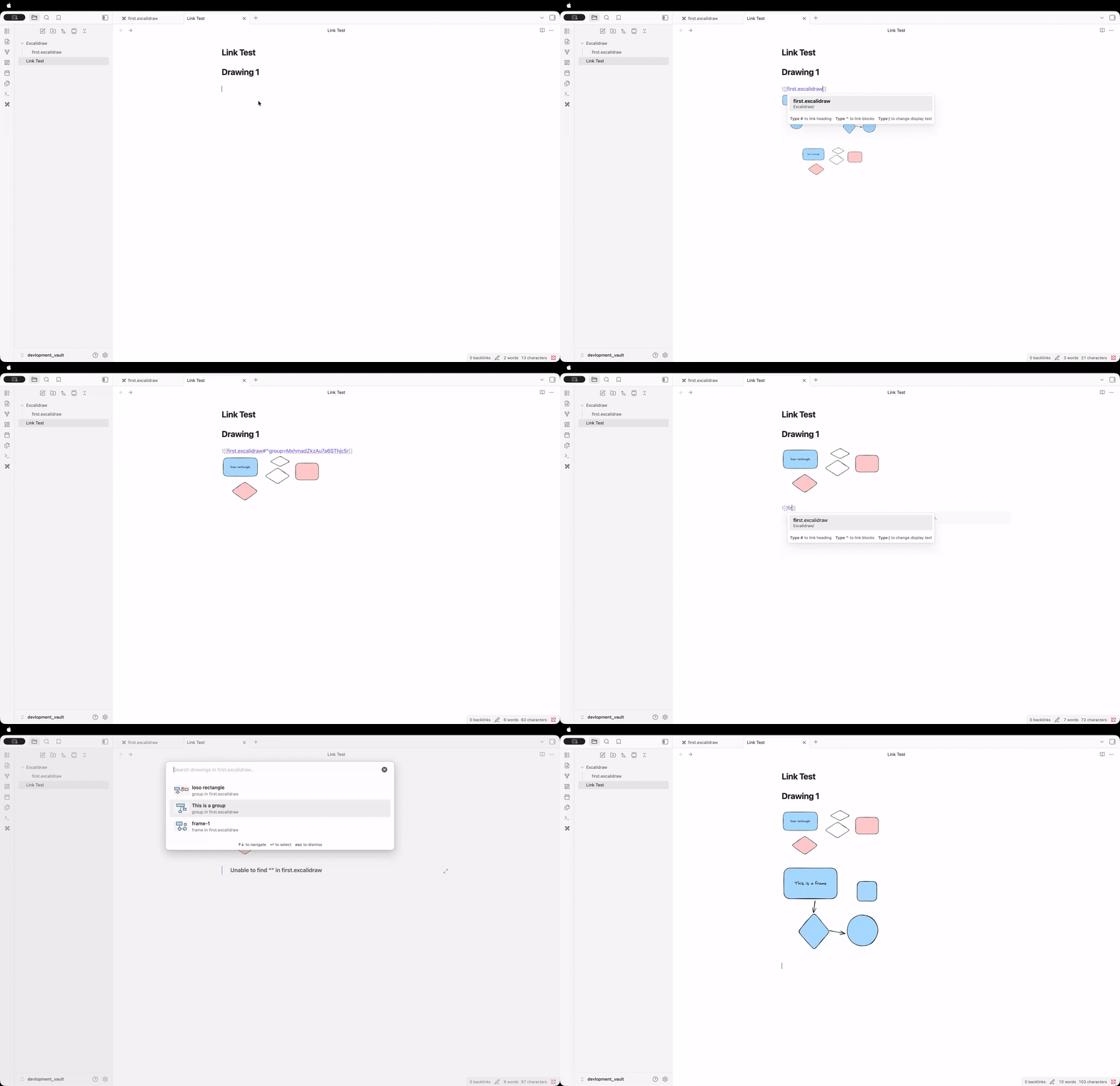
How it works
- Give a frame a name in Excalidraw, or select a few elements and group them (add a text element inside the group if you want it to have a name too).
- In any note, start typing
[[my-drawing#— Excalink detects the pattern and opens a fuzzy-search picker of every frame and group in that drawing. - Filter with fuzzy search, pick one with
↑↓+↵, and Excalink completes the link for you:- Frames:
[[my-drawing#^frame=FrameName]] - Groups:
[[my-drawing#^group=elementId]]
- Frames:
Both formats are the block-reference syntax already understood by the Excalidraw plugin, so the resulting links embed and navigate correctly.
Unnamed groups still show up in the picker — Excalink looks for a text
element inside the group to use as its label, falling back to a generic
Group N name if none is found.
Settings
Available under Settings → Community plugins → Excalink:
- Enable suggestions — turn the picker on or off entirely
- Include frames / Include groups — choose what shows up in the picker
- Show recent first — most recently edited frames/groups appear at the top
- Max suggestions displayed — cap the picker's list size
- Show file context — show the source filename under each suggestion
A Rescan vault action (in settings, or via the command palette) rebuilds the index on demand; it also updates automatically when Excalidraw files change.
Installation
From Obsidian Community Plugins
- Open Settings → Community plugins → Browse
- Search for "Excalink", click Install, then Enable
Manual installation
- Download
main.js,manifest.json, andstyles.cssfrom the latest release - Copy them into
VaultFolder/.obsidian/plugins/excalink/ - Reload plugins in Obsidian and enable Excalink
Development setup
git clone https://github.com/AarambhaAnta/Excalink.git
cd Excalink
npm install
npm run dev    # watch mode
npm run build   # production build
Changelog
1.2.0
- Suggestions now show a small preview of the actual drawing (shapes, colors, rotation) instead of a generic icon, falling back to the icon when there's nothing visual to show (e.g. a text-only group)
- "Show recent first" now sorts by each frame/group's real last-edited timestamp instead of its position in the file
1.1.0
- Added group support: grouped elements are now suggested and linkable alongside frames, with automatic name detection from nearby text
- Reorganized the codebase into
src/ - Trimmed the settings panel to the options people actually use
- General security, styling, and logging cleanup for community plugin review
1.0.x
Initial release: frame detection, fuzzy-search suggestion modal, caching, file watching, and a full settings panel.
License
MIT License — see LICENSE file for details.
For plugin developers
Search results and similarity scores are powered by semantic analysis of your plugin's README. If your plugin isn't appearing for searches you'd expect, try updating your README to clearly describe your plugin's purpose, features, and use cases.