Extended Task Lists
approvedby joeriddles
Extended reader view support for task lists, including in-progress and won't do task items.
 Extended Task Lists
Features
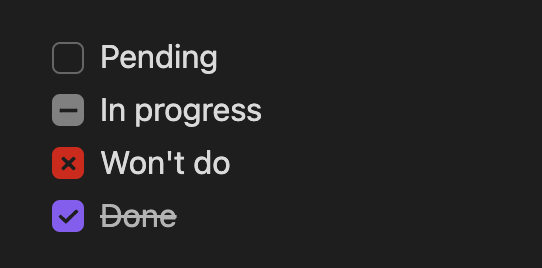
- 🌟 Render in-progress and won't do task items with their own UI:
- in-progress syntax:
- [.] In progress - won't do syntax:
- [~] Won't do - Now supports live preview mode (as of release 1.0.4)!
- in-progress syntax:
- 🌟 Generate a top-level
TODO.mdfile by scanning all tasks lists in markdown files- Run using the command
Extended Task Lists: Update TODO
- Run using the command
To use
Extra syntax
Simply add an in-progress or won't do task item:
- [ ] Pending
- [.] In progress
- [~] Won't do
- [x] Done
Generate TODO.md
Open the command palette (Ctrl/Cmd + P by default) and run the Extended Task Lists: Generate TODO command.
The generated filename can be configured in the plugin settings, as well as what task item types are included. By default, done and won't do task items are excluded.
To exclude a markdown file's task items from being included in the generated TODO.md file, add <!-- exclude TODO --> anywhere in the markdown file. To exclude are markdown files in a folder, add an empty .exclude_todos file in the folder.
Development
To get started, set up your local dev environment by following steps 1–3 in the official Obsidian docs for building a plugin.
Basically, the steps look like this:
mkdir -p extended-task-lists/.obsidian/plugins
cd extended-task-lists/.obsidian/plugins
git clone https://github.com/joeriddles/extended-task-lists.git
npm i
npm run dev
Then open the top-level extended-task-lists/ folder in Obsidian as a new vault, enable community plugins in the settings, and enable the Extended Task Lists plugin.
Remember to run npm run dev while developing or you won't see your changes in Obsidian.
Release
Note: releases are now done using GitHub Actions and Releases.
To update the package version:
npm version [major|minor|patch]
To create a release:
git tag x.y.z  # done by `npm version`
git push origin --tags
For plugin developers
Search results and similarity scores are powered by semantic analysis of your plugin's README. If your plugin isn't appearing for searches you'd expect, try updating your README to clearly describe your plugin's purpose, features, and use cases.