Foldable Embedded Notes
approvedby Nickolay Kondratyev
Make embedded notes foldable in reading view and Live Preview, with a trailing-dash syntax to fold by default. - This plugin has not been manually reviewed by Obsidian staff.
Foldable Embedded Notes
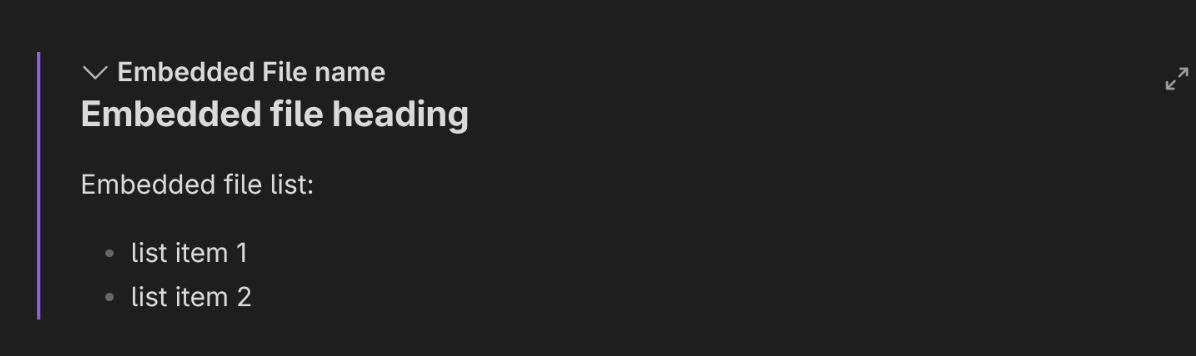
Make embedded notes (![[ ]]) foldable in reading mode and Live Preview: each note
embed gets a clickable title bar with a rotating collapse chevron. Click the title to
fold/unfold.
Expanded — chevron points down, the embedded note's content is shown:
Folded — chevron points right, only the title bar remains:

Use the ![[ ]]- syntax to fold an embedded note by default. In reading mode the
trailing - is a fold marker only when it comes immediately after ]] and is followed by
whitespace or the end of the line, so ![[note]]-like keeps its literal dash. The marker
itself is never rendered.
Settings
Settings → Community plugins → Foldable Embedded Notes has one option:
- Start embedded notes collapsed — off by default. Turn it on to have every embedded
note render folded until you expand it. The
![[ ]]-marker keeps its meaning and simply becomes redundant while this is on. The new default applies to the next render: reopen the note, switch modes, or edit it — already-open panes are not re-folded on the spot.
Fold state is remembered for the current session and resets when Obsidian restarts; once
you toggle an embed, your choice overrides the - default. Each mode keeps its own state
(see the limitations below): in reading mode it survives re-renders and reading↔editing
round-trips, in Live Preview it follows the embed as you edit the note around it.
Limitations:
- The
-marker in Live Preview applies only to whole-line embeds — the line must be nothing but![[note]]-. A mid-paragraphtext ![[note]]- textkeeps its literal dash there and is not folded by default (reading mode still handles it). In the editor the plugin only sees raw text, which cannot tell a real embed from one written inside a code span; a whole-line match can't be inside one, so that is the rule it can apply safely. Such embeds are still click-foldable.- Fold state is per mode and per session. Folding in Live Preview does not carry over to reading mode or vice versa, and both reset when Obsidian restarts. In Live Preview it is tracked per LINE, so two embeds written on the same line fold together.
- Only note embeds are foldable — image/PDF/media embeds are untouched.
- An embed nested inside another embed's body is foldable in both modes, but it is always handled by the reading-mode path — in Live Preview its fold state is not tracked per editor line, and folding it never folds the embed it sits in.
- Plain Source mode is left completely alone: raw markdown, dash included.
Usage
![[My note]]      → foldable embed, expanded by default
![[My note]]-     → foldable embed, folded by default
Click the embed's title bar to fold or unfold it. The click never navigates to the embedded note.
Installation
From the community plugin list
Settings → Community plugins → Browse, search for Foldable Embedded Notes, install, then enable it.
Manually
Download main.js, manifest.json and styles.css from the
latest release
and copy them into <Vault>/.obsidian/plugins/foldable-embedded-notes/, then reload
Obsidian and enable the plugin in Settings → Community plugins.
Development
- Node.js v18 or newer (
node --version). npm install— install dependencies.npm run dev— compilesrc/main.tstomain.jsin watch mode.npm run build— type-check and produce a production build.npm run lint— ESLint, including the Obsidian plugin guideline rules. CI runs it on every push.
E2E testing
The e2e suite drives a real Obsidian (Electron) under Playwright: it boots a throwaway copy of a seeded dev vault with the built plugin installed and asserts the plugin actually works. It runs headless in Docker/CI (auto-downloading a pinned Obsidian) and on a real machine.
npm run test:e2e                              # run the whole suite
npm run test:e2e -- hello-world.e2e.ts        # run a single spec
OBSIDIAN_PATH='/Applications/Obsidian.app/Contents/MacOS/Obsidian' npm run test:e2e   # use an already-installed Obsidian
On Linux the runner auto-downloads and caches a pinned Obsidian build the first time;
you can also pre-provision it with npm run setup:obsidian. On a display-less machine
it automatically switches Obsidian to headless flags.
Environment variables:
OBSIDIAN_PATH— path to an Obsidian binary. When set, it is used as-is (no download). Required on macOS/Windows (no auto-download there).OBSIDIAN_E2E_EXTRA_ARGS— extra space-separated Chromium/Electron flags. An explicit value always wins over the auto headless default.OBSIDIAN_CACHE_DIR— where the downloaded Obsidian is cached (default~/.cache/obsidian-e2e); share it across checkouts / mount it in Docker.
Releasing
./release_to_public.sh            # patch (default)
./release_to_public.sh minor
./release_to_public.sh major
The script gates on lint, build and e2e (SKIP_E2E=1 opts out), bumps the version in
package.json, manifest.json and versions.json, commits, and pushes the commit plus
a tag named exactly after the new version (no leading v).
That tag is the only trigger needed: .github/workflows/release.yml verifies the tag
matches manifest.json, rebuilds, and publishes a GitHub release with main.js,
manifest.json and styles.css attached — the assets Obsidian's installer expects.
Bump minAppVersion in manifest.json by hand before releasing whenever a newer
Obsidian API is used; versions.json picks it up automatically.
To release the version already in manifest.json unchanged (the very first release),
push the tag directly instead: git tag 1.0.0 && git push origin 1.0.0.
License
For plugin developers
Search results and similarity scores are powered by semantic analysis of your plugin's README. If your plugin isn't appearing for searches you'd expect, try updating your README to clearly describe your plugin's purpose, features, and use cases.