Inline Toggles
unlistedby Niklas Tran
Create reliable inline toggles that save their state directly in Markdown.
Inline Toggles for Obsidian
Inline Toggles brings Notion-style collapsible sections directly to your Markdown lines. The collapse state is saved directly in your file (%%⏷%% / %%⏵%%), ensuring your view remains perfectly synced across desktop and mobile.
✨ Why Inline Toggles?
Unlike standard Obsidian callouts, Inline Toggles offer a more fluid writing experience:
- Interactive Widgets: In Live Preview, toggles become clickable icons to instantly expand or collapse sections.
- No Syntax Overhead: Stop prefixing every line with
>. Just write normal text or indented lists. - No Layout Jumps: Editing content doesn't force the view to switch to raw source code. You type exactly where you read.
- Reliable State: Your vault remembers what was collapsed—even after syncing or restarting Obsidian.
- Flexible Placeholders: Use any symbols you like to define your toggles. While
%%is the default, you can customize the border and icons to fit your aesthetic.
🚀 Usage
Basic Syntax
| Source Mode (Markdown) | Live Preview (Result) |
|---|---|
%%⏷type: info%% This is a toggle headerThis text will be collapsed. Just use indentation to group content. | 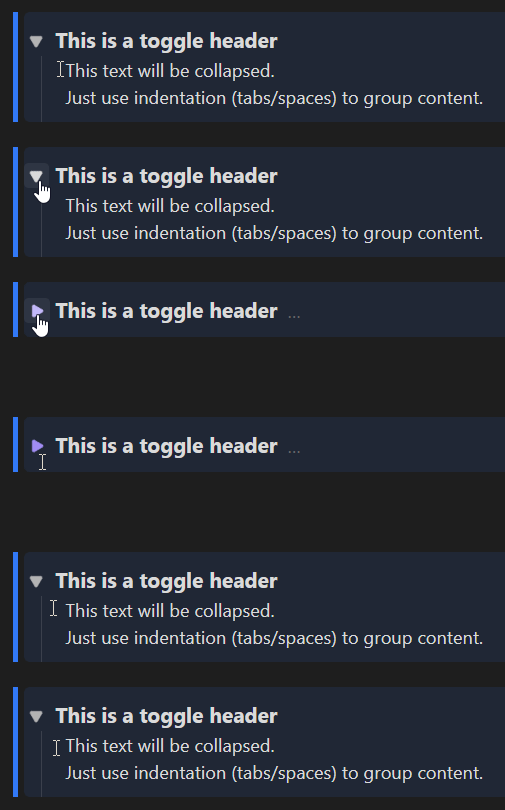 |
Commands & Hotkeys
- Insert/Remove Toggle: e.g., set to
Ctrl/Cmd + Shift + L - Edit Attributes: Opens a modal for quick styling (via command or Right-Click on the widget).
- Change Type: Cycle through callout types (via command or Right-Click on the widget).
🎨 Styling & CSS
You can add CSS attributes to any toggle (e.g., %%⏷type: info; bg: rgba(0,100,255,0.1)%%).
- Shorthands:
type(presets),bg(background),col(color),border(left border). - Free CSS: Use any valid CSS attribute (e.g.,
opacity: 0.5). - End Styling: Block styling stops automatically at the end of the collapsed section or as soon as a horizontal rule (
---) appears in the text.
⚙️ Settings & Migration
[!CAUTION]
⚠️ Important: Create a Backup!
The "Migrate Entire Vault" and "Remove All Toggles" features modify many files at once. Always create a backup of your vault before using these tools.
Disclaimer: This plugin is not affiliated with or endorsed by Notion Labs, Inc. It provides a similar user experience within Obsidian.
Developed by Niklas Tran
For plugin developers
Search results and similarity scores are powered by semantic analysis of your plugin's README. If your plugin isn't appearing for searches you'd expect, try updating your README to clearly describe your plugin's purpose, features, and use cases.