Gantt Tracker
approvedby surranov
Gantt charts for real project tracking: plan vs actual bars, automatic highlighting of delays, early finishes and pauses, vacation and day-off columns, per-day comments, sticky headers. Configured with a simple YAML code block. - This plugin has not been manually reviewed by Obsidian staff.
Gantt Tracker
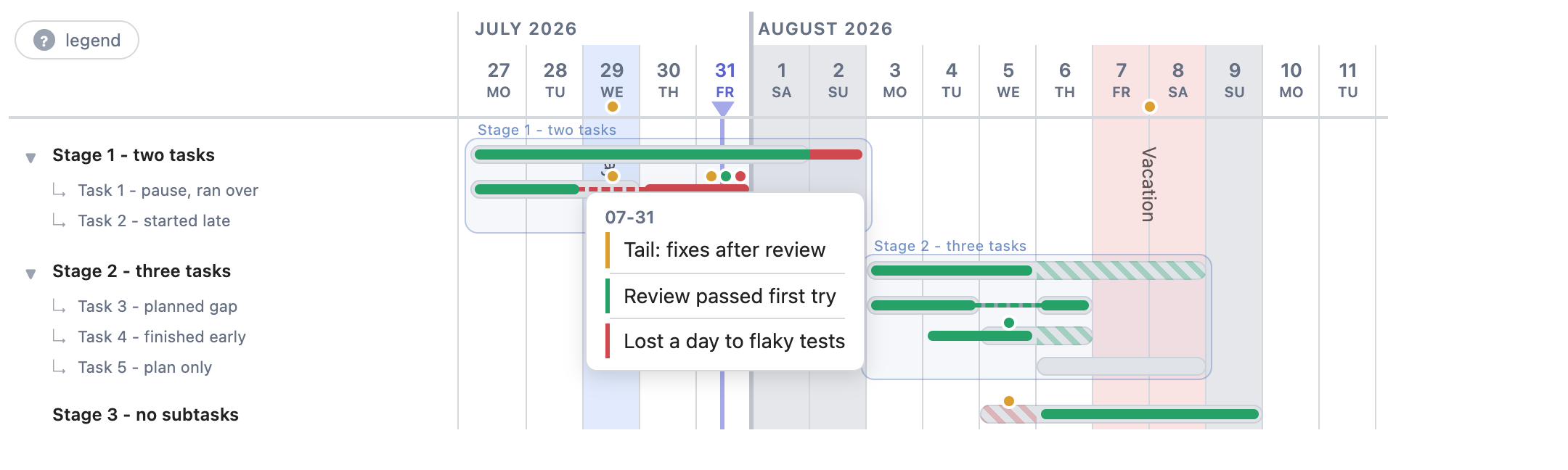
Gantt charts for living with a plan, not just drawing one. A single code block turns YAML into a day-by-day chart of planned vs actual work — with delays, early finishes, pauses, vacations and per-day comments highlighted automatically.







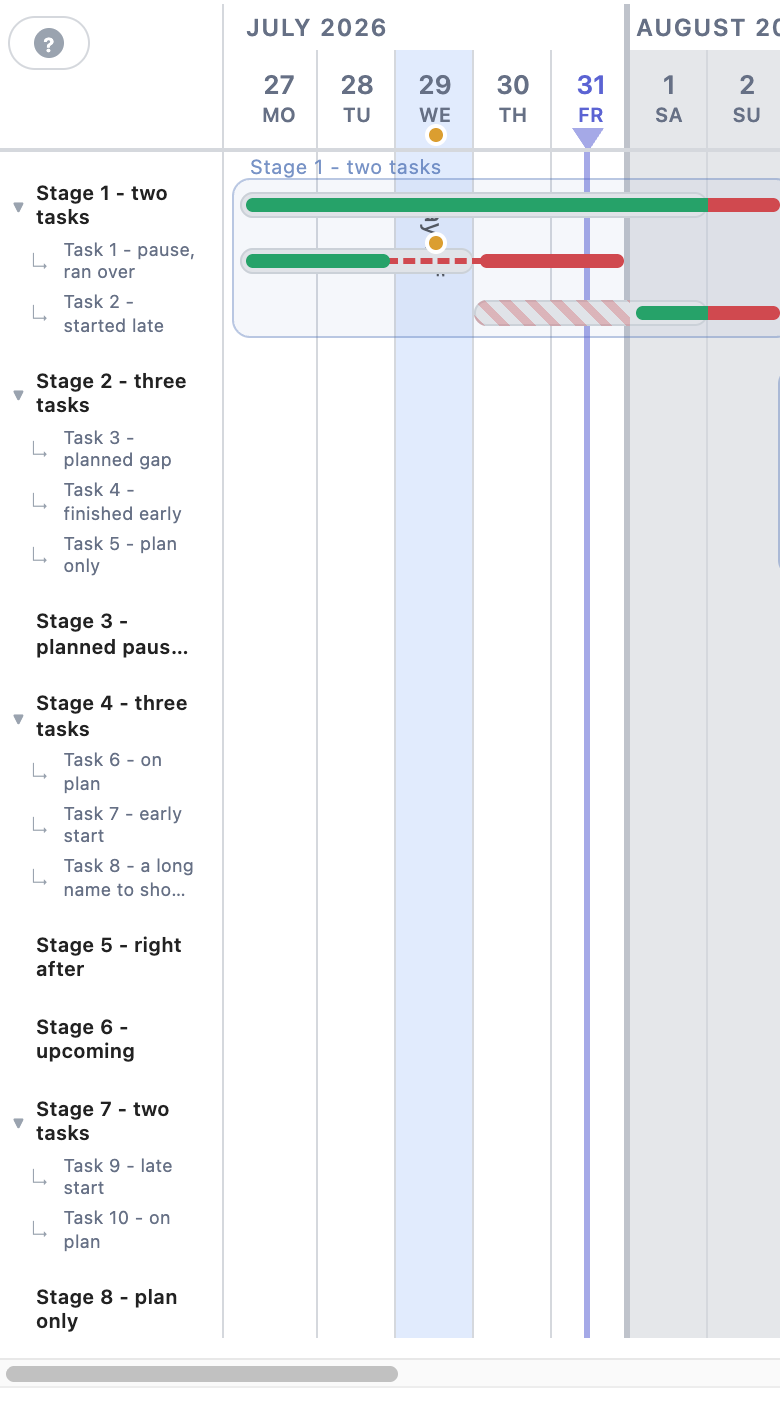
The same chart on a phone: compact sidebar, everything works by tap.
Why another gantt plugin?
Most gantt tools render a plan once. Gantt Tracker is built for tracking execution: you set the plan per stage, then append the actual dates day by day. The chart answers at a glance: where am I behind, where ahead, why did that slip happen, and how does my vacation cut the timeline.
- Plan vs actual on every row — the plan is a pill, the actual is a bar inside it.
- Automatic deviation coloring — nothing to mark up by hand:
- actual outside the plan → red;
- late start / early finish → red / green hatching on the plan;
- unplanned pause → red dashes, planned gap → neutral dashes;
- a plan with no actuals → overdue days (before today) hatched red.
- Stages with subtasks — frames around groups, sticky stage titles, touch-friendly collapse/expand.
- Background events — vacations, days off, releases: full-height tinted columns with their own comments; hover or tap a date to raise the event above the chart.
- Per-day comments — up to three typed notes per day (neutral, positive, negative) as colored dots; click opens a centered card in data order, multi-line text supported.
- Today line — with intraday position mapped to your working hours.
- Navigation — sticky sidebar and month headers, click a label to scroll to its bars.
Advantages
- Zero dependencies — no Dataview, no libraries, no build step; one
main.js+ onestyles.css. - Fully offline — nothing leaves your vault, no network requests at all.
- Plain text in, plain text out — the config is YAML inside your note; readable in any editor, friendly to git and sync.
- Mobile friendly — works on Obsidian mobile; the sidebar compacts itself on narrow screens.
- Theme-aware — colors derive from Obsidian CSS variables; event tints are translucent and read well in light and dark themes.
- AI-agent friendly — the format is documented in FORMAT.md and AGENTS.md, shipped inside the plugin folder so an agent working in your vault finds them instantly.
- Fast — a full board renders in about a millisecond.
Who is it for
- Developers and leads running a personal plan for a project: estimate stages, log actuals daily, see slippage before it bites.
- Anyone who liked Mermaid gantt but needs actuals, comments and day-level tracking on top of the plan.
- People who keep project journals in Obsidian and want the timeline to live next to the notes that explain it.
Quick start
Create a code block with the gantt-tracker language:
```gantt-tracker
start: 2026-07-27
days: 14
rows:
  - label: Stage 1 Design - 15h
    plan: [2026-07-27, 2026-07-29]
    fact: [2026-07-27, 2026-07-30]
  - label: Stage 2 Build - 12h
    plan: [2026-07-30, 2026-08-04]
```
Full example (every feature)
```gantt-tracker
start: 2026-07-27       # first day of the window
days: 14                # number of day columns
timezone: Europe/Moscow # today line clock (default: local)
events:
  - label: Vacation
    start: 2026-08-07
    end: 2026-08-08
    note: Approved before the project started
  - label: Day off
    start: 2026-07-29
    end: 2026-07-29
    color: blue         # red green blue gray purple yellow, or any CSS color
    note: Family day
rows:
  - label: Stage 1 - two tasks
    plan: [2026-07-27, 2026-08-01]
    fact: [2026-07-27, 2026-08-02]        # ran one day over: red tail
    children:
      - label: Task 1 - pause, ran over
        plan: [2026-07-27, 2026-07-29]
        fact: [[2026-07-27, 2026-07-28], [2026-07-30, 2026-07-31]]
        notes:
          "2026-07-29": "Pause: pulled into a production incident"
          "2026-07-31":
            neutral: "Tail: fixes after the security review"
            good: "Review passed first try"
            bad: "Lost a day to flaky tests"
      - label: Task 2 - started late
        plan: [2026-07-30, 2026-08-01]    # red hatch before the actual start
        fact: [2026-08-01, 2026-08-02]
  - label: Stage 2 - three tasks
    plan: [2026-08-03, 2026-08-08]
    fact: [2026-08-03, 2026-08-05]        # green hatch on the leftover plan
    children:
      - label: Task 3 - planned gap
        plan: [[2026-08-03, 2026-08-04], [2026-08-06, 2026-08-06]]
        fact: [[2026-08-03, 2026-08-04], [2026-08-06, 2026-08-06]]
      - label: Task 4 - started and finished early
        plan: [2026-08-05, 2026-08-06]
        fact: [2026-08-04, 2026-08-05]    # early start stays green
      - label: Task 5 - plan only, not started
        plan: [2026-08-06, 2026-08-08]    # overdue days get red hatching
  - label: Stage 3 - no subtasks
    plan: [2026-08-05, 2026-08-09]
    fact: [2026-08-06, 2026-08-09]
```
The complete field reference lives in FORMAT.md.
Gantt Tracker vs Mermaid gantt
| Mermaid | Gantt Tracker | |
|---|---|---|
| Plan | one set of bars | plan and actual per row |
| Deviations | — | automatic red/green coloring and hatching |
| Context | — | per-day comments, background events |
| Interaction | static SVG | comment cards, collapse/expand, scroll-to-row, event raise |
| Scheduling | after, business-day durations | explicit dates (that's the point of tracking) |
Mermaid is great for sketching a plan in a minute. Gantt Tracker is for the month you spend executing it.
For AI agents
If you are an AI agent asked to update a chart: read AGENTS.md and FORMAT.md — both are shipped inside .obsidian/plugins/gantt-tracker/ in every vault, next to main.js. The chart config is plain YAML in a ```gantt-tracker code block; coloring is derived, never written by hand.
Install
From the community store: Settings → Community plugins → Browse, search for “Gantt Tracker” (or open the listing), install and enable. Requires Obsidian 1.8+.
Manual alternative: copy main.js, styles.css and manifest.json from the latest release into <vault>/.obsidian/plugins/gantt-tracker/ and enable Gantt Tracker in Settings → Community plugins.
License
For plugin developers
Search results and similarity scores are powered by semantic analysis of your plugin's README. If your plugin isn't appearing for searches you'd expect, try updating your README to clearly describe your plugin's purpose, features, and use cases.