Git Commands


A clean, lightweight native Git integration plugin for Obsidian Desktop.
The plugin delegates repository, index, merge, and transport operations directly to your system's installed Git executable. By avoiding bundled JavaScript/Wasm Git reimplementations, it ensures maximum performance, security, and native Git semantics.
Supported desktop platforms: Linux, Windows, and macOS.
Features
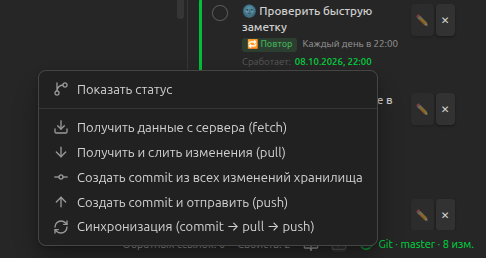
- Status Bar Indicator: Real-time indicator in the Obsidian status bar displaying:
- Active branch name
- Working-tree change counts (modified, staged, untracked)
- Commits ahead of or behind the remote tracking branch
- Interactive click menu with quick actions
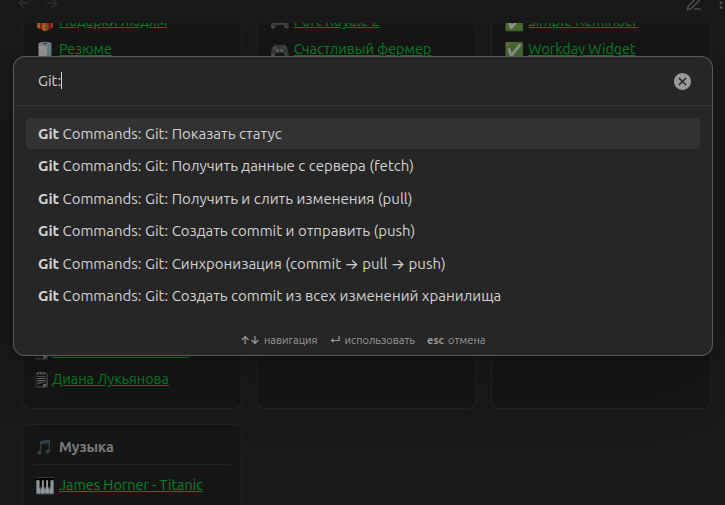
- Command Palette Actions:
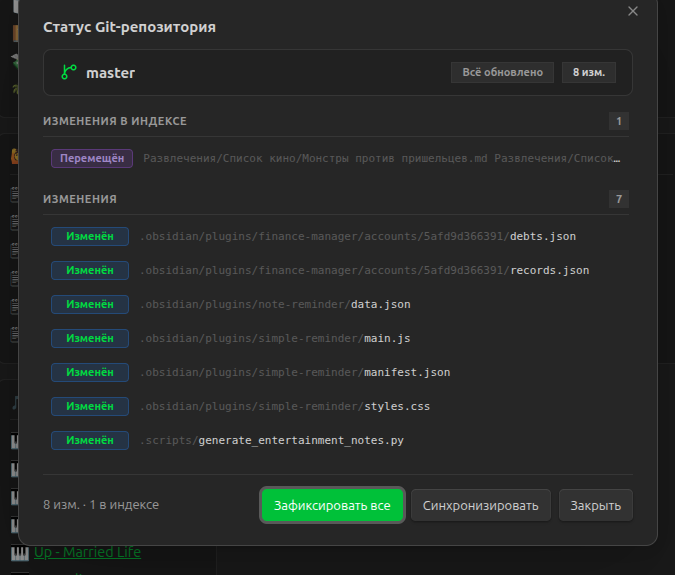
Show status: Open an interactive modal displaying changed files and branch sync stateFetch: Fetch remote commits without altering working treePull: Pull remote changes from upstreamCommit all changes: Stage all vault changes and create a commitPush: Push local commits to the upstream branchSync: Pull latest remote commits then push local changes
- Automation:
- Periodic background fetch (configurable interval; default 30s)
- Configurable auto-sync interval
- Customizable Commit Message:
- Commit message template support with
{datetime}timestamp substitution (e.g.,vault backup: {datetime})
- Commit message template support with
- Executable Discovery:
- Automatic lookup in system
PATHand common platform-specific directories (/usr/bin/git,/usr/local/bin/git, Program Files, Homebrew, Xcode command-line tools) - Optional custom executable command or absolute path in settings
- Automatic lookup in system
- Internationalization (i18n):
- Automatic language selection matching Obsidian (English and Russian supported, graceful fallback to English)
- Safe Execution:
- Non-shell child process execution (
execFile) with strict argument arrays to prevent shell injection - Terminal interactive prompts disabled (
GIT_TERMINAL_PROMPT=0) - Configurable process timeouts
- Non-shell child process execution (
Screenshots
Repository Status Modal
Review changed files, staged and unstaged state, and perform one-click commit or sync operations.
Status Bar & Quick Actions Menu
View branch and modified file indicators directly in the Obsidian status bar, and click to access the quick actions popup.
Command Palette
Trigger all operations quickly via the standard Obsidian Command Palette.
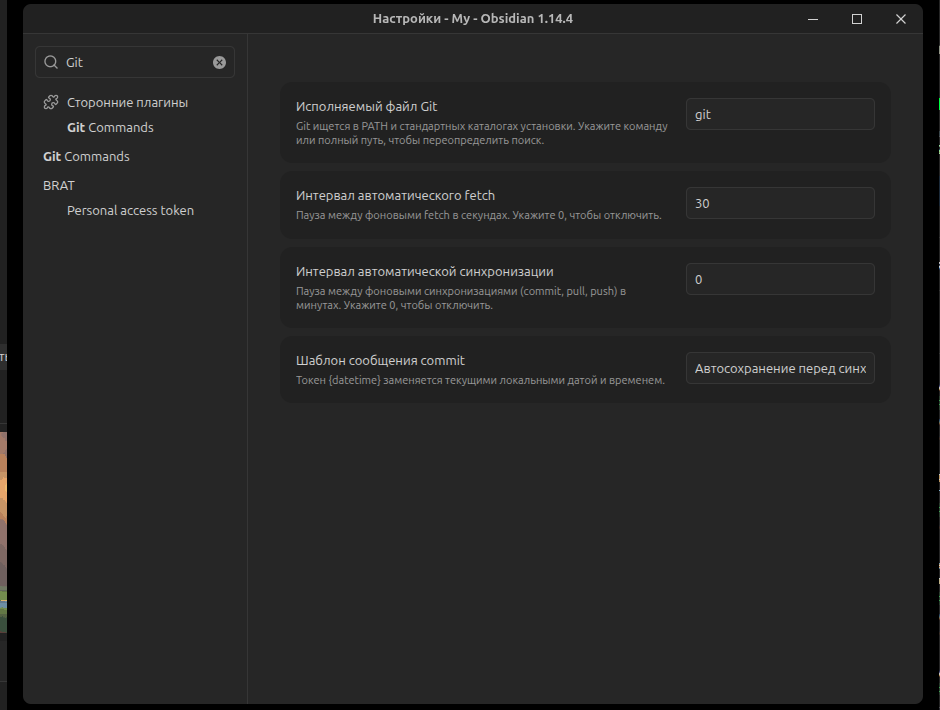
Plugin Settings
Configure custom Git executable paths, auto-fetch and auto-sync intervals, and commit message templates.
Prerequisites
- Obsidian Desktop v1.8.7 or newer.
- Git installed on your operating system and accessible in
PATH(or configured via plugin settings). - Your vault must be inside an initialized Git repository (
git init).
Installation
Via BRAT (Beta Reviewer's Auto-update Tester)
- Install the BRAT plugin from Obsidian Community Plugins.
- Open BRAT settings and click Add Beta plugin.
- Enter
dimanchello/obsidian-git. - BRAT will automatically download the plugin and keep it updated.
Manual Installation
- Go to the Releases page and download the latest release files:
main.jsmanifest.jsonstyles.css
- Open your Obsidian vault folder and navigate to
.obsidian/plugins/. - Create a new directory named
git-commands. - Place
main.js,manifest.json, andstyles.cssinto that directory:<vault>/.obsidian/plugins/git-commands/ ├── main.js ├── manifest.json └── styles.css - In Obsidian, go to Settings > Community plugins, click Reload plugins, and enable Git Commands.
Settings
| Setting | Default | Description |
|---|---|---|
| Git executable path | (empty) | Optional path to the git binary. When blank, the plugin searches PATH and standard system locations. |
| Commit message template | vault backup: {datetime} | Commit message format. {datetime} is replaced with the local date and time. |
| Auto-fetch interval (seconds) | 30 | Interval between background fetches. Set to 0 to disable. |
| Auto-sync interval (minutes) | 0 | Interval between background syncs (pull + push). Set to 0 to disable. |
Development
Prerequisites
- Node.js 22+
- npm 10+
Setup
# Clone the repository
git clone https://github.com/dimanchello/obsidian-git.git
cd obsidian-git

# Install dependencies
npm ci
Scripts
npm run dev— Watches source files and compiles in development mode intodist/.npm run build— Typechecks and bundles the plugin intodist/for production.npm run check— Runs TypeScript typechecking and all unit and integration tests.npm run test:unit— Runs isolated unit tests.npm run test:integration— Runs integration tests against local Git repositories.npm version <patch|minor|major>— Updates version inpackage.json,manifest.json, andversions.json.
Architecture
src/main.ts— Obsidian entry point, commands, status bar integration, and lifecycle management.src/git/process-runner.ts— Node.jsexecFileabstraction avoiding shell interpolation.src/git/git-cli.ts— Maps high-level operations to Git argument vectors.src/git/git-executable-locator.ts— SearchesPATHand platform directories, validates withgit --version.src/git/git-service.ts— Validates command exit codes and coordinates status, fetch, pull, commit, and push.src/git/status-parser.ts— Parses Git porcelain v2 format.src/i18n/— Typed English and Russian translations.
License
This project is open source and available under the MIT License.
For plugin developers
Search results and similarity scores are powered by semantic analysis of your plugin's README. If your plugin isn't appearing for searches you'd expect, try updating your README to clearly describe your plugin's purpose, features, and use cases.