by qingchuan
Show Git blame (time / author / message) at the end of the current line. 在当前光标所在行的行尾显示该行 Git 归属:提交人、提交时间、提交消息,格式可配置.
GitLine
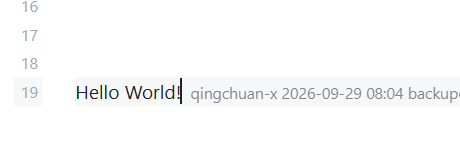
GitLine is an Obsidian desktop plugin that shows Git blame information at the end of the current cursor line. Each line displays the committer, the commit time, and the commit message, using a fully configurable format.
Features
- Line-end blame: the blame information of the current cursor line is rendered as an inline annotation at the end of the line.
- Configurable format: assemble the display freely with the
{date},{time},{author},{message}and{hash}placeholders. - Flexible timestamps: choose between relative time (e.g. "3 days ago") and absolute time, accurate to the minute.
- Uncommitted lines: lines that have not been committed yet are marked as Uncommitted.
- Status bar: shows the author of the current line (optional).
- Whitespace handling:
git blame -wcan be enabled to ignore whitespace-only changes. - Caching: an LRU cache avoids repeated
gitcalls; entries are invalidated automatically when a file is saved. - Robustness: git is detected automatically; a friendly hint is shown instead of an error when git is unavailable.
Requirements
- Obsidian desktop (the plugin uses Node.js APIs and is desktop-only).
- Git installed and available on
PATH(git --versionmust succeed).
Installation
- Copy the
gitlineplugin folder into<your vault>/.obsidian/plugins/gitline/. - In Obsidian, open Settings → Community plugins, and enable GitLine.
Once the plugin is published, it can also be installed directly from the community plugin list.
Usage
Open a note that lives in a Git repository and move the cursor. The blame information appears at the end of the current line.
Settings
| Setting | Description | Default |
|---|---|---|
| Enable | Master switch for the line-end blame display. | On |
| Display format | Template with placeholders{date} {time} {author} {message} {hash}. | {author} {time} {message} |
| Time style | Relative (e.g. "3 days ago") or Absolute (accurate to the minute). | Absolute |
| Absolute time format | Moment format string. | YYYY-MM-DD HH:mm |
| Uncommitted lines | Show a marker on uncommitted lines. | On |
| Ignore whitespace | Map togit blame -w. | Off |
| Status bar | Show the current line's author in the status bar. | On |
| Cache size | Maximum number of files kept in the LRU cache. | 100 |
Development
npm install   # install dependencies
npm run dev   # watch and build main.js
npm run build # type-check and build for production
License
For plugin developers
Search results and similarity scores are powered by semantic analysis of your plugin's README. If your plugin isn't appearing for searches you'd expect, try updating your README to clearly describe your plugin's purpose, features, and use cases.