Graph Scroll Pan
approvedby Jeonghyeon Park
Pan the graph view by scrolling instead of zooming. Zoom with pinch or Cmd/Ctrl+scroll. Great for trackpad users. - This plugin has not been manually reviewed by Obsidian staff.
Graph Scroll Pan
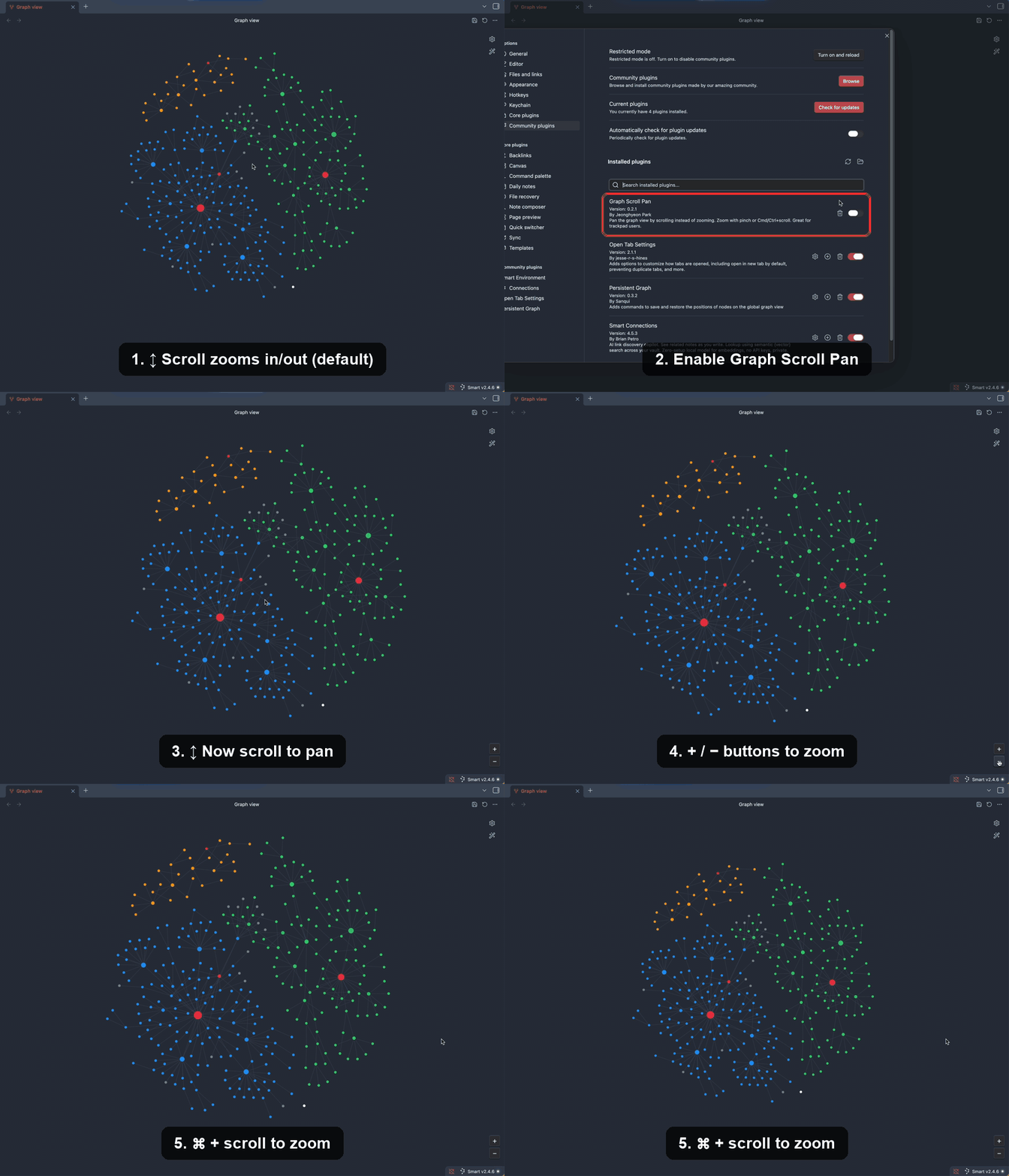
An Obsidian plugin that makes the graph view pan when you scroll, instead of zooming. Zooming is moved to pinch or Cmd/Ctrl + scroll — the same convention used by design and map apps. Built with trackpad users in mind.
Why
By default, scrolling over the graph view zooms in and out, and panning requires click-and-dragging. If you prefer scrolling (or a two-finger trackpad swipe) to move around the graph — like in Figma or a maps app — this plugin swaps the behavior.
Behavior
| Gesture | Action |
|---|---|
| Scroll / two-finger swipe | Pan (move the graph) |
| Pinch | Zoom in / out |
| Cmd/Ctrl + scroll | Zoom in / out |
On macOS, trackpad pinch gestures arrive as Ctrl-modified wheel events, so pinch-to-zoom works automatically. Pinch and Cmd/Ctrl + scroll zoom toward the mouse pointer (turn off Zoom to cursor to zoom around the view center instead); the + / − buttons always zoom around the center.
Optional + / − zoom buttons are shown in the bottom-right corner of the graph for zooming without a gesture.
Works in both the global Graph view and the Local graph view.
Settings
- Pan speed — multiplier for how far the graph moves per scroll (default
1.0). - Zoom speed — multiplier for pinch and
Cmd/Ctrl+ scroll zoom; raise it if pinch feels too slow (default1.0). - Zoom to cursor — zoom toward the mouse pointer instead of the view center (default on).
- Invert horizontal — flip the horizontal pan direction.
- Invert vertical — flip the vertical pan direction.
- Show zoom buttons — show the
+/−buttons over the graph (default on).
Installation
From the Community Plugins browser
- Open Settings → Community plugins → Browse.
- Search for Graph Scroll Pan.
- Install and enable it.
Manual
- Download
main.js,manifest.json, andstyles.cssfrom the latest release. - Copy them into
<your vault>/.obsidian/plugins/graph-scroll-pan/. - Reload Obsidian and enable the plugin in Settings → Community plugins.
Notes
This plugin intercepts the graph view's wheel events and drives Obsidian's internal graph renderer to pan. It relies on internal renderer APIs that are not part of the public plugin API and may change in future Obsidian versions. It is desktop-only.
License
For plugin developers
Search results and similarity scores are powered by semantic analysis of your plugin's README. If your plugin isn't appearing for searches you'd expect, try updating your README to clearly describe your plugin's purpose, features, and use cases.