Hill Charts
approvedby stufro
Add hill charts to your notes.
Obsidian Hill Charts



An Obsidian plugin for adding hill charts to your notes.
- Create hill charts inline by writing a tiny bit of YAML.
- Customizable styles and sizes
- What is a hill chart?
Installation
Please install via the regular Community Plugins setting tab within Obsidian.
Usage
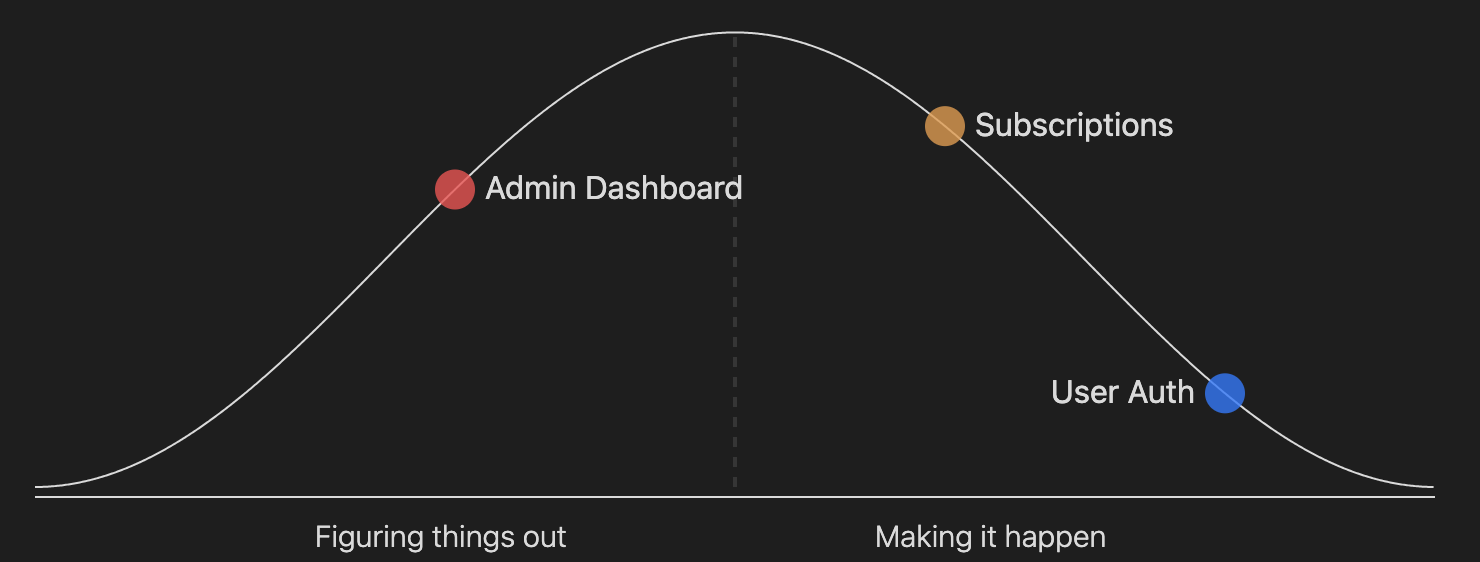
Once installed, you can define a hillchart in a code block like this:
```hillchart
points:
  - position: 30
    text: Admin Dashboard
  - position: 85
    text: User Auth
  - position: 65
    text: Subscriptions
 ```
There are 5 available options you can pass to each point:
- position: 30
  text: Admin Dashboard
  color: "#fb3590"
  size: 15
  opacity: 0.5
And you can optionally set the width and height of a hillchart like this:
points:
  - position: 10
width: 600
height: 150
The default width & height, plus the size and opacity of each point can be configured in the plugin settings.
Contributing
You can follow the Obsidian instructions for setting up a plugin in a development vault, swapping the git clone command for this repo instead of the sample plugin.
If you want to fix a bug or add a new feature, please:
- Fork the project.
- Create a feature branch (
git checkout -b my-new-feature). - Make your changes. Include tests for your changes, otherwise I may accidentally break them in the future.
- Run the tests with the
npm exec jestcommand. Make sure that they are still passing. - Write descriptive commit messages.
- Push the branch to GitHub (
git push origin my-new-feature). - Create a Pull Request and submit it to be merged with the main branch.
Building locally
npm run dev # this will watch for code changes and recompile
Testing
npm exec jest
Releasing
npm version [patch|minor|major]
git push origin master --tags
Credits
For plugin developers
Search results and similarity scores are powered by semantic analysis of your plugin's README. If your plugin isn't appearing for searches you'd expect, try updating your README to clearly describe your plugin's purpose, features, and use cases.