Horizontal Blocks
approvedby icodealchemy
Bring Notion-style layouts with blocks side-by-side, resizable Markdown blocks that support texts, images, embeds, and internal links.
README.md
🧱 Horizontal Blocks Plugin
Bring Notion-style layouts with blocks side-by-side, resizable markdown blocks that support full Obsidian syntax including images, embeds, and internal links.
✨ Features
- 🔲 Side-by-side markdown blocks using
horizontal/hblockcode block - 📏 Resizable columns with a draggable divider
- 🧠 Dynamic layout — support for 2 or more columns using
---separator - 🖼️ Auto-scaling images inside blocks
- 💾 Block width persistence — remembers layout when you return
- Live editing for page/section embeds within blocks, with reduced extra spacing for a cleaner look.
- Styling settings tab: tweak divider (color, thickness, opacity, style), block backgrounds/borders, padding and gaps, toolbar visibility, and theme-aware colors — all applied live via CSS variables.
- Also includes text color option for block content.
- Title text color for block headers.
- Per-block toolbar inside each column: width +/- controls, and per-block background/text color pickers with instant updates and persistence.
- Right-click any block for quick visibility toggles (toolbar, borders, alternating shading).
⚠️ WARNING
Please refrain from entering tasks directly within the Horizontal code block.

The Horizontal function operates based on the code block. In Obsidian, text within a code block is treated as plain text. Consequently, if you input tasks inside a code block, neither the tasks plugin nor the dataview plugin will be able to recognize them.
🚀 Examples
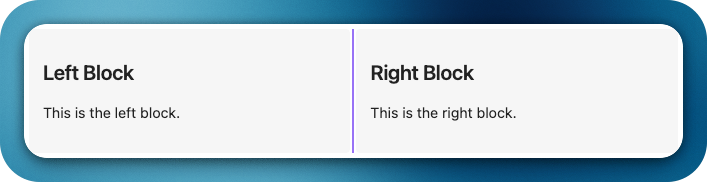
Code 1:
```horizontal
### Block 1
This is the left block.
---
### Block 2
This is the right block.
```
Preview 1:
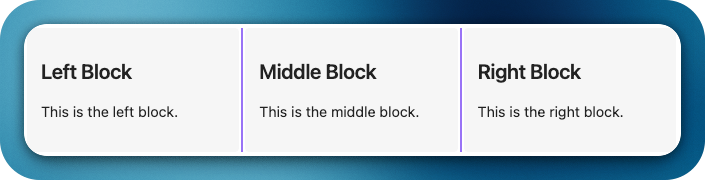
Code 2:
```horizontal
### Left Block
This is the left block.
---
### Middle Block
This is the middle block.
---
### Right Block
This is the right block.
```
Preview 2:
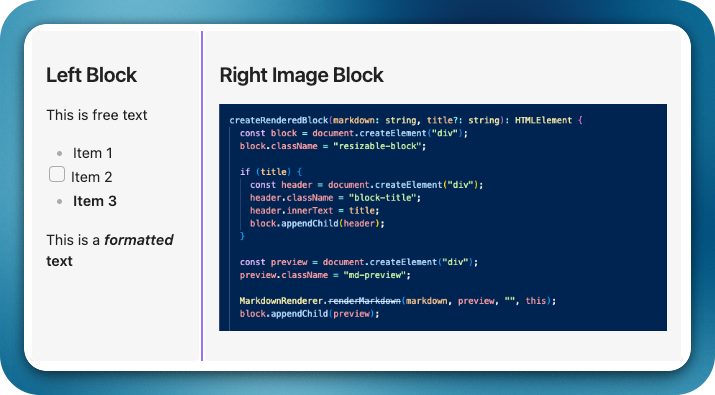
Code 3:
```hblock
### Left Block
This is free text
- Item 1
- [ ] Item 2
- **Item 3**

This is a ***formatted*** **text**
---
### Right Image Block
![[test_image.png]]
```
Preview 3:
🎨 Styling Settings
You can customize the layout appearance globally without editing CSS:
- Divider: color, thickness (1–5px), opacity, and style (solid | dashed | dotted | transparent); hover accent and drag highlight.
- Blocks: background color, optional alternating shading (zebra), show/hide borders, border radius, border thickness.
- Text color for content inside blocks.
- Title text color for block headers.
- Spacing: inner padding (0–32px) and gap between blocks (0–24px).
- Toolbar: global visibility toggle for optional
.hblocks-toolbarareas. - Theme-aware: auto-inherit theme colors instead of custom picks.
Find it under Obsidian → Settings → Community Plugins → Horizontal Blocks – Styling.
All options apply via CSS variables/classes, so themes/snippets can override them; changes apply live without restart.
Toolbar Controls
- Width +/-: Nudge the current block’s width by small steps; changes are saved.
- Background: Per-block background color picker (overrides global background).
- Text color: Per-block foreground color picker (overrides global text color).
🧾 Changelog
See the full release history in CHANGELOG.md.
🤝 Contributing
Contributions are welcome! Whether it's a bug fix, a new feature, or a UI improvement — here's how to get involved.
Getting Started
- Fork the repository and clone your fork locally.
- Install dependencies:
npm install - Start the dev build (watches for changes):
npm run dev - Link to your Obsidian vault for testing — copy
main.js,manifest.json, andstyles.cssinto your vault's plugin folder:
Reload Obsidian or use the Reload App Without Saving command to pick up changes.<vault>/.obsidian/plugins/horizontal-blocks/
Submitting a Pull Request
- Create a focused branch for your change:
git checkout -b feature/your-feature-name - Keep commits atomic and write clear commit messages (e.g.
fix: correct font size in block content). - Make sure
npm run buildpasses without TypeScript errors before opening a PR. - Open your PR against the
mainbranch. Include a clear description of what changed and why. - Reference any related issues in the PR description (e.g.
Closes #12).
Code Style Guidelines
- This project is written in TypeScript. Keep type annotations explicit.
- Follow the existing patterns for
StyleSettingswhen adding new styling options — add the field to the interface, set a default inDEFAULT_STYLE_SETTINGS, wire it up inapplyStylingVariables(), and add a toggle/picker inHBlockStylingSettingTab. - Avoid hardcoding paths, user-specific directories, or environment-dependent commands in
package.jsonscripts.
Reporting Bugs & Requesting Features
Please use our GitHub Project board to submit bug reports and feature requests. It helps us triage and prioritize efficiently.
👏🏼 Support
Have you found the Horizontal Blocks plugin helpful, and want to support it? I welcome donations to support future development efforts. However, I typically do not accept payments for bug bounties or feature requests, as financial incentives can create stress and expectations that I prefer to avoid in my hobby project!
Support @iCodeAlchemy:

For plugin developers
Search results and similarity scores are powered by semantic analysis of your plugin's README. If your plugin isn't appearing for searches you'd expect, try updating your README to clearly describe your plugin's purpose, features, and use cases.