HTML Tables
approvedby SunnyYYLin
Enhance Markdown tables with headers, cell merging, column resizing, formulas, and captions. - This plugin has not been manually reviewed by Obsidian staff.
HTML Tables
Enhanced table support for Obsidian with advanced features like table headers, cell merging, and more.
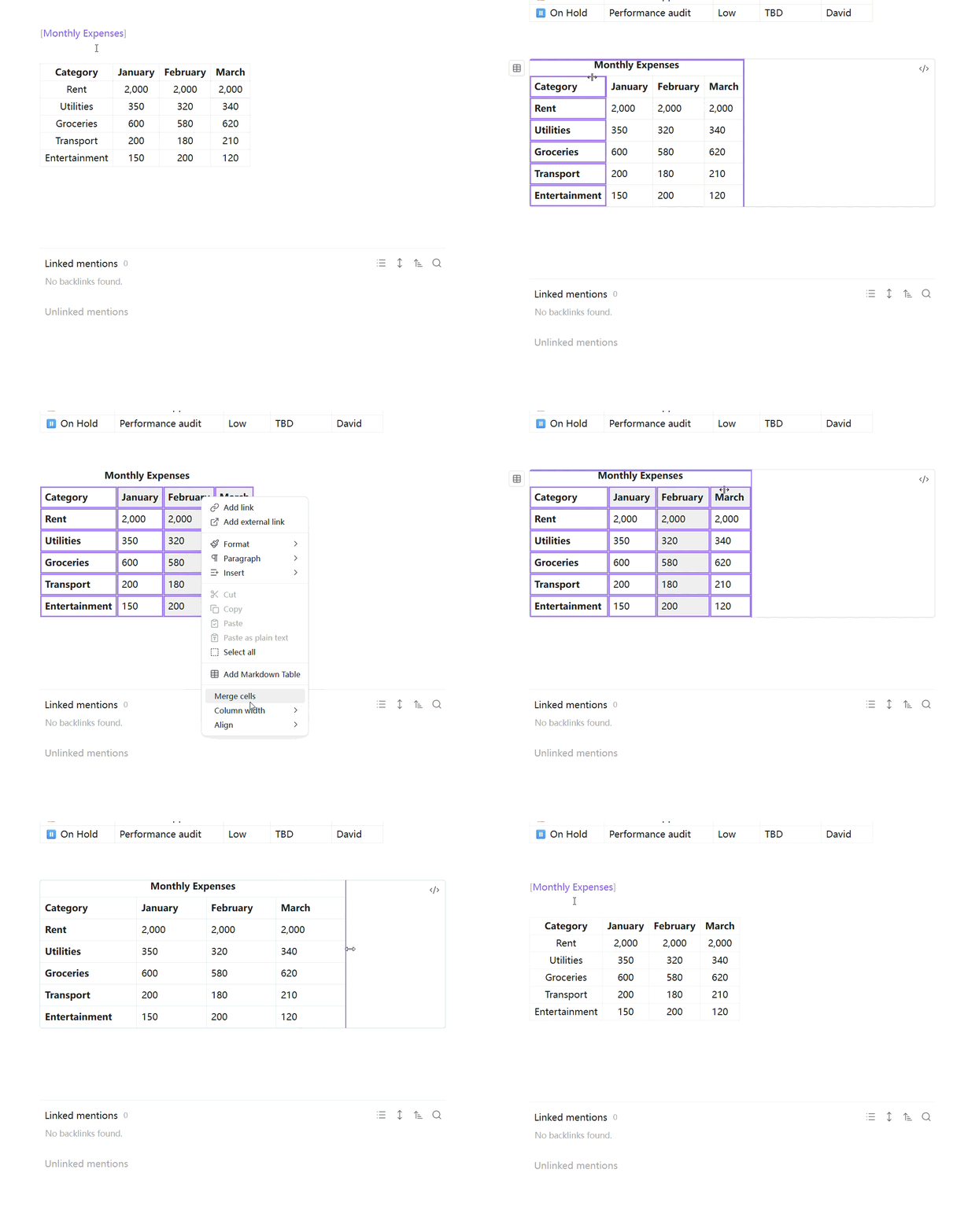
Features
- Table Headers: Support for header rows and header columns
- Cell Merging: Merge cells horizontally and vertically
- Column Resizing: Drag to resize columns, auto-fit, and equalize column widths
- Table Captions: Add captions above tables
- Formula Support: Basic formula support in table cells
- Multiline Cells: Support for newlines within cells
- Alignment Options: Horizontal and vertical alignment for cells
- Context Menu: Right-click context menu for table operations
- Preview Mode Support: All features work in Obsidian's preview mode
Installation
- Download the latest release from GitHub
- Copy
main.js,manifest.json, andstyles.cssto your vault:VaultFolder/.obsidian/plugins/html-tables/ - Enable the plugin in Settings → Community plugins
Usage
Basic Usage
The plugin automatically enhances tables in preview mode. Simply create a standard markdown table:
| Header 1 | Header 2 | Header 3 |
|----------|----------|----------|
| Cell 1   | Cell 2   | Cell 3   |
| Cell 4   | Cell 5   | Cell 6   |
Table Captions
Add a caption by placing bracket text in a paragraph before your table:
[My Table Caption]

| Header 1 | Header 2 |
|----------|----------|
| Cell 1   | Cell 2   |
Floating Button
Hover over any table to reveal a floating action button. Click it to access:
- Convert between Markdown and HTML format
- Toggle Header Row
- Toggle Header Column
- Add Caption
- Auto-fit / Equalize Column Width
Context Menu
Right-click on any table to access:
- Merge Cells
- Unmerge Cells
- Auto-fit / Equalize Column Width
- Horizontal / Vertical Alignment
Column Resizing
- Drag to resize: Hover over the right edge of a header cell and drag to resize
- Double-click to auto-fit: Double-click the resize handle to auto-fit the column width
- Equal column widths: Use the context menu to make all columns equal width
Formula Support
Use formulas in table cells by starting with =:
| Value 1 | Value 2 | Sum |
|---------|---------|-----|
| 10      | 20      | =10+20 |
Multiline Cells
Use \n for newlines within cells:
| Description |
|-------------|
| Line 1\nLine 2 |
Settings
- Enable advanced tables: Enable/disable all advanced features
- Enable header row: Automatically format the first row as a header
- Enable header column: Automatically format the first column as a header
- Enable cell merging: Allow merging cells in tables
- Enable formula support: Support formulas in table cells (starting with =)
- Enable newline in cells: Support newlines in table cells using \n
- Enable table caption: Support table captions above the table
- Default horizontal alignment: Default horizontal alignment for table cells
- Default vertical alignment: Default vertical alignment for table cells
Examples
Complete Example
[Quarterly Sales Report]

| Product | Q1 | Q2 | Q3 | Q4 | Total |
|---------|----|----|----|----|-------|
| Widget A | 100 | 150 | 200 | 250 | =100+150+200+250 |
| Widget B | 80 | 120 | 160 | 200 | =80+120+160+200 |
| Widget C | 50 | 75 | 100 | 125 | =50+75+100+125 |
Table with Multiline Cells
| Feature | Description |
|---------|-------------|
| Header Rows | Automatically format the first row as a header\nwith bold text and centered alignment |
| Header Columns | Automatically format the first column as a header\nwith bold text and centered alignment |
Table with Alignment
| Left Aligned | Center Aligned | Right Aligned |
|:-------------|:--------------:|--------------:|
| Text | Text | Text |
| More text | More text | More text |
Development
- Clone this repository
- Run
bun installto install dependencies - Run
bun run devto start development with hot reload - Run
bun run buildto build for production
Contributing
Contributions are welcome! Please feel free to submit a Pull Request.
License
BSD-0-Clause License
For plugin developers
Search results and similarity scores are powered by semantic analysis of your plugin's README. If your plugin isn't appearing for searches you'd expect, try updating your README to clearly describe your plugin's purpose, features, and use cases.