Sheets Extended
approvedby niconekoru
Vertical headers, merged cells, and custom CSS tables with Advanced Tables compatability.
Obsidian Sheets


This is a plugin for Obsidian that brings greater functionality and usage of markdown tables.
Features
- Cell Merging
- Vertical Table Headings
- Custom css cell styles
- Advanced Tables compatibility
How to Use
Create a normal markdown table and start using Obsidian Sheets features:
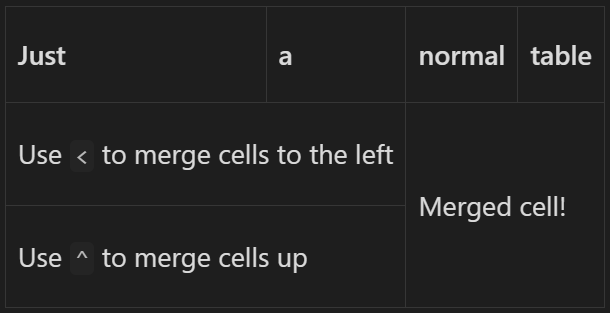
The characters < and ^ in a cell will merge it with the cell to the left and above. Merged cells stack with each other, as seen below.
| Just                               | a   | normal       | table |
| ---------------------------------- | --- | ------------ | ----- |
| Use `<` to merge cells to the left | <   | Merged cell! | <     |
| Use `^` to merge cells up          | <   | ^            | ^     |
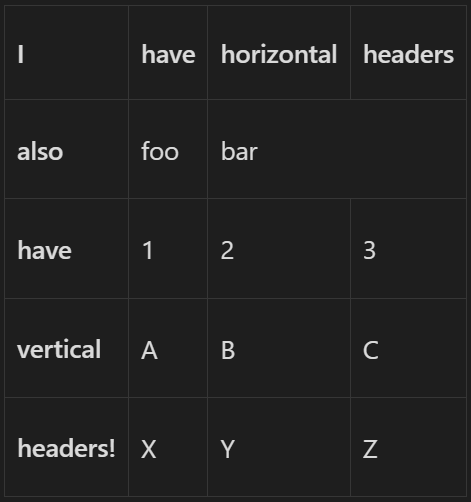
Vertical Headers are created by making a column contain only dashes, much like how native horizontal headers are made with a row containing only dashes.
| I        | -   | have | horizontal | headers |
| -------- | --- | ---- | ---------- | ------- |
| also     | -   | foo  | bar        | <       |
| have     | -   | 1    | 2          | 3       |
| vertical | -   | A    | B          | C       |
| headers! | -   | X    | Y          | Z       |
And it works with Advanced Tables!
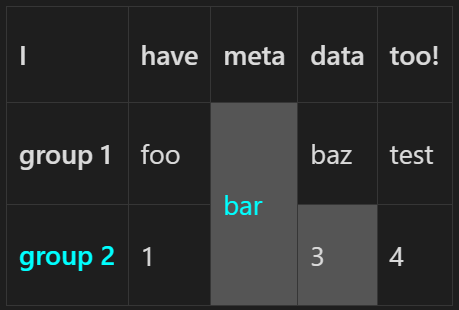
Use the sheet language tag and start using Obsidian Sheets with custom CSS! Partition off the class names, prefixed with a . using a ~ as seen below and use CSS with said class names in metadata above the table.
```sheet
{
    classes: {
        class1: {
            "color": "cyan",
        },
        class2: {
            backgroundColor: "#555",
        }
    },
}
---
| I                 | -   | have | meta                  | data        | too! |
| ----------------- | --- | ---- | --------------------- | ----------- | ---- |
| group 1           | -   | foo  | bar ~ .class1 .class2 | baz         | test |
| group 2 ~ .class1 | -   | 1    | ^                     | 3 ~ .class2 | 4    |

```
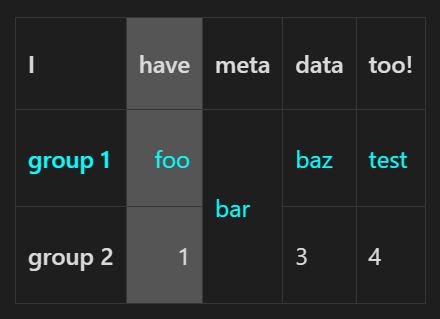
Apply custom css to full rows and headers by applying custom classes to the row and column headers. Markdown table alignment with : is also allowed.
```sheet
{
    classes: {
        c1: {
            "color": "cyan",
        },
        c2: {
            backgroundColor: "#555",
        }
    },
}

---

| I           | ----   | have     | meta       | data  | too! |
| ----------- | ----   | -: ~ .c2 | ---------- | ----- | ---- |
| group 1     | - ~.c1 | foo      | bar        | baz   | test |
| group 2     | ------ | 1        | ^          | 3     | 4    |

```
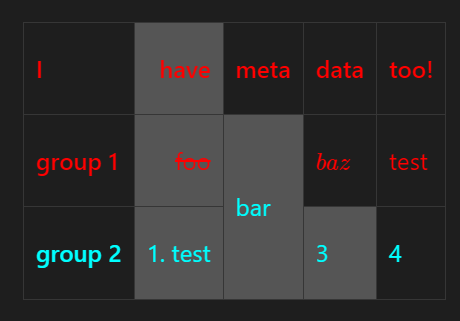
Apply custom styles to the entire table by using the custom styles/classes syntax on the metadata!
```sheet

{
    classes: {
        c1: {
            "color": "cyan",
        },
        c2: {
            backgroundColor: "#555",
        }
    },
}

--- ~ { color: 'red' }

| I           | ----   | have     | meta                  | data        | too! |
| ------------| ------ | -: ~ .c2 | --------------------- | ----------- | ---- |
| group 1     | ----   | ~~foo~~  | bar ~ .c1 .c2         | $baz$       | test |
| group 2     | - ~.c1 | 1\. test | ^                     | 3 ~ .c2     | 4    |
```
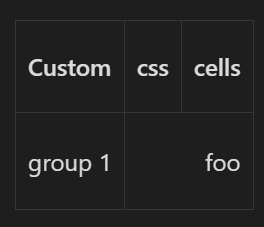
You can also directly apply custom css to cells instead of defining a class
| Custom  | css                             | cells |
| ------- | ------------------------------- | ----- |
| group 1 | foo ~ { "text-align": "right" } | <     |
Installation
From within Obsidian
This plugin is now available on Obsidian community plugins under the name Sheets Extended.
Go to Settings -> Community plugins -> Browse, search for Sheets Extended, click install then enable.
Manual
- Download
main.js,styles.css, andmainfest.jsonfrom releases - Place the installed files in
<vault>/.obsidian/plugins/sheets - Reload Obsidian (Open command palette and
Reload without saving) - Go to
Settings -> Options -> Community Pluginsand disable safe mode - Enable the plugin
Sheets ExtendedunderSettings -> Options -> Community Plugins -> Installed plugins
Future Functionality
- Merging Cells
- Vertical Headers
- Custom Cell Styles
- Custom row and column styles
- Inline custom styles
- Automatic
advanced-table-like Formatting- Custom css for
advanced-table
- Custom css for
Support me!
Using this plugin is completely free, but if you would like to support me or think that I have contributed value to your days you can support me here:


For plugin developers
Search results and similarity scores are powered by semantic analysis of your plugin's README. If your plugin isn't appearing for searches you'd expect, try updating your README to clearly describe your plugin's purpose, features, and use cases.