by sbk-panda-meow
Embed a vault-local HTML file in a note as a sandboxed iframe, using ![[file.html]] or an html-embed code block.
HTML Widget Embed
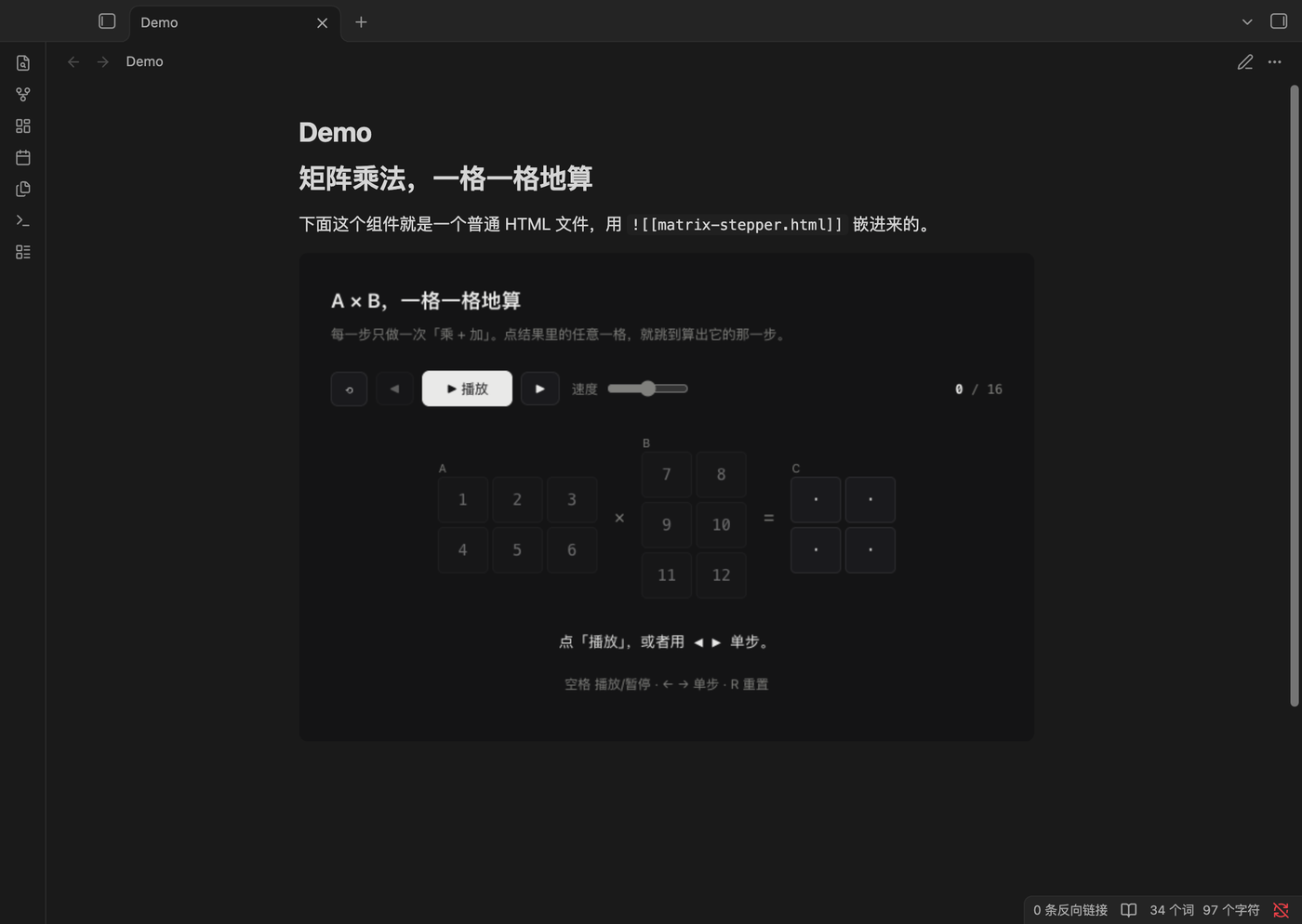
Embed a vault-local .html file inside an Obsidian note as a sandboxed iframe — for interactive diagrams, step-through explainers, small simulations, or anything else you built as a standalone page.
Obsidian embeds notes, images and PDFs, but an .html file in your vault is only a file you can open. This plugin renders it inline, with the JavaScript running, and without hardcoding absolute paths.
Usage
Two ways to embed:
![[matrix-stepper.html]]
![[matrix-stepper.html|520]]
```html-embed
lessons/matrix-stepper.html
height: 470
| Form | Height | Notes |
| --- | --- | --- |
| `![[file.html]]` | auto | Resolved like any wikilink — relative to the note, then across the vault |
| `![[file.html\|520]]` | 520 | The number after `\|` pins the pixel height |
| `![[file.html\|auto]]` | auto | Same as omitting it |
| `html-embed` block | `height: 470` or `height: auto` | Explicit path, useful when the path is long or lives outside the note's folder |
Both forms render in **reading view**. The `html-embed` block also renders in **live preview**; `![[file.html]]` shows Obsidian's file card there, because live preview does not run post processors on file embeds.

**Height adapts to the content by default.** The plugin injects a tiny measuring script into the frame and receives the content height over `postMessage` (the sandbox has no same-origin access, so the frame cannot be measured directly). The iframe is sized to fit, so widgets don't get scrollbars. Give a number when you want a fixed height instead. The frame re-measures on resize, so content that grows later still fits.
A missing file renders a one-line notice instead of breaking the note.
## Install
### Manual
```bash
cd <your-vault>/.obsidian/plugins
git clone https://github.com/MrDongShan/obsidian-html-widget html-widget-embed
Then enable HTML Widget Embed in Settings → Community plugins.
If you already keep the repo somewhere else, symlink it instead of cloning — edits take effect after reloading Obsidian:
ln -s ~/WebstormProjects/obsidian-html-widget <your-vault>/.obsidian/plugins/html-widget-embed
BRAT
BRAT installs plugins straight from a GitHub repo, without waiting for a release in the community directory. Install BRAT, then BRAT → Add beta plugin and enter MrDongShan/obsidian-html-widget. The repository must be public.
How it works
- The file is read through Obsidian's vault API and injected as the iframe's
srcdoc. No blob URLs, no temp files, nothing written to disk. - Paths go through
metadataCache.getFirstLinkpathDest— the same resolver behind[[wikilinks]]— so notes stay portable when the vault moves or syncs to another machine. - Only public APIs are used (
registerMarkdownCodeBlockProcessor,registerMarkdownPostProcessor,metadataCache), which keeps the plugin working across Obsidian updates.minAppVersionis0.15.0.
Security model
Widgets run in a sandboxed frame with allow-scripts allow-forms allow-modals allow-popups and without allow-same-origin. They can run their own JavaScript but cannot reach Obsidian's DOM, window.app, localStorage, or your other files.
Treat an embedded HTML file the way you treat a script: only embed files you trust.
Limitations
- Desktop only. Enable it on desktop; the manifest marks it
isDesktopOnly. - The HTML must be self-contained. Relative images, external CSS/JS and fonts won't load inside the frame.
- Each widget is its own document. A few per note is fine; dozens will make the note heavy.
Development
No build step — main.js is the source and ships as-is.
node --check main.js          # syntax
node version-bump.mjs 0.3.0   # bump package.json / manifest.json / versions.json
git tag 0.3.0 && git push --tags   # CI publishes the release assets
Release tags must equal manifest.json's version (no v prefix), and every release needs main.js, manifest.json and styles.css — the layout Obsidian expects.
中文说明
把 vault 里的 .html 文件渲染成笔记里的可交互组件,两种写法都行:
![[组件.html]]:当成普通嵌入用,高度自动贴合内容,不出滚动条![[组件.html|520]]:|后面的数字固定高度html-embed代码块:路径 +height: 470(阅读视图和实时预览都能显示;![[...]]只在阅读视图显示)
路径走 Obsidian 自己的链接解析,vault 搬家、换设备都不会断。组件运行在沙盒里,摸不到 Obsidian 的 API。仅桌面端。
安装:把仓库克隆(或软链接)到 <vault>/.obsidian/plugins/html-widget-embed,在设置里启用。
License
MIT
For plugin developers
Search results and similarity scores are powered by semantic analysis of your plugin's README. If your plugin isn't appearing for searches you'd expect, try updating your README to clearly describe your plugin's purpose, features, and use cases.