iCloud Contacts
approvedby trulsaa
Imports contacts from iCloud and manages a note for each contact.
Obsidian iCloud contacts





This plugin provides functions to sync contacts from your iCloud account to a folder in your vault. A contact file will look something like this.
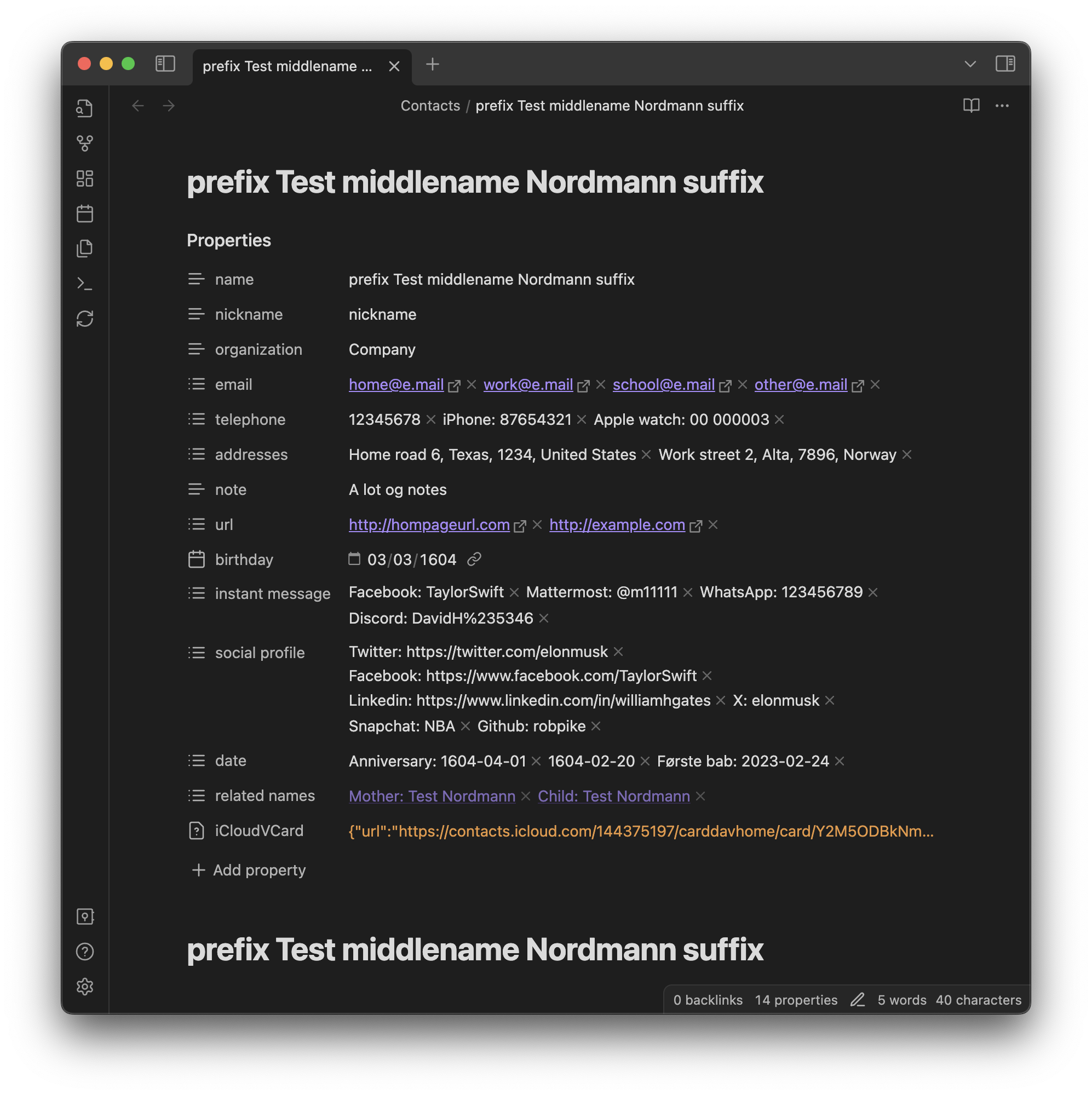
Features
- Sync contacts from your iCloud to Obsidian
- Creates a file for each contact with properties corresponding to contact details.
- Optionally sync only contacts in selected groups.
- Optionally add the names of the iCloud lists (groups) each contact belongs to as a
listsproperty (setting "Add iCloud lists to contacts"). This works independently of the group sync filter, so you can filter contacts by list in bases and Dataview without limiting which contacts are synced. Thelistsproperty is then managed by the plugin and is not affected by the excluded keys setting. - Optionally download contact photos into the vault (setting "Download contact photos"). Each photo is saved in the photos folder and linked from the
photo fileproperty. Thephoto fileproperty is then managed by the plugin. - Optionally show the photo under the title in the contact file (setting "Show photo under the title"). The plugin only manages that one
![[photo]]line, so you can write anything below it and it will not be overwritten. If you add a size to the line (e.g.|300) it is kept. If you delete the line, it is not added back. - Optionally add your own markdown to every contact file (setting "Custom content"), for example a
dataviewjsblock that builds a contact card from the properties of the note. The content is placed below the title and photo. The plugin does not mark the added text in the file. It finds the text again by matching the previous value of the setting exactly, line for line, and only replaces or removes that text. If you edit the added text in a contact file, it is no longer found: it is then not updated or removed when you change or clear the setting, and changed content is added as a new block next to your edited text. If you delete the text from a file it is not added back unless you change the setting. Change the content in the setting, not in the files. Text you added by hand earlier is left alone, but identical text is not added twice. - This plugin only updates the properties, the title and the top H1 header (the name). Any further info written in the files will not be touched when updating the contact.
- You can add your own properties to the frontmatter. The plugin will only manage the following property keys: name, organization, departement, telephone, email, url, related names, instant message, social profile, date, birthday, lists (if enabled) pluss any of the kays you remove from the excluded keys setting.
How to use
- Install this plugin
- Add username and app specific password to the plugin settings.
- If using Nextcloud instead iCloud, copy-paste the address book's share URL into "iCloud server URL" field in plugin settings.
- Run the command
iCloud contacts: Update contactsto sync your contacts - After syncing is complete, you will see a notification stating how many Contacts have been synced.
Now that you have a folder with all your contacts you can link all your projects to their participants. All your vacation plans to your travel partners. All your meeting notes to the participants.
In addition, you can for example use the dataview plugin to display a table with email and phone number for all the contacts you have referenced in the current file like this.
```dataview
TABLE email, telephone
FROM outgoing([[#]])
WHERE iCloudVCard
```
And you can add this to you daily notes template. Given that the title of your daily notes are formatted like YYYY-MM-DD. Then this will create a list of all your contacts who has a birthday on that day.
```dataview
LIST
FROM "Contacts"
WHERE birthday.day = number(split(this.file.name, "-")[2]) AND birthday.month = number(split(this.file.name, "-")[1])
```
Example of a custom content setting that shows the contact card with a script of your own:
```dataviewjs
dv.view("Resources/Dataview Scripts/Contact Info")
```
Commands
This plugin provides two commands. Use the command pallet to search for iCloud contacts and use one of the two commands to update your contacts folder.
- Update Contacts: Downloads all contacts from iCloud and updates the contacts files in you vault that based what contacts have been updated in iCloud.
- Update all Contacts: - Downloads all contacts form iCloud and rewrites all contacts files in your vault based on the contacts from iCloud. Usefull for when you have changed the Excluded keys setting.
Notes
- The iCloudVCard property is used to update contacts that have been changed. I also like it as a backup of my contacts in my vault.
- Only one address book from Nextcloud can be tracked.
- If encryption is enabled on Nextcloud, sync may fail.
- This plugin is not affiliated with Apple in any way.
Thanks
The IcloudClient in this codebase is copied and adapted from tsdav.
Support
If you want to support me and my work, you can buy me a coffee.

For plugin developers
Search results and similarity scores are powered by semantic analysis of your plugin's README. If your plugin isn't appearing for searches you'd expect, try updating your README to clearly describe your plugin's purpose, features, and use cases.