by Nooshin Java
Capture ideas instantly, organize them later and resurface forgotten ones.
Idea Vault
Capture ideas instantly, organize them later, and resurface forgotten ones.
Features
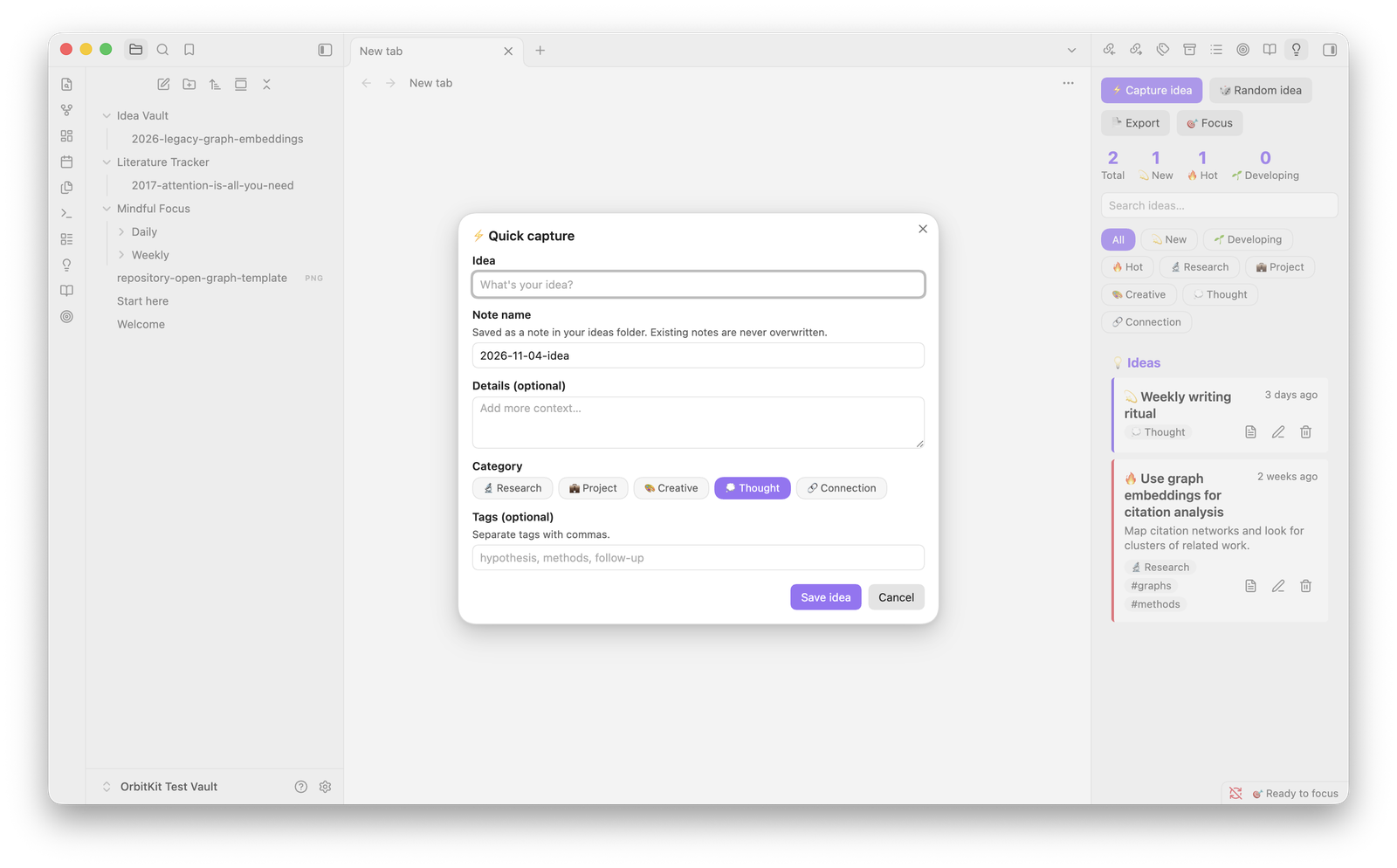
- Quick capture with a title, optional details, a category and tags. Each idea gets its own note.
- Categories: Research, Project, Creative, Thought, Connection.
- Statuses: New → Developing → Hot → Implemented → Archived.
- Search, plus filters by status or category, in the side panel.
- Random idea resurfaces something you haven't finished with.
- Export writes a Markdown digest of all ideas (
Ideas-YYYY-MM.md).
Editing an idea updates only the properties you changed, plus the note's title and 💭 Idea section. If you've edited those parts directly in the note, your version is kept and Idea Vault tells you so. Everything else you write in the note, including the 📝 Notes section, is never touched. If you rename or move an idea note, the idea follows it, even when the move happens outside Obsidian.
Commands
| Command | What it does |
|---|---|
| Quick capture idea | Opens the capture dialog |
| Open panel | Shows the side panel (also the 💡 ribbon icon) |
| Show a random idea | Picks an idea that isn't implemented or archived |
| Export ideas to Markdown | Writes the export note and opens it |
No hotkeys are set by default. Assign your own under Settings → Hotkeys. In the dialogs, Ctrl/Cmd+Enter saves.
Settings
| Setting | Default | Used for |
|---|---|---|
| Ideas folder | Idea Vault | Where idea notes and exports are saved (paths outside the vault are rejected) |
| Open note after capture | on | Opens the new note after Quick capture |
Your data
The list of ideas lives in this plugin's data.json, and each idea also has
a readable note in the ideas folder. New notes never overwrite an existing
file: if the name is taken, Idea Vault adds a number, as in "My idea 1". When
you delete an idea, Idea Vault asks first, then moves its note to the trash
you've set in Obsidian.
Install
From Obsidian: open Settings → Community plugins → Browse, search for Idea Vault, then click Install and Enable.
By hand: download main.js, manifest.json and styles.css from the
latest release into
<your vault>/.obsidian/plugins/idea-vault/, reload Obsidian and enable
Idea Vault under Settings → Community plugins.
Feedback
I'd love to hear how Idea Vault works for you. Please open an issue for bugs or ideas.
Idea Vault is part of OrbitKit, where I develop it together with my other Obsidian plugins. This repository is generated from there.
Acknowledgements
I designed and built Idea Vault. I used Claude, an AI assistant by Anthropic, to help with parts of the code, tests and documentation.
License
MIT © Nooshin Javaheripour
For plugin developers
Search results and similarity scores are powered by semantic analysis of your plugin's README. If your plugin isn't appearing for searches you'd expect, try updating your README to clearly describe your plugin's purpose, features, and use cases.