Japanese Invoice Helper
approvedby e8dev
Write Japanese invoices (適格請求書) in Markdown. Calculates consumption tax by rate, withholding tax and payment due dates, and renders a printable invoice. - This plugin has not been manually reviewed by Obsidian staff.
Japanese Invoice Helper
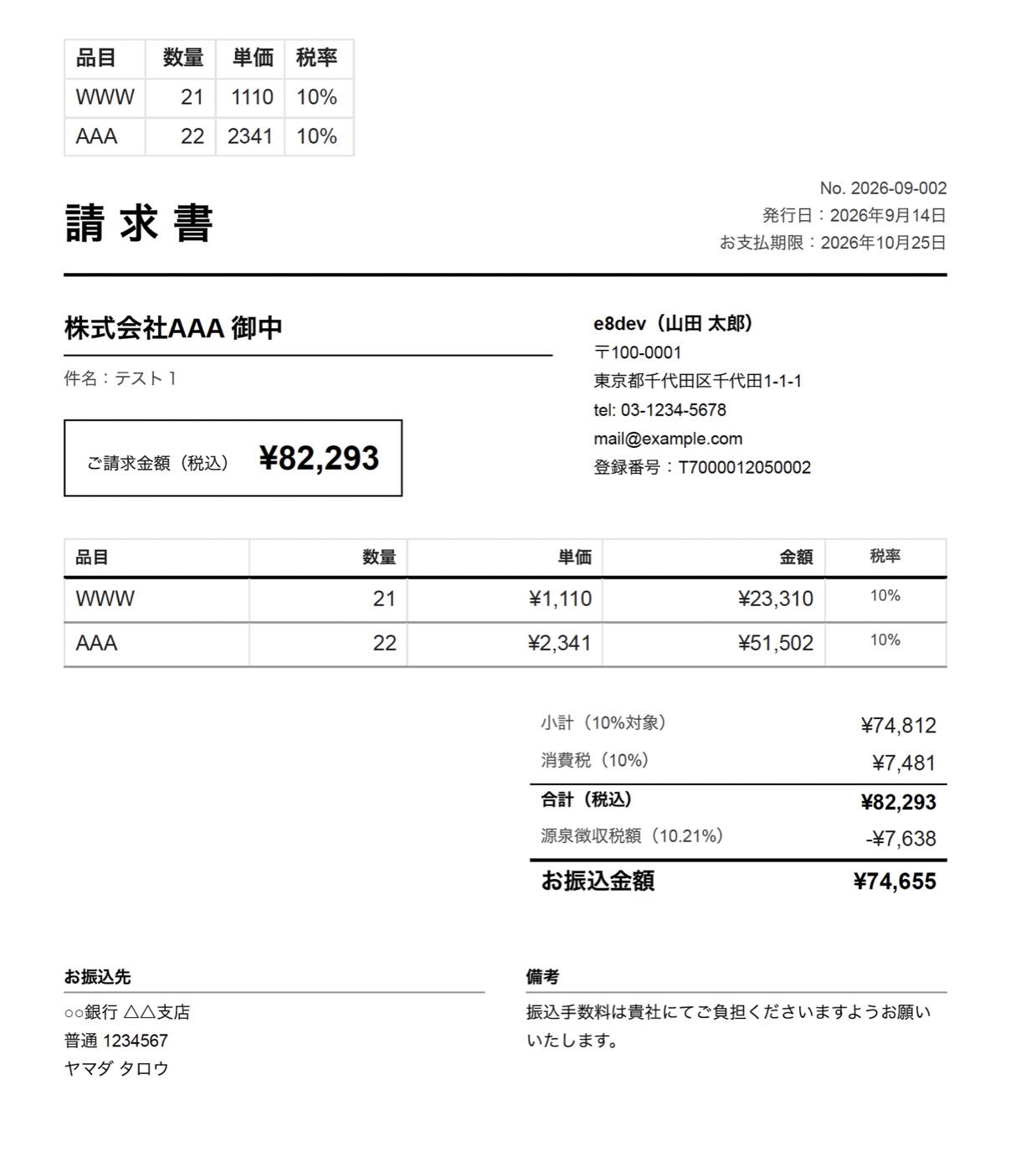
An Obsidian plugin for writing Japanese invoices (適格請求書) in Markdown. It calculates consumption tax per rate, withholding tax (源泉徴収) and payment due dates, and renders a printable invoice you can export to PDF.
Features
- Invoice in a note — metadata in frontmatter, line items in a Markdown table, and an
invoicecode block that renders the finished document - Correct tax arithmetic — consumption tax summarized per rate (10% / 8% reduced / exempt) and rounded once per rate per invoice, as the qualified-invoice rules require; rounding mode is configurable
- Withholding tax — 10.21% up to ¥1,000,000 and 20.42% above, on the pre-tax or tax-inclusive amount; optional deduction for bank transfer fees
- Registration number check — format check for
T+ 13 digits, plus the corporate-number check digit for corporations - New invoice command — client name suggestions from past invoices, automatic sequential numbering (
2026-09-001), due date from payment terms such as 月末締め翌月末払い - Amount helpers — format a selected number as
¥1,234,567,123万4567円, or 大字 (金壱拾弐万参千四百五拾六円也) for receipts - Print-ready — issuer details, registration number and bank account come from settings; Export to PDF produces a clean invoice
- Works offline; no external services, no telemetry
Usage
- Open Settings → Japanese Invoice Helper and fill in the issuer section (name, address, registration number, bank account).
- Run the command Create new invoice. A note like the one below is created in your invoice folder and opened.
- Edit the table; switch to reading view (or export to PDF) to see the invoice.
---
type: invoice
number: "2026-09-001"
client: "株式会社サンプル"
issued: 2026-09-30
due: 2026-10-31
withholding: true
status: unpaid
---

| 品目 | 数量 | 単価 | 税率 |
|---|---:|---:|---|
| 記事執筆(3本) | 3 | 30,000 | 10% |
| 取材交通費 | 1 | 5,000 | 10% |

```invoice
### Frontmatter keys

| Key (aliases) | Meaning |
| --- | --- |
| `number` (`請求番号`) | Invoice number |
| `client` (`宛先`, `取引先`) | Client name; the honorific (御中) comes from settings or `client_suffix` |
| `issued` (`発行日`), `due` (`支払期限`) | Dates (`YYYY-MM-DD`) |
| `subject` (`件名`) | Subject line |
| `withholding` (`源泉徴収`) | `true` / `false` |
| `withholding_base` | `excl` (before tax, default) or `incl` |
| `deduction` (`振込手数料`) | Amount deducted from the payable |
| `status` | `unpaid` / `paid` — shown as a badge on screen only |
| `note` (`備考`) | Remarks printed at the bottom |
| `title` | Document title (default 請求書; use 見積書 etc.) |

The same keys can be written inside the `invoice` code block as `key: value` lines, and a table inside the block takes precedence over the note's table, so a self-contained block also works.

### Table columns

Headers are matched by name: 品目/内容/item, 数量/qty, 単価/unit price, 金額/amount, 税率/rate. Rate cells accept `10%`, `8%`, `軽減`, `非課税`, or blank (default rate from settings). Negative amounts work as discounts.

## Disclaimer

This plugin performs arithmetic according to publicly documented rules; it is not tax advice. Rates and thresholds are settings so they can be adjusted when the law changes. Verify invoices with your accountant or the National Tax Agency guidance where needed.

## Development

```bash
npm install
npm run dev
npm test
npm run lint
License
MIT
日本語
Markdown で請求書(適格請求書)を書き、消費税・源泉徴収・支払期限を自動計算して、そのまま PDF に出力できる Obsidian プラグインです。
機能
- frontmatter にメタ情報、本文に明細テーブル、
invoiceコードブロックで請求書を描画 - 消費税は税率ごと(10%/8%軽減/非課税)に集計し、税率ごとに1回だけ端数処理(切り捨て・四捨五入・切り上げを選択可)
- 源泉徴収税(100万円まで10.21%、超過分20.42%)を税抜または税込ベースで計算。振込手数料などの控除にも対応
- 登録番号(T+13桁)の形式チェック。法人の場合は法人番号のチェックデジットも検証
- 「新しい請求書を作成」コマンド:過去の宛先を候補表示、連番の自動採番、支払条件(月末締め翌月末払い など)から支払期限を計算
- 選択した数値を
¥1,234,567/123万4567円/大字(金壱拾弐万参千四百五拾六円也)に変換 - 発行者情報・登録番号・振込先は設定に一度入れれば全請求書に印字。「PDFにエクスポート」でそのまま送付可能
- 通信なし・外部サービスなし
使い方
- 設定 → Japanese Invoice Helper で発行者情報(氏名/屋号、住所、登録番号、振込先)を入力
- コマンド 新しい請求書を作成 を実行すると、請求書ノートが作成されて開きます
- 明細テーブルを編集し、閲覧モードに切り替えると請求書が表示されます
免責
本プラグインは公開されているルールに基づく計算を行うものであり、税務上の助言ではありません。税率やしきい値は法改正に備えて設定で変更できます。必要に応じて税理士や国税庁の案内でご確認ください。
For plugin developers
Search results and similarity scores are powered by semantic analysis of your plugin's README. If your plugin isn't appearing for searches you'd expect, try updating your README to clearly describe your plugin's purpose, features, and use cases.