Accounting Journal and Ledger
approvedby javierribaldelrio
Tool for recording simple journal entries in class, based on the Spanish libro diario and libro mayor (ledger). Uses double-entry bookkeeping.
Accounting Journal and Ledger
A lightweight Obsidian plugin for recording simple journal entries in class, based on the Spanish libro diario and libro mayor. Uses double-entry bookkeeping. Designed for educational use or for creating example entries easily — not a full accounting system.
Features
- Register journal entries using standard format and classical Spanish format (libro diario)
- Minimal interface focused on simplicity and clarity
- Entries saved as Markdown for transparency and customization
- Manual or file-based account recognition — you can provide your own chart of accounts
- Convert journal or ledger to clean HTML directly from within the active Obsidian note
Usage
Journal and Ledger Entries
This plugin recognizes accounting entries written inside Markdown code blocks using custom tags. Each tag corresponds to a different entry format.
| Tag | Format | Description |
|---|---|---|
acj-m | Journal (Modern) | One line per movement, concise and structured |
acj | Journal (Traditional Spanish) | Classic format used in Spanish accounting education |
acl | Ledger (T-Account Style) | Visual layout of debit and credit similar to T-accounts |
Format 1 & 2: Modern Journal (acj-m) and Traditional Spanish Journal (acj)
```acj-m
{date},{concept}
{debit account} - {amount}
...
---
{credit account} - {amount}
...
===
{debit account} - {amount}
...
---
{credit account} - {amount}
...
```
- First line:
date,concept— the date of the transaction and a short description. - Sections:
- Each section contains a debit group (above
---) and a credit group (below---). - You can add multiple sections using
===, useful for breaking the entry into phases or subcomponents.
- Each section contains a debit group (above
- The date and concept apply to the entire block, not just the first section
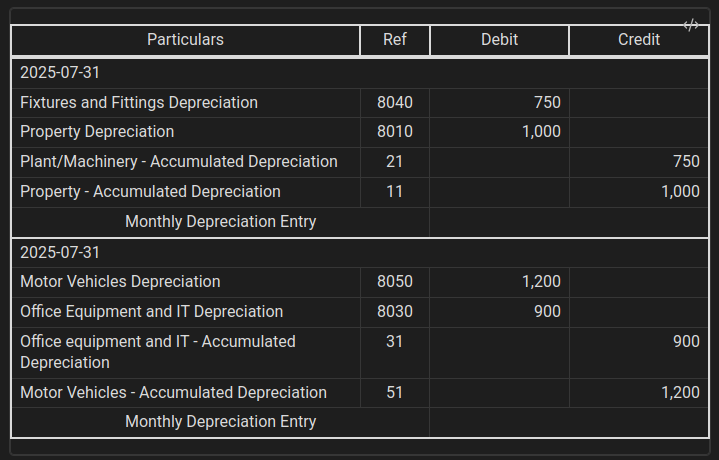
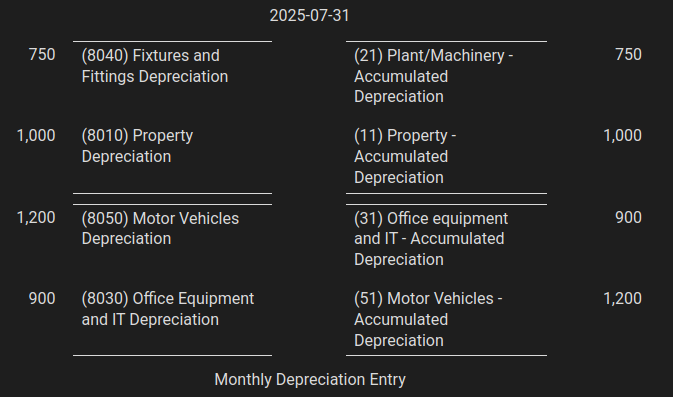
Example
```acj-m
2025-07-31,Monthly Depreciation Entry

8040 - 750
8010 - 1000
---
21 - 750
11 - 1000
===
8050 - 1200
8030 - 900
---
31 - 900
51 - 1200
```
Format 3: Ledger
```acl
{account}
{debit-amount}
{debit-amount}
...
---
{credit-amount}
{credit-amount}
...
```
Example
```acl
1200
1020.23
29020.20
---
1000
12000
24000000
```
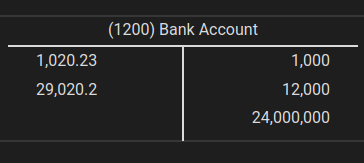
Ledger (T-Account Style)
Fix accounting entries
The Fix accounting entries command transforms your accounting blocks (acj, acj-m, acl) into static HTML previews directly inside the note. This makes the entry visually clear and presentation-ready — but no longer editable from within the block.
Custom Chart of Accounts (CSV)
You can use your own chart of accounts by selecting a CSV file from the plugin settings.
CSV format
8010,Property Depreciation
11,Property - Accumulated Depreciation
1200,Bank
1210,Cash
The plugin will use it to display account names in fixed entries and exports. Remember that you must type the exact same code.
Developer Setup
If you want to contribute or test the plugin locally:
- Clone this repository
- Run
npm installto install dependencies - Run
npm run devto build and watch for changes - In Obsidian, enable Developer Mode and load the plugin folder as a local plugin in
Vault/.obsidian/plugins/accounting-journal-ledger
The source code is written in TypeScript and uses standard Obsidian plugin APIs.
Issues & Feature Requests
Feel free to open an issue for:
- Bug reports
- Suggestions for small enhancements
- Clarifications on usage
You’re also welcome to request new features, as long as they keep the plugin simple and focused on learning.
This plugin is not intended to:
- Automatically generate ledgers from logic-heavy rules
- Replace full accounting systems
- Handle complex workflows like payroll engines or tax reporting
License
This project is under MIT License see LICENSE for more information
Author
Developed by JavierRibaldelRio
For plugin developers
Search results and similarity scores are powered by semantic analysis of your plugin's README. If your plugin isn't appearing for searches you'd expect, try updating your README to clearly describe your plugin's purpose, features, and use cases.