neoloopy
approvedby neoloopy
Systems-thinking causal-loop diagrams (CLDs): build variables and causal links, detect reinforcing/balancing feedback loops, and annotate them — fully local and offline. - This plugin has not been manually reviewed by Obsidian staff.
neoloopy for Obsidian




Think in systems, not lists. neoloopy turns your vault into a causal-loop diagramming tool: map how variables push and pull on each other, and let the plugin find the reinforcing and balancing feedback loops that drive the system's behaviour — all stored as plain Markdown you own.
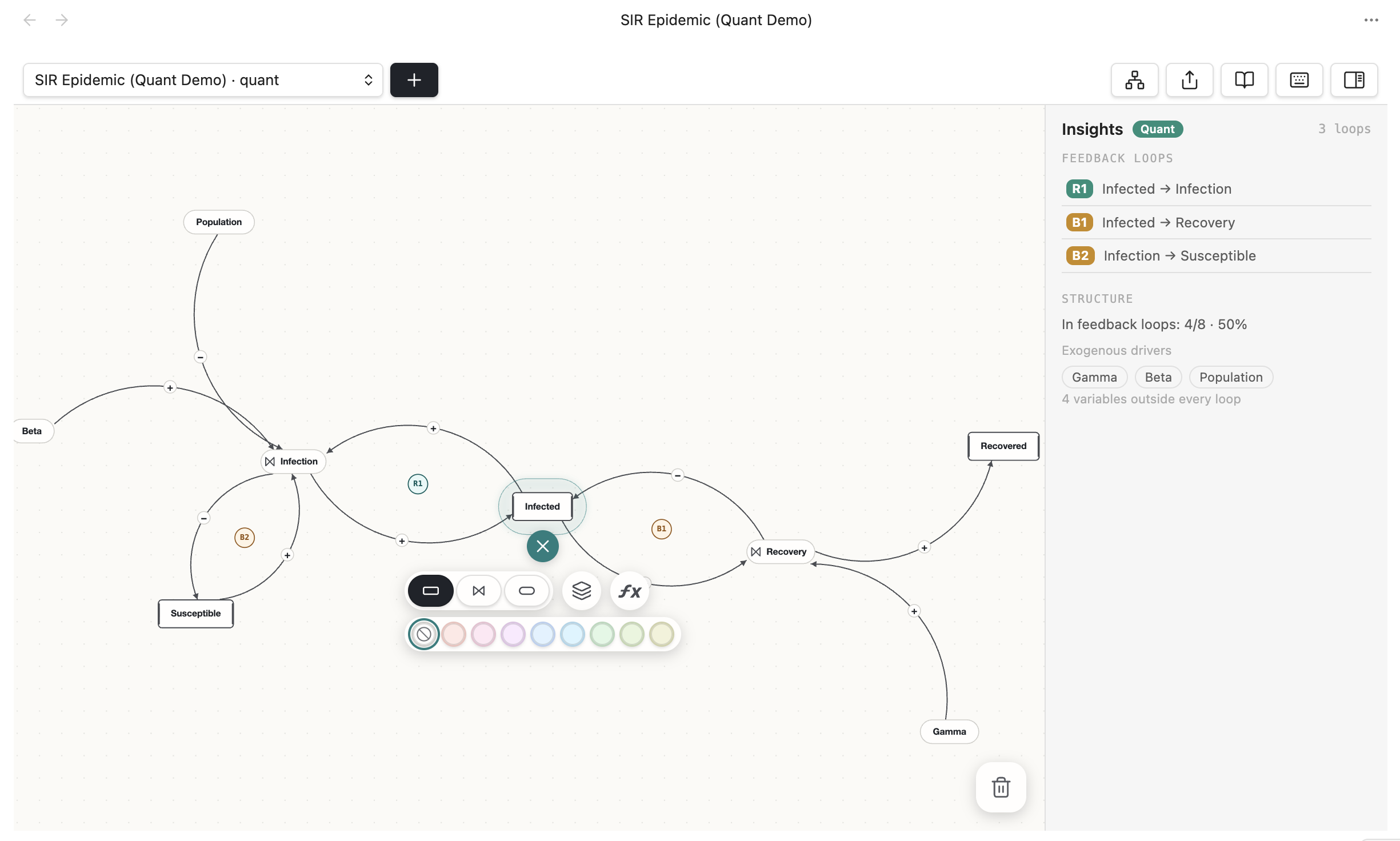
A real capture of the neoloopy canvas inside Obsidian — an SIR epidemic model with the link-editing toolbar open.
Contents
- What it does
- Why causal-loop diagrams?
- Features
- Installation
- Getting started
- Commands
- Settings
- Works with the neoloopy app & CLI
- Privacy — fully local, offline
- About quantitative models
- Support
- Development
- License
What it does
neoloopy is a systems-thinking modelling tool that lives inside Obsidian. You build a causal-loop diagram (CLD) by adding variables (each is a Markdown note) and connecting them with causal links that carry a polarity:
+(same direction) — when the cause goes up, the effect goes up.−(opposite direction) — when the cause goes up, the effect goes down.
From that structure, neoloopy detects every feedback loop and labels it as reinforcing (R) — a loop that amplifies change, like a vicious or virtuous cycle — or balancing (B) — a loop that resists change and seeks an equilibrium. The loops are drawn right on the canvas (R1, B1, …) so the system's dynamics become visible at a glance.
Because every variable is a note and every model is just a folder of Markdown
plus a small model.json manifest, your models are searchable, linkable,
version-controllable, and yours — no database, no account, no lock-in.
Why causal-loop diagrams?
Lists and outlines capture what you know; causal-loop diagrams capture how it behaves over time. They're the standard notation in system dynamics for reasoning about delays, unintended consequences, and leverage points — useful for anything with feedback: product growth, team dynamics, ecology, economics, personal habits, epidemics. neoloopy keeps that modelling where the rest of your thinking already lives.
Features
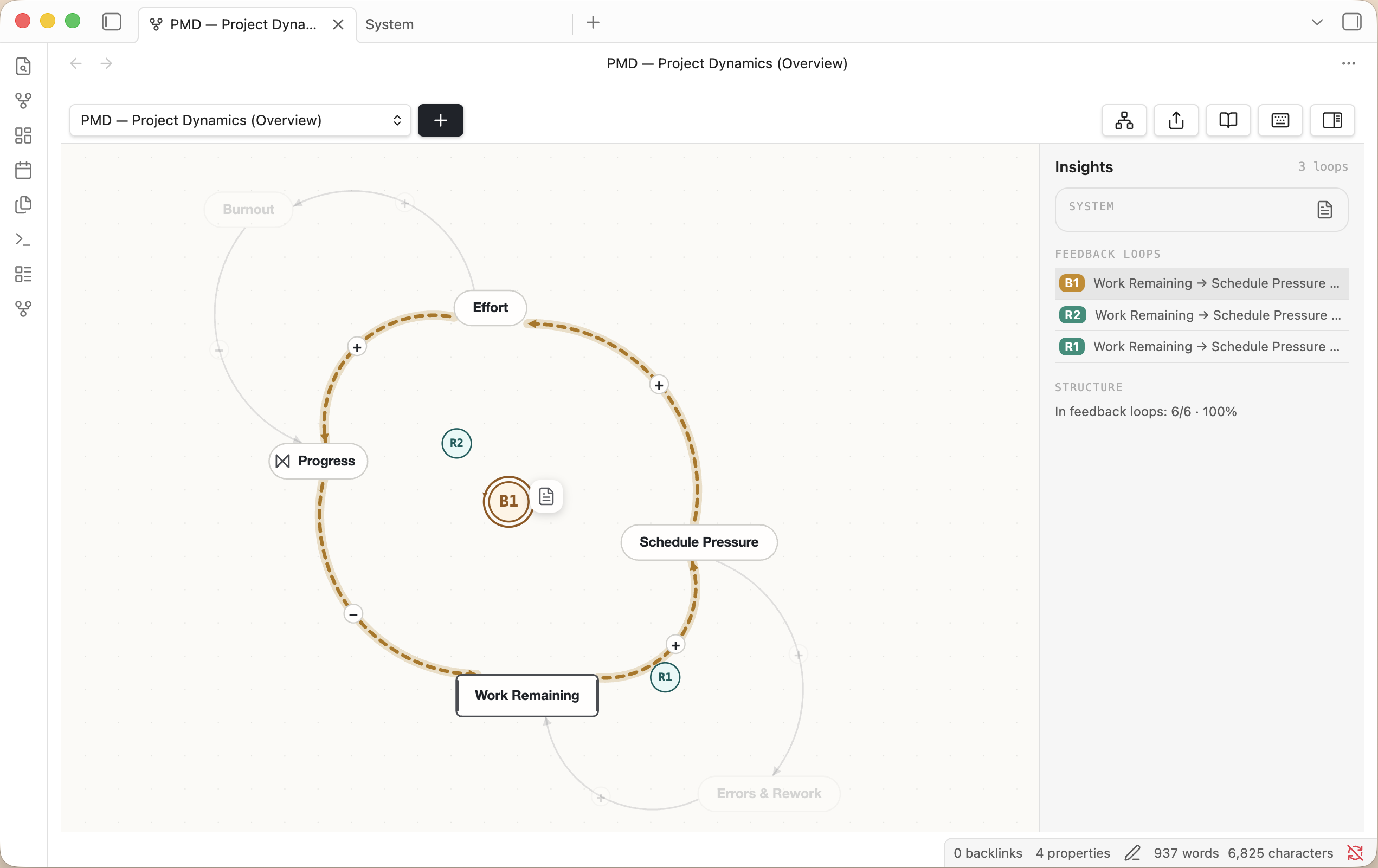
A project-dynamics model (effort, schedule pressure, rework, burnout) with detected R/B loops and the insight panel open.
- 🗂️ Local-first and offline. Each model is a folder of Markdown notes plus
a small
model.jsonmanifest. No account, no server, nothing leaves your machine — the files are the source of truth and stay Obsidian-readable. - 🎛️ Interactive canvas. Pan and zoom, drag nodes, draw and edit links, flip polarity, and mark links as delayed, indirect (dashed), or nonlinear. One command auto-tidies the layout.
- 🔁 Automatic loop detection. Reinforcing (R) and balancing (B) feedback loops are found for you and labelled R1/B1… directly on the diagram. Declared loops remain complete in SFD when their path resolves, with material closures highlighted as stock-flow pipes. Executable quantitative-only loops also appear when their complete path resolves; CLD projects each material effect as a causal link.
- ⚡ Live edits. Change a note in another pane — or let an AI agent edit the vault — and the canvas updates instantly, flashing exactly what changed.
- 🧭 System insight & navigation. A side panel surfaces detected loops and structure, opens each model's System note, and — when a model is referenced as a subsystem — lists its parent systems so you can jump up and recentre on the linking variable.
- 📤 Export a model to JSON, Markdown, or Mermaid with one command.
- 🖥️📱 Desktop and mobile. Pure on-device TypeScript. The plugin works in
Obsidian desktop and mobile (
isDesktopOnly: false), with current mobile support validated through the WebKit harness used for the iOS touch path.
Installation
From the Community Plugins store (recommended)
- Open Settings → Community plugins and make sure Restricted/Safe mode is off.
- Click Browse, search for "neoloopy", and choose Install.
- Click Enable.
Manually
- Download
main.js,manifest.json, andstyles.cssfrom the latest release. - Copy them into
<your-vault>/.obsidian/plugins/neoloopy/. - Reload Obsidian, then enable neoloopy under Settings → Community plugins.
Release assets are built by GitHub Actions and ship with a signed build-provenance attestation, so you can verify they were built from this source:
gh attest verify --repo frozenabe/neoloopy-obsidian main.js.
Beta versions via BRAT
Prefer to test pre-release builds? Install the
BRAT plugin, then Add beta
plugin with the repository frozenabe/neoloopy-obsidian.
Getting started
- Open the canvas from the fork icon in the left ribbon, or run the command
"neoloopy: Open canvas" from the command palette (
Ctrl/Cmd-P). - Run "neoloopy: Create new model" (or the + in the canvas header) and type a title when prompted to start a model. Rename it any time with the pencil button next to the model picker, or "neoloopy: Rename model".
- Add a variable, then drag from one variable to another to draw a causal link and pick its polarity.
- Build out the structure — neoloopy highlights the R and B loops as they form.
- Open the insight panel to read the detected loops, jump between models, and open each model's System note.
Already have a vault from the neoloopy app or CLI? Use Open folder as vault
on that folder and the plugin finds every model automatically — it scans the
whole vault for model.json, and they're the same Markdown files on disk, so
there's nothing to sync. The reverse works too: point the neoloopy CLI at your
existing Obsidian vault folder.
Commands
All commands are available from the command palette under the neoloopy: prefix. Commands marked (canvas) act on the model in the active canvas.
| Command | What it does |
|---|---|
| Open canvas | Open or focus the neoloopy canvas. |
| Create new model | Prompt for a title, then start a new model in your default model folder. |
| Rename model (canvas) | Change the current model's title. |
| Add variable (canvas) | Add a variable to the current model. |
| Tidy layout (canvas) | Auto-arrange the nodes. |
| Detect feedback loops (canvas) | Report the reinforcing/balancing loops. |
| Export model as Markdown (canvas) | Export to Markdown (with a Mermaid diagram). |
| Export model as JSON (canvas) | Export the model structure as JSON. |
| Export model as Mermaid (canvas) | Export a Mermaid diagram. |
Settings
| Setting | Default | Description |
|---|---|---|
| Default model folder | neoloopy | New models are created as subfolders here. |
| Live-edit spotlight | On | Flash nodes/edges that change outside the canvas (e.g. edited in a note or by an agent). |
Works with the neoloopy app & CLI
neoloopy's on-disk format is shared across tools. Models created here open in the
neoloopy app or neoloopy CLI and vice versa, with no import/export step —
they're the same Markdown notes and model.json manifest on disk. Parity tests
in this repo round-trip fixtures produced by the reference neoloopy binary to
guarantee the format stays byte-compatible.
Privacy — fully local, offline
This plugin never touches the network and spawns no external process. Everything runs in pure TypeScript on-device; your models stay in your vault. There's no telemetry, no account, and no cloud component.
About quantitative models
Quantitative System Dynamics simulation is not part of this plugin (it lives in the neoloopy app/CLI). Quantitative models are still viewable and lightly editable here without a simulator: in the ƒx modal you can edit a node's equation (or a stock's initial value) and its units, written straight back to the vault note. The plugin statically resolves complete executable feedback paths from equations and first-class stock-flow endpoints. It renders material effects as causal projections in CLD mode and as pipes in SFD mode; unsupported, ambiguous, or incomplete topology produces no partial quantitative badge. The insight panel also surfaces parents, exogenous drivers, and reference-mode sparklines with no simulator and no network.
Support
neoloopy is free and open source. If it's useful to you and you'd like to support its development, you can donate here. Learn more at neoloopy.com. Bug reports and feature requests are welcome on the issue tracker.
Development
npm install
npm run dev        # esbuild watch → main.js
npm run build      # typecheck + production bundle
npm test           # vitest (engine, codec, loop detection, geometry, Dart parity)
The engine is split into pure, dependency-free modules (src/engine, src/view
math) that are unit-tested without Obsidian, plus thin Obsidian adapters. Parity
tests under test/ round-trip fixtures produced by the real Dart neoloopy
binary to guarantee the on-disk format stays byte-compatible across tools.
License
Open source under the MIT License. All shipped code is readable TypeScript — no bundled binaries, no obfuscation, no network calls.
For plugin developers
Search results and similarity scores are powered by semantic analysis of your plugin's README. If your plugin isn't appearing for searches you'd expect, try updating your README to clearly describe your plugin's purpose, features, and use cases.