Note Decay
approvedby NEWO-J
Color-codes notes by duration since you last reviewed them, using SM-2 spaced repetition. - This plugin has not been manually reviewed by Obsidian staff.

An Obsidian plugin for spaced-repetition visualization of your notes.
Grade a note with Again/Hard/Good/Easy (SM-2 Algorithm), and the plugin schedules the next review and color-codes the whole vault by how overdue each note is.
Features
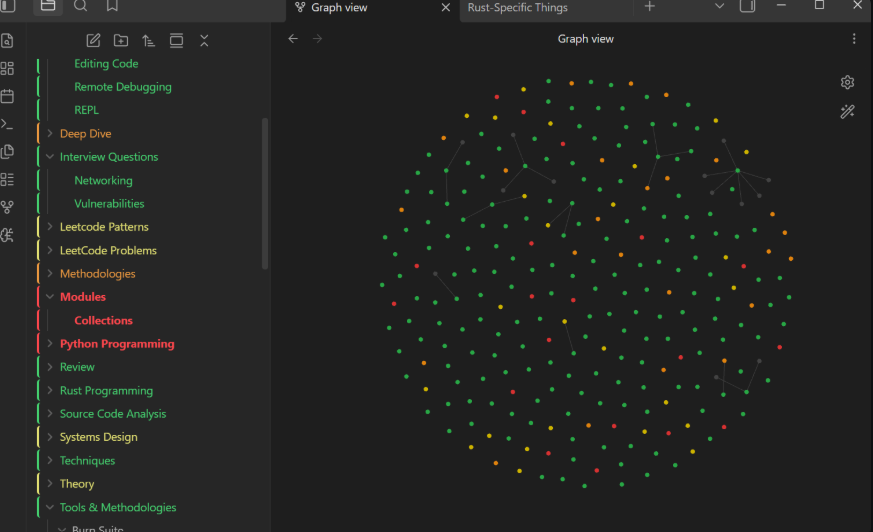
- File explorer notes are colored green/yellow/orange/red by how overdue they are.
- Folders are tinted by the share of their notes that are still fresh (green).
- Graph view nodes can be colored too, via a
review_statusproperty and color groups. - Existing notes are seeded from their file date so the vault isn't blank on day one.
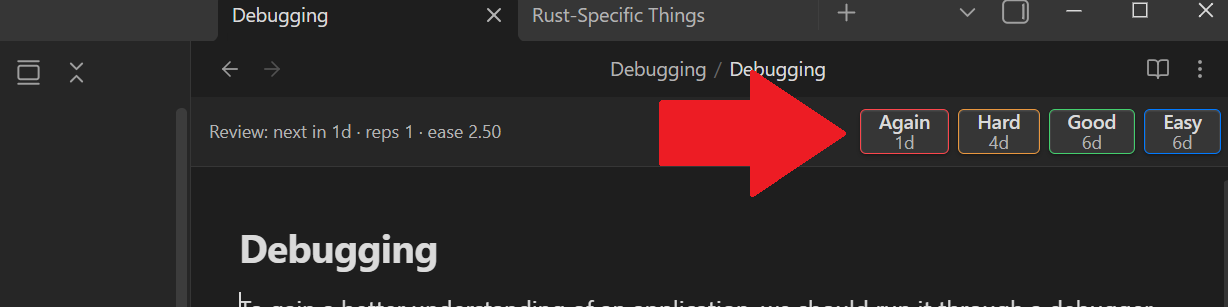
- Grade notes from a bar at the top of each note. Each button shows the interval it will schedule.
- Grading cooldown to avoid accidentally spamming a note's interval.
Install
- Open Obsidian
- Enable community plugins - Go to Settings → Community plugins → Turn on community plugins
- Install Note Decay - Click "Browse" → Search for "Note Decay" → Install
OR
- Browse Here
- Click "Add to Obsidian"
Frontmatter
Grading a note writes:
last_reviewed: 2026-06-26
sr_due: 2026-07-02
sr_interval: 6
sr_ease: 2.5
sr_reps: 2
sr_lapses: 0
Graph colors
Add color groups in Graph view settings matching ["review_status":"green"] etc.,
or let the plugin write the property and set them up once.
Copy main.js, manifest.json, and styles.css into
<vault>/.obsidian/plugins/note-decay/.
License
MIT
For plugin developers
Search results and similarity scores are powered by semantic analysis of your plugin's README. If your plugin isn't appearing for searches you'd expect, try updating your README to clearly describe your plugin's purpose, features, and use cases.