by prometheus-maker
Keeps every pop-up notification from Obsidian and your plugins, so you can read the ones that vanished too fast. Bell in the status bar, ribbon and command.
Notification History
Obsidian's pop-up notifications disappear after a few seconds, and there is no list of them anywhere. A plugin reports an error, a sync finishes, a file takes long to index, and if you were looking away it's gone. On desktop you can dig through the developer console; on mobile there is nothing. (forum request)
This plugin keeps them.
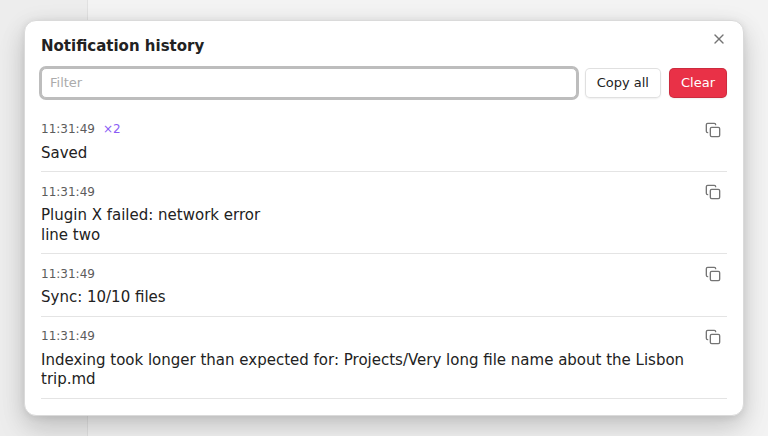
Every notification that Obsidian or any plugin shows is saved with its time. Open the list with the bell in the status bar, the bell in the ribbon (that one works on mobile), or the command Notification History: Show history.
- Newest first. The same message shown again within 10 seconds is counted (
×2) instead of repeated. - Notifications that change while on screen, like progress messages, are saved with their last text.
- Filter box, a copy button on each one, Copy all and Clear.
- The status bar bell shows how many came in since you last looked.
Settings
- Keep history after restart: on by default. Off keeps the list in memory only.
- Notifications to keep: 50 to 1000, default 200.
- Bell in the status bar: on by default.
The history is stored in the plugin's own data.json in your vault's .obsidian folder. Nothing leaves your device.
Install
In Obsidian: Settings → Community plugins → Browse, search for "Notification History", install and enable it.
Manual install: download main.js, manifest.json and styles.css from the
latest release into
<vault>/.obsidian/plugins/notice-history/.
Limits
It records notifications from the moment it loads, so the very first ones at startup, shown before community plugins load, are missed. It reads them from the screen, so text inside a notification is saved but buttons are not. Tested on Obsidian 1.15 desktop (Linux); not yet on mobile.
Same plugin for other apps
Licence
MIT
For plugin developers
Search results and similarity scores are powered by semantic analysis of your plugin's README. If your plugin isn't appearing for searches you'd expect, try updating your README to clearly describe your plugin's purpose, features, and use cases.