Habit Tracker
approvedby duoani
Create a simple month view for visualizing your punch records.
Obsidian Habit Tracker Plugin
This plugin for Obsidian creates a simple month view for visualizing your punch records.
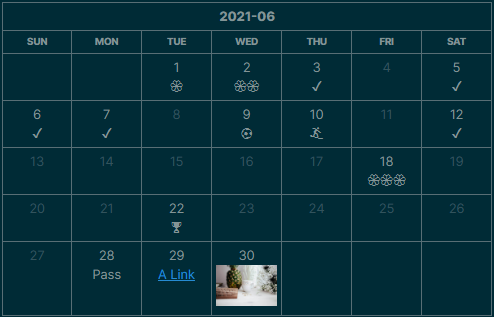
How To
To show the view above, just create a code block and type:
```habitt
[month:2021-06]
(1,💮)(2,💮💮)(3)(5)(6)(7)(9, ⚽)(10, 🏄)(12)(18,💮💮💮)(22,🏆)(28,Pass)
```
[month:YYYY-MM]: Which month to display(date_num, tag): The day (date_num) you want to punch in, with atagin it. Iftagis missing, such as(12), a default tag✔️is given to that day.[width: css_width]: Restrict the Month-view table tocss_width, such as[width: 50%],[width: 500px]
Rich Text
Some people like to insert rich text (e.g. links or images). Since v1.0.4, Habit Tracker plugin adds a new configuration Enable HTML to activate HTML parsing. For some security reasons, this config is "off" as default.
To insert Web URL:
```habitt
(1, <a href="https://www.google.com">Google</a>)
```
To insert other note in the Vault (Using Obsidian url):
```habitt
(1, <a href="obsidian://open?vault=my-notes&file=xxx">Google</a>)
```
Learn more about Obsidian url.
To insert a image (from web):
```habitt
(1, <img src="https://www.xyz.com/img.jpg" />)
```
Since now, in Obsidian, we are not able to link the local image using <img /> tag. See Does ANY HTML work in Obsidian w/local files? - Resolved help - Obsidian Forum.
Installation
You can install the plugin via the Community Plugins tab within Obsidian. Just search for "Habit Tracker"
For plugin developers
Search results and similarity scores are powered by semantic analysis of your plugin's README. If your plugin isn't appearing for searches you'd expect, try updating your README to clearly describe your plugin's purpose, features, and use cases.