Habit Tracker
approvedby narsail
Forked from Richardsl/heatmap-calendar-obsidian
Display the Habits of a calendar week.
★ 37 stars↓ 10,300 downloadsUpdated 4y agoApache-2.0
Habit Tracker plugin for Obsidian
Visualise your Habits based on DataViewJS in Obsidian
Use:
- Annotate the data you want to track in your daily notes (see Dataview annotation documentation)
- Create a DataviewJS block wherever you want the Habit Tracker to display.
- Collect the data you want to display using DataviewJS
- Pass the data into Habit Tracker using renderHabitTracker()
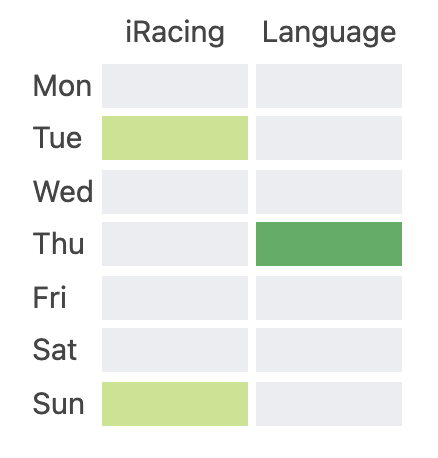
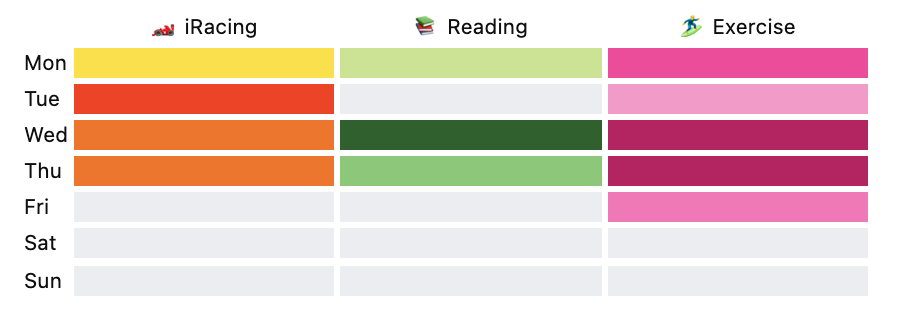
Full Example Code:
```dataviewjs
const weekData = {
	year: 2022,
	week: 25,
	habits: [
		{
			colors: ["#c6e48b", "#49af5d"],
			name: "iRacing",
			entries: [
				{
					date: "2022-06-26",
					value: 30
				},
				{
					date: "2022-06-21",
					value: 45
				}
			]
		},
		{
			colors: ["#49af5d", "#c6e48b"],
			name: "Language",
			entries: [
				{
					date: "2022-06-23",
					value: 30
				}
			]
		}
	]
}

renderHabitTracker(this.container, weekData)

```
Known Limitations
- It currently only supports up to 7 habits.
Attribution
This Plugin has been created on the foundation of the Heatmap Calendar by Richard Slettevoll
Changelog:
[0.3.3] - 2022-07-07
- Further clean up as per Request
[0.3.2] - 2022-07-04
- Removed settings references
- Make the EL and UL creation cleaner
[0.3.1] - 2022-07-04
- Remove conflict with Heatmap calendar due to same named css classses
[0.3.0] - 2022-07-01
- Fixed a bug where a value wasn't assigned to the right color
- Added tests for two core logic functions
- Added rollup for better file management
[0.2.0] - 2022-06-30
- Added the concept of intensities.
- Provide a value to the entity
- Provide multiple colors to map the values equidistant to the colors based on the min and max value
[0.1.0] - 2022-06-26
- initial release
For plugin developers
Search results and similarity scores are powered by semantic analysis of your plugin's README. If your plugin isn't appearing for searches you'd expect, try updating your README to clearly describe your plugin's purpose, features, and use cases.