Workout AI Tracker
pendingby avlihachev
Advanced workout tracker with AI analysis powered by Claude. Track exercises, analyze progress, and get personalized recommendations.
🏋️ Workout AI Tracker for Obsidian
Advanced workout tracking plugin for Obsidian with AI-powered analysis using Claude API.
✨ Features
📝 Workout Tracking
- ✅ Template-based workouts - Select from 5 default templates or create custom ones
- ✅ Quick workout entry with modal interface
- ✅ Track weight, reps, RPE, heart rate for each set
- ✅ Warmup/cooldown cardio activities (elliptical, rowing, etc.)
- ✅ Automatic markdown file generation with Obsidian Base properties
- ✅ Organized in customizable folder structure
- ✅ Progress tracking within workout (exercise X of Y)
⏱️ Built-in Tools
- ✅ Rest timer with countdown and notifications
- ✅ Quick add exercise to today's workout
- ✅ Progressive volume and set tracking
- ✅ Duration tracking
🤖 AI-Powered Analysis
- ✅ Claude API integration for intelligent workout analysis
- ✅ Progress tracking (weights, reps, volume)
- ✅ Program recommendations
- ✅ Recovery analysis
- ✅ Imbalance detection
- ✅ Personalized training advice
📊 Data Organization
- ✅ Uses Obsidian Base (properties in frontmatter)
- ✅ Markdown files for full-text search
- ✅ Git-friendly version control
- ✅ No external dependencies
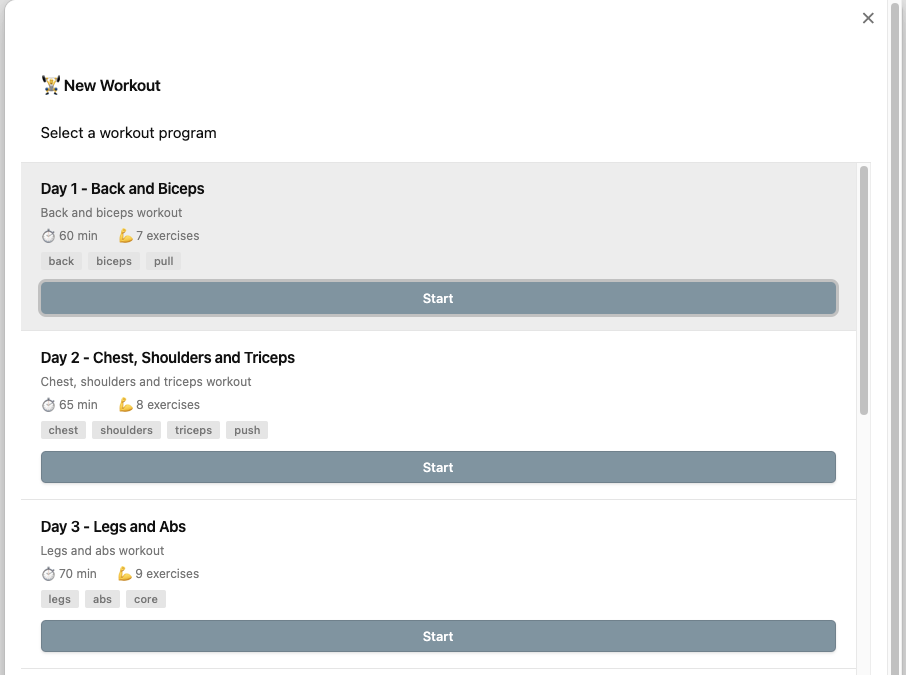
Below are some screenshots of the app in action:
New Workout Selection
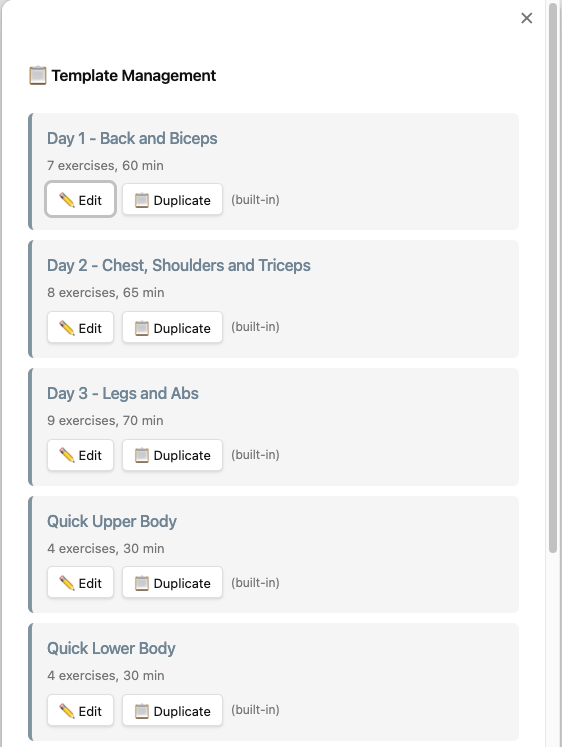
Template Management
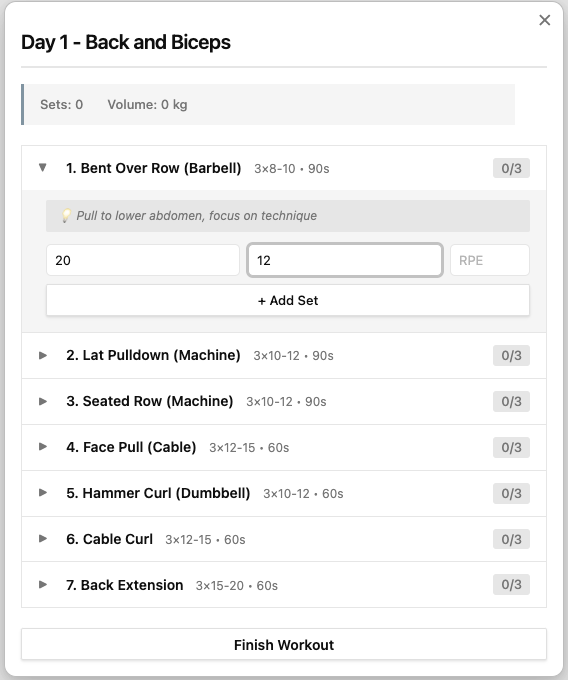
Workout Session
🚀 Installation
Manual Installation
- Download the latest release
- Extract files to
.obsidian/plugins/workout-ai-tracker/in your vault - Reload Obsidian
- Enable "Workout AI Tracker" in Settings → Community Plugins
From Source
git clone https://github.com/yourusername/obsidian-workout-ai
cd obsidian-workout-ai
npm install
npm run build
Copy main.js, manifest.json, and styles.css to your vault's plugins folder.
⚙️ Setup
1. Get Claude API Key
- Go to https://console.anthropic.com/
- Create an account or sign in
- Generate an API key
- Copy the key (starts with
sk-ant-...)
2. Configure Plugin
- Open Obsidian Settings
- Go to Workout AI Tracker
- Paste your Claude API key
- Set your workouts folder (default:
Workouts) - Configure default rest time (default: 90 seconds)
📖 Usage
Starting a Workout
Method 1: Ribbon Icon
- Click the 🏋️ icon in the left ribbon
- Select a template from the list (Day 1, Day 2, Day 3, Quick Upper, Quick Lower)
- Click "Start" to begin the workout with pre-configured exercises
- Or click "Create Empty Workout" for a custom workout
Method 2: Command Palette
- Press
Cmd/Ctrl + P - Type "Start new workout"
- Press Enter
- Select your template
Method 3: Hotkey (configure in settings)
- Set custom hotkey for "Start new workout"
Using Workout Templates
The plugin comes with 5 default templates based on your optimized training program:
-
Day 1 - Back and Biceps (60 min, 7 exercises)
- Back and biceps focused workout
- Includes Bent Over Row, Lat Pulldown, Seated Row, Face Pull, Hammer Curl, Cable Curl, Back Extension
-
Day 2 - Chest, Shoulders and Triceps (65 min, 8 exercises)
- Chest, shoulders, and triceps
- Includes Bench Press, Incline Press, Overhead Press, Lateral Raise, Reverse Fly, Tricep Pushdown
-
Day 3 - Legs and Abs (70 min, 9 exercises)
- Legs and abs
- Includes Goblet Squat, Leg Press, Romanian Deadlift, Bulgarian Split Squat, Leg Curl, Calf Raise, Abs exercises
-
Quick Upper Body (30 min, 4 exercises)
- Fast upper body workout
- Push-ups, Pull-ups, Overhead Press, Dumbbell Row
-
Quick Lower Body (30 min, 4 exercises)
- Fast lower body workout
- Goblet Squat, Lunges, Romanian Deadlift, Calf Raises
Managing Templates:
- Press
Cmd/Ctrl + Pand type "Manage workout templates" - ✏️ Edit any template (default or custom):
- Default templates: Creates a new custom copy when saved
- Custom templates: Updates the existing template
- ➕ Create new templates from scratch with the "+" button
- 📋 Duplicate templates to create variations
- 🗑️ Delete custom templates (default templates are protected)
- Custom templates are saved in plugin data.json (persistent, synced with vault)
Template Editor Features:
- Edit template name, description, and tags
- Add/remove/reorder exercises within the template
- Configure sets, reps range (min-max), and rest time for each exercise
- Set target weights as suggestions for exercises
- Add exercise notes (technique tips, progression advice)
- Set estimated workout duration
- Enable/disable warmup and cooldown (with duration)
- Save validates that name and at least one exercise are present
Tracking Exercises
When using a template, the plugin guides you through each exercise:
- Current Exercise Info - Shows exercise name, target sets/reps, rest time, and notes
- Set Counter - Displays which set you're on (e.g., "Set 2 of 3")
- Input Weight and Reps - Enter the weight (kg) and repetitions completed
- Optional Fields - Add RPE (1-10) and heart rate if desired
- Add Set - Click to record the set
- Progress Automatically - Plugin moves to next set or exercise
- Skip Exercise - Option to skip if needed
- View Completed - See summary of all completed sets
- Finish Workout - Save to markdown file when done
Template-Free Workouts:
- Choose "Create Empty Workout" for custom workouts
- Manually enter each exercise name as you go
- Add sets one at a time with full flexibility
Using Rest Timer
- After completing a set, press
Cmd/Ctrl + P - Type "Start rest timer"
- Timer countdown begins
- Skip anytime or wait for completion
AI Analysis
Analyze Recent Workouts:
- Open any note
- Press
Cmd/Ctrl + P - Type "Analyze workouts with AI"
- Wait for AI analysis
- Analysis inserted into current note
What AI Analyzes:
- 📈 Progress trends (weight/reps/volume)
- 💡 Program recommendations
- 😴 Recovery assessment
- ⚖️ Muscle group imbalances
- 🎯 Specific next-workout advice
📁 File Format
Generated Workout File
---
date: 2025-11-08
program: Day 1 - Back and Biceps
duration: 45
totalSets: 18
totalVolume: 2450
type: workout
---

# Day 1 - Back and Biceps

📅 2025-11-08 | ⏱️ 45 min | 💪 18 sets | 📊 2450 kg volume

## 🏃 Warmup

- **Type:** Elliptical
- **Duration:** 10 min
- **Resistance:** 7
- **Incline:** 8
- **Average HR:** 118 bpm

## 💪 Exercises

### Bent Over Row (Barbell)

| Set | Weight (kg) | Reps | RPE | HR | Rest (sec) |
| --- | ----------- | ---- | --- | --- | ---------- |
| 1   | 20          | 12   | 7   | 135 | 90         |
| 2   | 20          | 12   | 8   | 138 | 90         |
| 3   | 20          | 12   | 9   | 142 | 90         |

### Lat Pulldown (Machine)

| Set | Weight (kg) | Reps | RPE | HR | Rest (sec) |
| --- | ----------- | ---- | --- | --- | ---------- |
| 1   | 40          | 12   | 7   | 130 | 90         |
| 2   | 40          | 12   | 8   | 133 | 90         |
| 3   | 40          | 11   | 9   | 137 | 90         |

## 🏃 Cooldown

- **Type:** Elliptical
- **Duration:** 10 min
- **Resistance:** 7
- **Incline:** 8
- **Average HR:** 115 bpm

## 📝 Notes

Great workout! Feeling progress on rows.
Obsidian Base Properties
Properties automatically added to frontmatter:
date- Workout date (YYYY-MM-DD)program- Program nameduration- Total minutestotalSets- Number of sets completedtotalVolume- Total kg lifted (weight × reps)type- Always "workout" for filtering
Querying with Dataview
TABLE duration, totalSets, totalVolume
FROM "Workouts"
WHERE type = "workout"
SORT date DESC
LIMIT 10
TABLE WITHOUT ID
  date as "Date",
  duration as "Duration (min)",
  totalVolume as "Volume (kg)"
FROM "Workouts"
WHERE program = "Day 1 - Back and Biceps"
SORT date DESC
🎨 Customization
Custom CSS
Add to your vault's .obsidian/snippets/workout-custom.css:
/* Custom workout card styling */
.exercise-item {
  background: linear-gradient(135deg, #667eea 0%, #764ba2 100%);
  color: white;
}

/* Timer styling */
.timer-display {
  color: #ff6b6b;
  font-size: 96px;
}
🔧 Advanced Usage
Templates
Create a template in Templates/Workout Template.md:
---
date: { { date } }
program: { { title } }
type: workout
---

# {{title}}

## Warmup

- [ ] 10 min elliptical

## Exercises

- [ ] Exercise 1
- [ ] Exercise 2

## Cooldown

- [ ] 10 min elliptical
Dataview Dashboards
Create Workouts Dashboard.md:
# 🏋️ Workout Dashboard

## This Week

```dataview
LIST duration + " min"
FROM "Workouts"
WHERE type = "workout" AND date >= date(today) - dur(7 days)
SORT date DESC
```

## Total Volume by Program

```dataview
TABLE WITHOUT ID
  program as "Program",
  sum(totalVolume) as "Total Volume (kg)",
  count(rows) as "Sessions"
FROM "Workouts"
WHERE type = "workout"
GROUP BY program
```

## Recent PRs

```dataview
TABLE date, program, totalVolume
FROM "Workouts"
WHERE type = "workout"
SORT totalVolume DESC
LIMIT 5
```
🤝 Contributing
Contributions welcome! Please:
- Fork the repository
- Create a feature branch
- Make your changes
- Submit a pull request
📄 License
MIT License - see LICENSE file for details
🙏 Acknowledgments
- Obsidian team for amazing plugin API
- Anthropic for Claude API
- Community plugin developers for inspiration
🐛 Bug Reports
Report issues at: https://github.com/yourusername/obsidian-workout-ai/issues
📮 Support
- GitHub Discussions: Ask questions and share ideas
- Email: your@email.com
Made with 💪 for the Obsidian community
For plugin developers
Search results and similarity scores are powered by semantic analysis of your plugin's README. If your plugin isn't appearing for searches you'd expect, try updating your README to clearly describe your plugin's purpose, features, and use cases.