Pomodoro Task
pendingby Isabela Grunevald
Integrate Pomodoro timer with Markdown tasks. Track focus sessions, log completed cycles directly to your notes, and manage subtasks.
🍅 Pomodoro Task
A powerful Obsidian plugin that integrates the Pomodoro Technique directly with your Markdown tasks. Track time spent on specific tasks, log completed cycles, and boost your productivity without leaving your notes.



✨ Features
🎯 Task-Focused Timer
- Start Pomodoro sessions directly from tasks tagged with a configurable tag (default:
#pomodoro) - Automatically tracks and logs completed cycles to your Markdown files
- Supports both Work and Break sessions
🍅 Automatic Progress Tracking
- Logs completed Pomodoro cycles directly into your task line:
🍅:: 3/5 - Set goals for tasks and automatically mark them complete when reached
- Visual progress indicators in the task list
⏱️ Flexible Timer Controls
- Pause/Resume sessions anytime
- Reset the current timer
- Switch between work and break modes
- Configure cycle durations on-the-fly without changing global settings
📋 Subtask Management
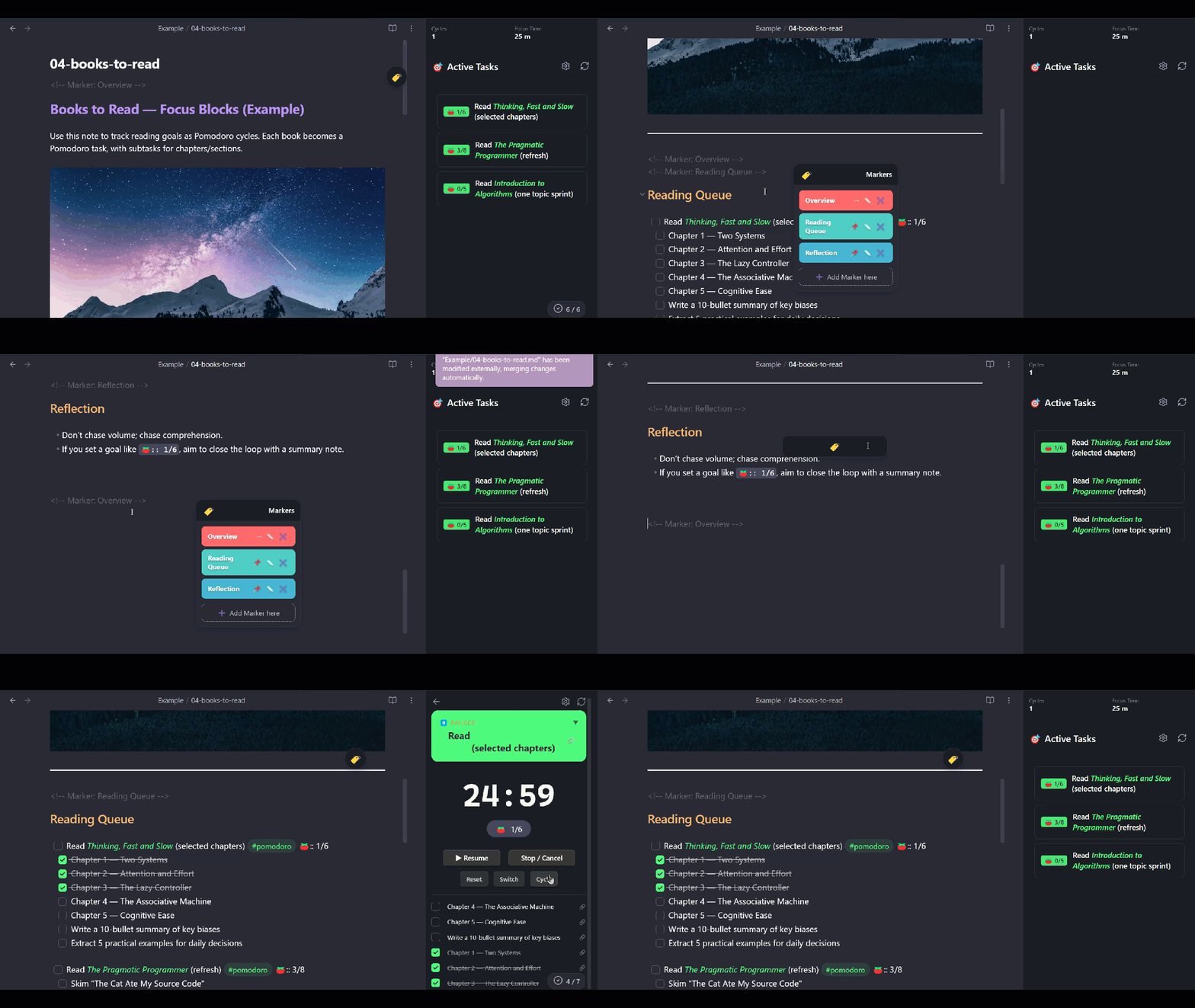
- View and toggle subtasks directly from the timer view
- Subtasks are displayed below the main task in your Markdown
- Track completed subtasks within sessions
- Configurable display limits and filters
🏷️ Document Markers
- Add navigation markers to your documents:
<!-- Marker: Section Name --> - Drag-and-drop floating widget for quick navigation
- Color-coded marker list with rename and delete options
- Markers are position-aware and update dynamically
🔊 Sound Notifications
- Customizable sounds for:
- Work session start
- Work session complete
- Break complete
- Timer paused
- 12+ built-in synthesized sounds (no external files needed)
- Adjustable volume control
📊 Statistics
- Track total completed Pomodoro cycles
- Monitor cumulative focus time
- Reset statistics when needed
⚙️ Highly Configurable
- Customizable work duration (default: 25 min)
- Customizable short break (default: 5 min)
- Customizable long break (default: 15 min)
- Option to start sessions paused
- Toggle subtask visibility and limits
- Filter completed subtasks
📥 Installation
From Obsidian Community Plugins (Recommended)
- Open Obsidian Settings
- Go to Community Plugins and disable Restricted Mode
- Click Browse and search for "Pomodoro Task"
- Click Install, then Enable
Manual Installation
- Download the latest release from the Releases page
- Extract the files (
main.js,manifest.json,styles.css) to:<your-vault>/.obsidian/plugins/pomodoro-task/ - Reload Obsidian
- Enable the plugin in Settings → Community Plugins
🚀 Quick Start
1. Create a Task with the Pomodoro Tag
- [ ] Write project documentation #pomodoro
2. Open the Pomodoro Panel
- Click the ⏰ alarm clock icon in the ribbon (left sidebar)
- Or use the command:
Pomodoro Task: Open View
3. Start a Session
- Click on any task in the list to start a Pomodoro session
- The timer will begin counting down
4. Complete Your Session
- When the timer ends, a tomato counter is automatically added:
- [ ] 🍅:: 1 Write project documentation #pomodoro
5. Set Goals (Optional)
- Click on
--next to the 🍅 icon in the timer view - Enter a goal number (e.g.,
4) - Your task will show progress:
🍅:: 2/4 - When the goal is reached, the task is automatically marked complete ✅
📝 Usage Guide
Task Format
The plugin recognizes unchecked Markdown tasks containing your configured tag:
- [ ] My task #pomodoro ← Basic task
- [ ] My task #pomodoro 🍅:: 3 ← With cycle count
- [ ] My task #pomodoro 🍅:: 2/5 ← With goal

* [ ] Also works with asterisk #pomodoro ← Alternative format
Recurring Tasks
Pomodoro Task fully supports recurring tasks when used with the Tasks plugin. When a recurring task completes all its Pomodoro cycles:
- Pomodoro Task uses the Editor API to mark the checkbox as complete
- The Tasks plugin intercepts this edit and automatically:
- Creates the next instance with correct due/scheduled dates
- Resets the checkbox to
[ ] - Preserves all metadata (tags, dates, priority, etc.)
- [ ] Daily review #pomodoro 🍅:: 0/2 🔁 every day
- [ ] Weekly report #pomodoro 🍅:: 0/3 🔁 every Monday when done
- [ ] Monthly audit #pomodoro 🍅:: 0/5 🔁 every month on the 1st
How it works: Instead of directly modifying the file text, Pomodoro Task uses Obsidian's Editor API to toggle the checkbox. This allows the Tasks plugin to detect the change and process recurrence patterns properly.
Important: Add the tomato counter reset (🍅:: 0/N) in your recurring task template so the new instance starts with zero cycles.
See Example/06-recurring-tasks.md for more examples.
Subtasks
Subtasks are automatically detected as tasks indented below the main Pomodoro task:
- [ ] Main task #pomodoro
  - [ ] Subtask 1 ← Shown in timer view
  - [ ] Subtask 2
  - [x] Completed subtask
Markers
Add navigation markers to your document:
<!-- Marker: Introduction -->

# Introduction

...

<!-- Marker: Conclusion -->

# Conclusion

...
Navigate between markers using the floating widget in the timer view.
⚙️ Settings
| Setting | Description | Default |
|---|---|---|
| Target Tag | Tag used to identify Pomodoro tasks | #pomodoro |
| Work Duration | Length of focus sessions (minutes) | 25 |
| Short Break | Length of short breaks (minutes) | 5 |
| Long Break | Length of long breaks (minutes) | 15 |
| Start Cycle Paused | Begin sessions in paused state | Off |
| Default Subtasks Expanded | Show subtasks by default | On |
| Limit Subtasks Shown | Limit visible subtasks | On |
| Max Subtasks | Maximum subtasks to display | 3 |
| Show Completed Subtasks | Display completed subtasks | Off |
| Always Show Completed Today | Show today's completions regardless of limit | Off |
| Volume | Sound notification volume (0-100) | 50 |
| Work Start Sound | Sound when starting focus | Digital |
| Work Complete Sound | Sound when work ends | None |
| Break Complete Sound | Sound when break ends | Gong |
| Pause Sound | Sound when pausing | Bell |
🎵 Available Sounds
| Sound | Description |
|---|---|
| None | No sound |
| Blip | Short start beep |
| Ding | Simple notification |
| Chime | Soft chime |
| Click | Mechanical click |
| Tick | Mechanical tick |
| Tock | Low mechanical sound |
| Bell | Metallic bell (FM synthesis) |
| Wood | Woodblock hit |
| Gong | Deep resonant gong |
| Digital | Digital watch beep-beep |
| Arcade | Retro game power-up |
| Alarm | Three-beep alarm |
⌨️ Commands
| Command | Description |
|---|---|
Pomodoro Task: Open View | Opens the Pomodoro panel |
🔧 Timer Controls
When a session is active:
| Button | Action |
|---|---|
| ⏸ Pause | Pause the current timer |
| ▶ Resume | Resume a paused timer |
| Stop | Cancel the current session |
| Reset | Restart the current session from the beginning |
| Switch | Toggle between Work and Break modes |
| Cycle | Open modal to adjust current session durations |
📊 How Cycle Logging Works
- First completion: Adds
🍅:: 1to the task line - Subsequent completions: Increments the counter
🍅:: 2,🍅:: 3, etc. - With goals: Shows progress as
🍅:: 2/4 - Goal reached: Task is automatically checked
[x]
The plugin reads the latest file content before logging to prevent overwriting any changes you made during the session.
🎨 Styling
The plugin uses CSS classes prefixed with pomodoro- for all elements. You can customize the appearance using CSS snippets in your vault.
Example customization:
/* Custom timer display color */
.pomodoro-timer-display {
  color: #e74c3c;
}

/* Custom task card background */
.pomodoro-active-task-card {
  background: linear-gradient(135deg, #667eea 0%, #764ba2 100%);
}
🤝 Compatibility
- Obsidian: v0.15.0 or higher
- Platforms: Windows, macOS, Linux, iOS, Android
- Integrations: Works alongside Tasks plugin, Dataview, and other task management plugins
🐛 Known Issues
- If you edit the task line while a session is running, the plugin attempts to match the original text but may fail if significant changes are made
- Markers require Editing mode (Live Preview or Source) for accurate line detection when adding new markers
📜 License
This project is licensed under the MIT License - see the LICENSE file for details.
🙏 Support
If you find this plugin useful, consider:
- ⭐ Starring the repository
- 🐛 Reporting bugs or suggesting features via Issues
- 💬 Sharing feedback
🔄 Changelog
v1.0.0
- Initial release
- Task-integrated Pomodoro timer
- Automatic cycle logging with
🍅:: Nformat - Goal setting and auto-completion
- Subtask management
- Document markers with floating widget
- Customizable sound notifications
- Statistics tracking
- Full settings panel
Made with ❤️ for the Obsidian community
For plugin developers
Search results and similarity scores are powered by semantic analysis of your plugin's README. If your plugin isn't appearing for searches you'd expect, try updating your README to clearly describe your plugin's purpose, features, and use cases.