SPL Syntax Highlighting
pendingby Evan Sims
Syntax highlighting for Splunk Processing Language (SPL) in code blocks.
SPL Syntax Highlighting
Syntax highlighting for Splunk Processing Language (SPL) in Obsidian code blocks.
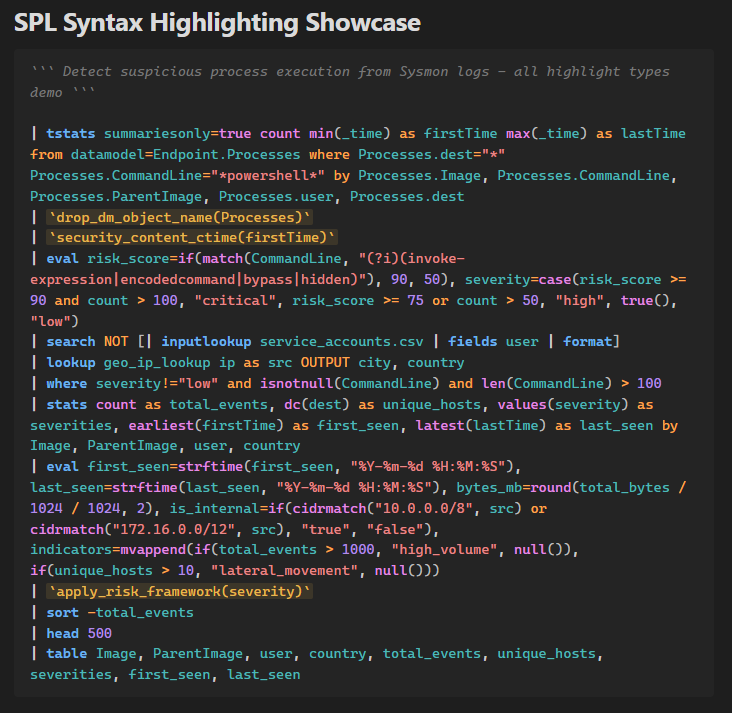
Features
- Full SPL syntax highlighting with 11 token types: commands, functions, keywords, operators, strings, numbers, fields, macros, comments, pipes, and brackets
- Context-aware highlighting — commands only highlighted after
|, functions only when called with()or inside stats commands - Light and dark theme support
- Word wrapping in code blocks
- Works in both Live Preview and Reading view
Usage
Use spl or splunk as the language identifier in fenced code blocks:
```spl
| search index=main sourcetype=syslog
| stats count by host
| sort -count
| head 10
```
SPL Comments
SPL uses triple backticks for comments. Since this conflicts with Markdown fences, use 4+ backtick fences when your SPL contains comments:
````spl
``` This is an SPL comment ```
| search index=main
````
Macros
Macros wrapped in backticks are highlighted:
```spl
| `my_macro(arg1, arg2)`
```
Highlighted Token Types
| Token | Examples | Color (light/dark) |
|---|---|---|
| Commands | search, stats, eval, where | Blue |
| Functions | count(), avg(), if(), len() | Magenta |
| Keywords | as, by, and, or, not, true | Orange |
| Operators | =, !=, >=, <, +, - | Orange |
| Strings | "value", 'value' | Red |
| Numbers | 42, 3.14, 1.5e10 | Purple |
| Fields | src_ip, user, _time | Teal |
| Macros | `macro_name` | Gold |
| Comments | ``` comment ``` | Gray italic |
| Pipes | |, , | Dark gray bold |
| Brackets | (), [] | Dark gray |
Installation
Manual
- Download the latest release
- Extract into your vault's
.obsidian/plugins/spl-syntax-highlighting/directory - Enable the plugin in Settings > Community plugins
Community Plugins
Search for "SPL Syntax Highlighting" in Settings > Community plugins > Browse.
For plugin developers
Search results and similarity scores are powered by semantic analysis of your plugin's README. If your plugin isn't appearing for searches you'd expect, try updating your README to clearly describe your plugin's purpose, features, and use cases.