Code Highlight
pendingby 0xd3af90d
Highlight text inside code blocks using Dradis-like or custom delimiters.
Code Highlight Plugin for Obsidian
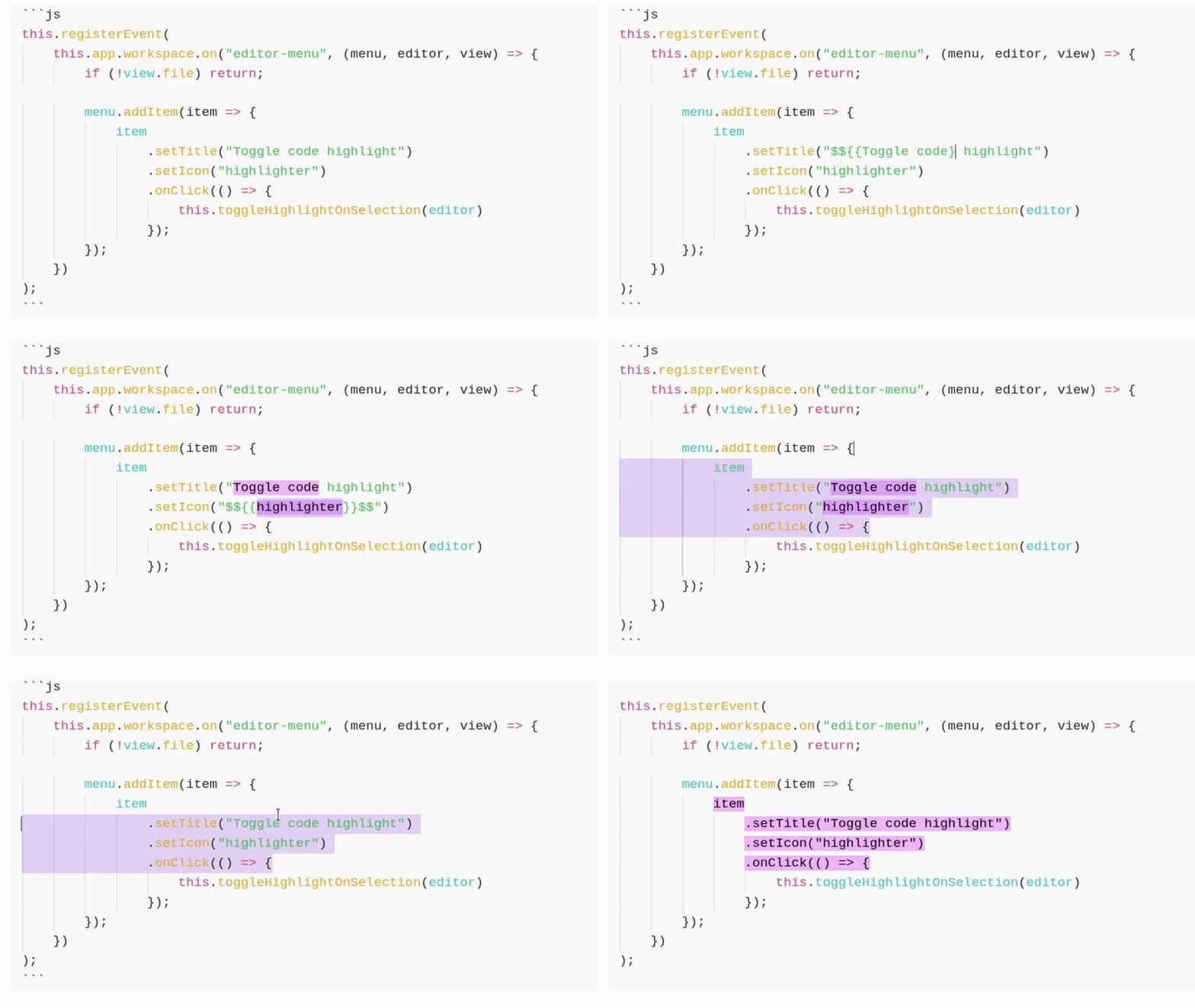
🚀 Features
- Highlight text inside code blocks with custom delimiters (e.g.,
$${{ ... }}$$,<mytag>...</mytag>). - Configurable: change delimiters and colors.
- Highlights can be added by typing your delimiters, or quickly toggled via the context menu or a keyboard shortcut.
🔨 Installation
Search for the Code Highlight plugin in the Community Plugins tab of Obsidian (If it gets accepted by the Obsidian team).
If you want to install it manually, download the main.js, style.css, manifest.json files from the latest release and copy them in <YOUR-VAULT>/.obsidian/plugins/code-highlight-d3af90d/.
Then, activate the plugin from the Community Plugins setting tab.
🔧 Settings
| Nome | Description | Default |
|---|---|---|
| Open Delimiter | Marks the start of an highlight | $${{ |
| Close Delimiter | Marks the end of an highlight | }}$$ |
| Highlight Foreground | Text color inside highlights | black |
| Highlight Background | Background color of highlights | yellow |
| Highlight Opacity | Opacity of highlights | 100% |
💬 Quirks & Design Decisions
-
Explicit delimiters in code block over code fence metadata
Highlights are inserted directly into the code itself rather than being defined via metadata on the code fence line, as many plugins do. This makes line-by-line processing much simpler for my use case, which involves generating Word reports from Obsidian files. Yep, this means the actual content of the code block is modified by inserting the delimiters 🤷♂️
-
Multi-line selections highlight each line individually
When highlighting multiple lines, each line receives its own highlight delimiters instead of wrapping the whole selection in a single pair. This is again a deliberate choice to support stateless, line-by-line processing, which avoids the need to track highlight state across lines and simplifies downstream tooling.
-
Highilight effect do not work in Preview Mode if a language is specified in the code fence (e.g., ```js)
The visual highlighting effect works fully in Editing mode (which is the primary mode I use). In Reading mode, highlights are applied only when the code fence does not specify a language.
I briefly experimented with supporting syntax-highlighted code blocks in Reading mode, but didn’t find a clean or lightweight solution. Since this isn’t part of my workflow, support for that case is intentionally not implemented.
⁉️ Issues & Suggestions
If you run into issues, open an issue on GitHub.
For plugin developers
Search results and similarity scores are powered by semantic analysis of your plugin's README. If your plugin isn't appearing for searches you'd expect, try updating your README to clearly describe your plugin's purpose, features, and use cases.