AI Renamer
pendingby Harry Wang
Auto-rename notes with AI-generated names based on content. Supports OpenAI, Anthropic, Google Gemini, and Ollama.
Obsidian AI Renamer
An Obsidian plugin that automatically renames notes using AI. It reads the note content and generates a short, descriptive filename (e.g., q4-budget-review-meeting.md).
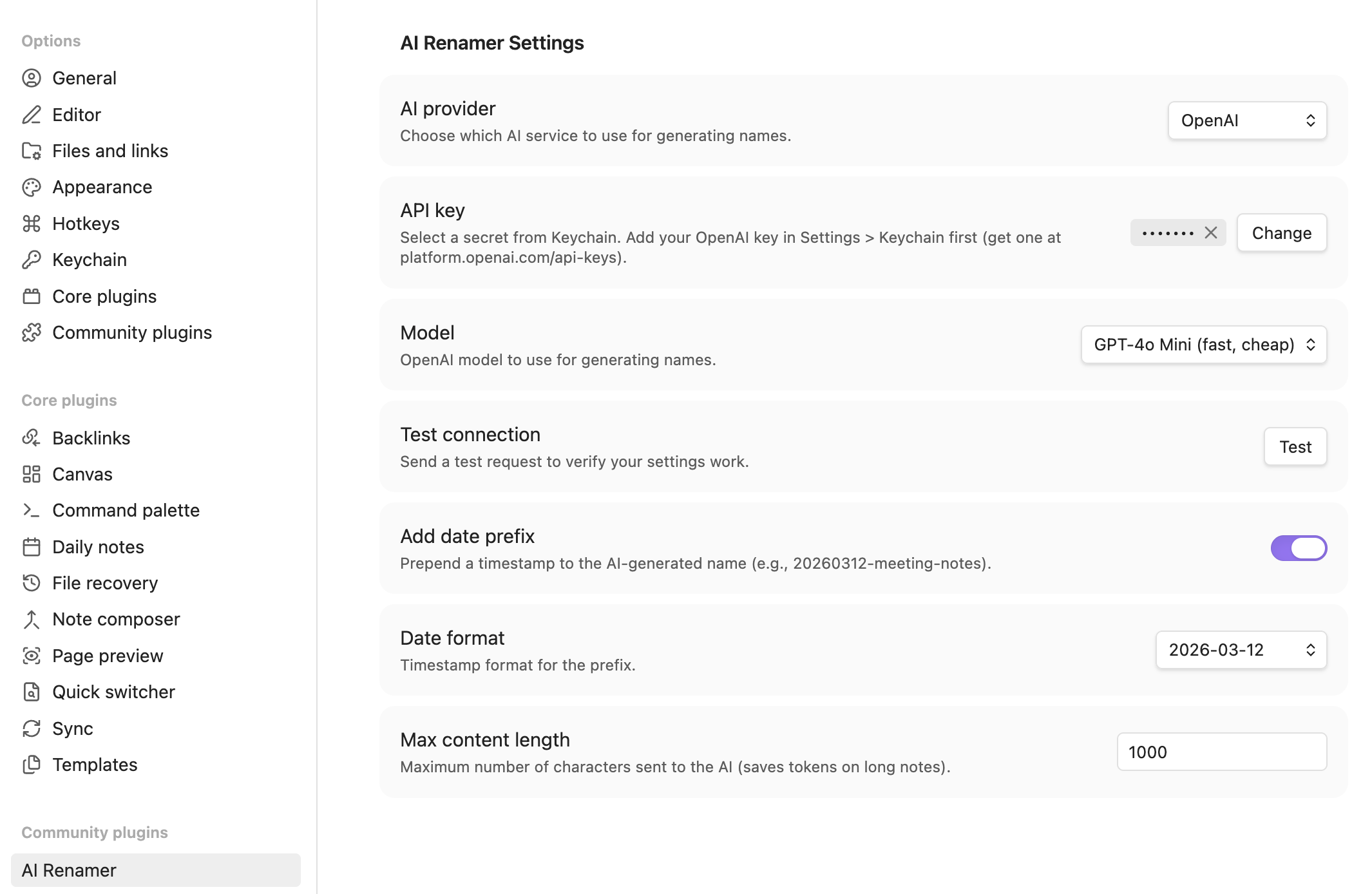
Features
- One-click rename — wand icon in the sidebar to rename the active note instantly
- Multiple AI providers — OpenAI, Anthropic, Google Gemini, or Ollama (local)
- Optional date prefix — prepend a timestamp (off by default, configurable format)
Supported Providers
| Provider | Models | API Key Required |
|---|---|---|
| OpenAI | GPT-4o Mini, GPT-4o, GPT-4.1 Nano, GPT-4.1 Mini | Yes |
| Anthropic | Claude Haiku 4.5, Sonnet 4.6, Opus 4.6 | Yes |
| Google Gemini | Gemini 2.0 Flash, Gemini 2.5 Pro | Yes |
| Ollama (local) | Any installed model | No |
For Ollama, the plugin auto-detects installed models. Recommended lightweight model for this task:
ollama pull llama3.2:1b # 1.3 GB, fast and capable
Installation
Option 1: BRAT (Recommended)
- Install the BRAT plugin from Settings > Community plugins > Browse
- Open Settings > BRAT and click Add Beta Plugin
- Enter
harrywang/obsidian-ai-renamerand click Add Plugin - Enable AI Renamer in Settings > Community plugins
Option 2: Manual Install
- Download
main.jsandmanifest.jsonfrom the latest release - Create
.obsidian/plugins/ai-renamer/in your vault - Copy
main.jsandmanifest.jsoninto that folder - Enable AI Renamer in Settings > Community plugins
Setup
- Go to Settings > Keychain and add your API key as a named secret (e.g., "openai-key")
- Go to Settings > AI Renamer
- Choose your AI provider
- Select your secret from the Keychain dropdown (not needed for Ollama)
- Pick a model
- Optionally enable date prefix
Usage
- Click the wand icon in the left sidebar to rename the current note
- Or use the command palette (Cmd/Ctrl+P) and search for "AI Renamer"
Settings
| Setting | Default | Description |
|---|---|---|
| AI provider | OpenAI | Which AI service to use |
| API key | — | Select a secret from Obsidian's Keychain |
| Model | GPT-4o Mini | Model for generating names |
| Ollama URL | localhost:11434 | Local Ollama instance URL (only shown for Ollama) |
| Add date prefix | Off | Prepend a timestamp to the generated name |
| Date format | YYYYMMDD | Timestamp style (only shown when date prefix is on) |
| Max content length | 1000 | Characters sent to AI (saves tokens on long notes) |
Example
A note containing meeting minutes about Q4 budget review would be renamed to:
q4-budget-review-meeting.md
With date prefix enabled:
20260312-q4-budget-review-meeting.md
Security
API keys are stored securely using Obsidian's built-in Keychain (available since v1.11.0), which uses your OS secure storage (macOS Keychain, Windows Credential Manager, Linux libsecret). Keys are never saved in plain text plugin files.
Requires Obsidian v1.11.0 or later for Keychain support.
Development
npm install
npm run dev    # watch mode
npm run build  # production build
License
MIT
For plugin developers
Search results and similarity scores are powered by semantic analysis of your plugin's README. If your plugin isn't appearing for searches you'd expect, try updating your README to clearly describe your plugin's purpose, features, and use cases.