AI Title Generator
pendingby Jeffrey Gu
Quickly and easily title your notes using AI (OpenAI, DeepSeek, Claude, etc.)
Title Generator
Quickly and easily title your Obsidian notes using AI models (OpenAI, DeepSeek, Claude, etc.)
Generate titles for one or multiple notes at a time based on their content.
Generating a title will set the note's title directly. Run multiple times for variations.
Features
- Multiple AI Model Support: Use GPT-3.5, GPT-4, DeepSeek, Claude, or any OpenAI-compatible API
- Custom API Endpoints: Support for third-party API providers like ChatAnywhere, OpenRouter, etc.
- Flexible Model Selection: Manually enter any model name supported by your API provider
- Batch Processing: Generate titles for multiple files at once
Three ways to use
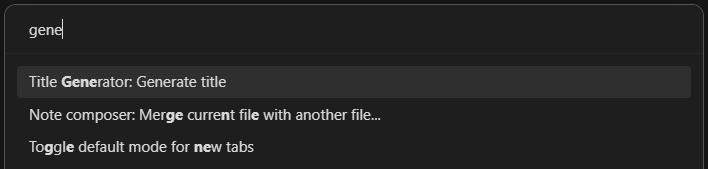
Command Palette
If a note is active in either editing or reading mode, there will be an entry in the command palette: Title Generator: Generate title
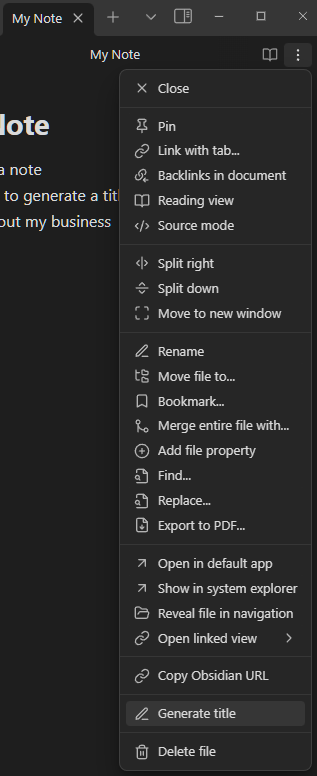
Editor Menu
If a note is active in either editing or reading mode, there will be an entry in the editor dropdown menu: Generate title
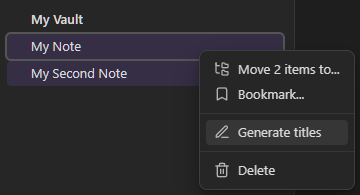
File Menu
If you right click on a file name in the file menu there will be an entry in the contextual menu: Generate title.
With multiple files selected, right click on a file name and there will be an entry in the contextual menu: Generate titles
Settings
API Configuration
- OpenAI API Key: Get your API key from OpenAI or your API provider
- API Base URL: Default is
https://api.openai.com/v1. Change to use third-party providers:- ChatAnywhere:
https://api.chatanywhere.tech/v1 - OpenRouter:
https://openrouter.ai/api/v1 - Or any other OpenAI-compatible API endpoint
- ChatAnywhere:
- Model: Enter the model name (e.g.,
gpt-3.5-turbo,gpt-4o,deepseek-v3,claude-3-5-sonnet-20241022)
Additional Options
- Lower-case titles: Automatically convert generated titles to lowercase
Version 2.0 Changes
This is a community-maintained fork with the following improvements:
- Removed OpenAI SDK dependency for better compatibility
- Added support for custom API endpoints
- Added support for any AI model (not just GPT-3.5)
- Switched to Chat Completions API for better model support
- Improved error handling
Credits
Original plugin by Jascha Ephraim
Maintained by Jeffrey Gu
Support
If you find this plugin helpful, consider supporting its development:
- PayPal: paypal.me/jeffreygu0109
License
MIT
标题生成器
使用 AI 模型(OpenAI、DeepSeek、Claude 等)快速便捷地为您的 Obsidian 笔记生成标题。
根据笔记内容为单个或多个笔记生成标题。
生成标题将直接设置笔记的标题。可多次运行以获得不同的标题变体。
功能特性
- 多种 AI 模型支持:使用 GPT-3.5、GPT-4、DeepSeek、Claude 或任何兼容 OpenAI 的 API
- 自定义 API 端点:支持第三方 API 提供商,如 ChatAnywhere、OpenRouter 等
- 灵活的模型选择:手动输入您的 API 提供商支持的任何模型名称
- 批量处理:一次为多个文件生成标题
三种使用方式
命令面板
当笔记在编辑或阅读模式下处于活动状态时,命令面板中会有一个条目:Title Generator: Generate title
编辑器菜单
当笔记在编辑或阅读模式下处于活动状态时,编辑器下拉菜单中会有一个条目:Generate title
文件菜单
在文件菜单中右键单击文件名,上下文菜单中会有一个条目:Generate title
选择多个文件后,右键单击文件名,上下文菜单中会有一个条目:Generate titles
设置
API 配置
- OpenAI API Key:从 OpenAI 或您的 API 提供商获取 API 密钥
- API Base URL:默认为
https://api.openai.com/v1。更改以使用第三方提供商:- ChatAnywhere:
https://api.chatanywhere.tech/v1 - OpenRouter:
https://openrouter.ai/api/v1 - 或任何其他兼容 OpenAI 的 API 端点
- ChatAnywhere:
- Model:输入模型名称(例如:
gpt-3.5-turbo、gpt-4o、deepseek-v3、claude-3-5-sonnet-20241022)
其他选项
- 小写标题:自动将生成的标题转换为小写
2.0 版本更新
这是社区维护的分支版本,包含以下改进:
- 移除 OpenAI SDK 依赖以获得更好的兼容性
- 添加对自定义 API 端点的支持
- 添加对任何 AI 模型的支持(不仅限于 GPT-3.5)
- 切换到 Chat Completions API 以获得更好的模型支持
- 改进错误处理
致谢
原始插件由 Jascha Ephraim 开发
由 Jeffrey Gu 维护
支持
如果您觉得这个插件有帮助,请考虑支持其开发:
-
PayPal:paypal.me/jeffreygu0109
-
支付宝:

-
微信支付:

许可证
MIT
For plugin developers
Search results and similarity scores are powered by semantic analysis of your plugin's README. If your plugin isn't appearing for searches you'd expect, try updating your README to clearly describe your plugin's purpose, features, and use cases.