Any Task
pendingby HMage
Renders task markers using any character as a visual checkbox.
*️⃣ Any Task: Bring your checklists to life
Unlock the full potential of your Obsidian tasks. Any Task renders every task marker as a beautiful, theme-aware checkbox, giving you the freedom to use any character to categorize your workflow.
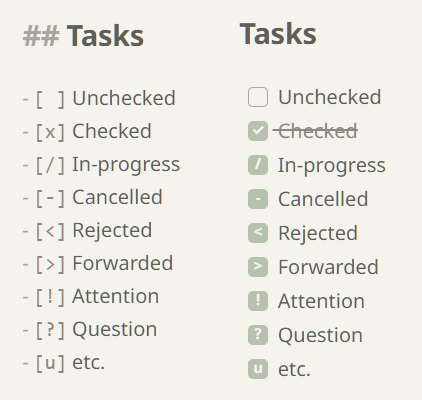
Whether you're tracking progress with /, scheduling with >, or marking urgency with !, Any Task ensures these markers aren't just plain text—they are fully rendered, interactive checkboxes that look like a native part of your chosen theme.
Author: HMage (highmagician@gmail.com)
✨ Why you'll love Any Task
- ✅ Render any task marker — Transform any character inside your checkboxes (
[/],[>],[!],[-], etc.) into a fully rendered, visual icon. This extends Obsidian's default behavior to support any custom workflow you can imagine. - 🎨 Broad theme compatibility — Built-in support for the custom styles of popular community themes. It applies surgical CSS fixes to ensure every marker aligns perfectly with your chosen aesthetic, regardless of which theme you prefer.
- 🚀 Zero-config, instant setup — No complex menus or settings required. Just enable the plugin and it starts working immediately, adapting to your vault environment and theme changes.
- 💎 Lightweight and blazing fast — Optimized for performance to ensure your notes stay snappy and responsive, even with large task lists.
Installation
- Open Settings → Community plugins.
- Select Browse and search for "Any Task".
- Select Install, then Enable.
Development workspace
To contribute or customize the plugin:
# Install dependencies
npm install

# Start development (watch mode)
npm run dev

# Create a production-ready bundle
npm run build
For plugin developers
Search results and similarity scores are powered by semantic analysis of your plugin's README. If your plugin isn't appearing for searches you'd expect, try updating your README to clearly describe your plugin's purpose, features, and use cases.