Checklist Table
pendingby Vredix
Create beautiful checklist tables with customizable columns.


Checklist Table
A powerful Obsidian plugin that transforms simple markdown into beautiful, interactive checklist tables with customizable columns, progress tracking, and multiple task states.
Features
Flexible Task Management
- Multiple task states: Open, Done, Cancelled, Important, Forwarded, Scheduled
- Custom columns: Define your own column structure for different workflows
- Quick task addition: Add new tasks directly from the table interface
- Visual progress tracking: Real-time progress bar with color-coded completion status
Beautiful Design
- Clean, modern table design that integrates seamlessly with your Obsidian theme
- Color-coded checkboxes for different task states
- Smooth animations and hover effects
- Responsive layout that works on desktop and mobile
Multilingual Support
- English and German translations included
- Auto-detection of system language
- Easy to extend with additional languages
Customizable
- Configure default column headers, or set them as needed per table
- Choose when to show controls (on hover or always visible)
- Flexible table structure with support for sections and separators (no limitations)
Installation
From Obsidian Community Plugins (Recommended)
... coming soon ...
Manual Installation
- Download the latest release from the releases page
- Extract the folder to your vault's
.obsidian/plugins/folder - Reload Obsidian
- Enable the plugin in Settings → Community Plugins
Usage
Basic Syntax
Create a checklist table using a code block with the checklist language identifier:
(The first line, which starts with a | gets rendered as the Header)
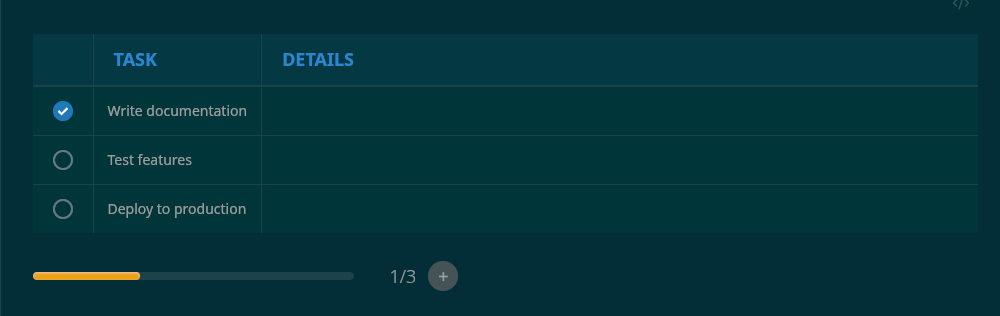
```checklist

| Task | Details |

[ ] Write documentation
[ ] Test features
[ ] Deploy to production

```
Task States
Change task states by right-clicking on a checkbox:
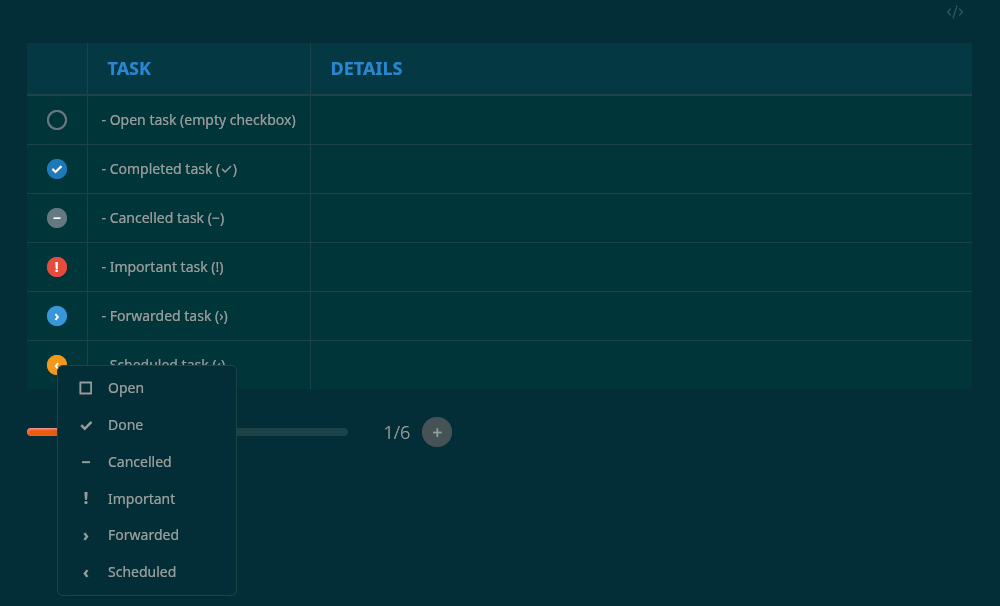
[ ]- Open task (empty checkbox)[x]- Completed task (✓)[-]- Cancelled task (−)[!]- Important task (!)[>]- Forwarded task (›)[<]- Scheduled task (‹)
Multiple Columns
Add as many columns and headings as you need:
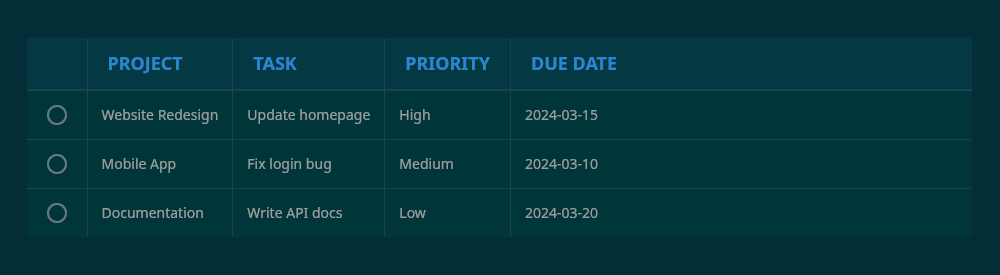
```checklist

| Project | Task | Priority | Due Date |

[ ] Website Redesign | Update homepage | High | 2024-03-15
[ ] Mobile App | Fix login bug | Medium | 2024-03-10
[ ] Documentation | Write API docs | Low | 2024-03-20

```
Adding Tasks
Hover over the table to reveal the + button, which allows you to add new tasks without editing the markdown directly. (Can be changed to permanently visible in the plugin settings)
Sections with Separators
Use --- to create visual separators between task groups:
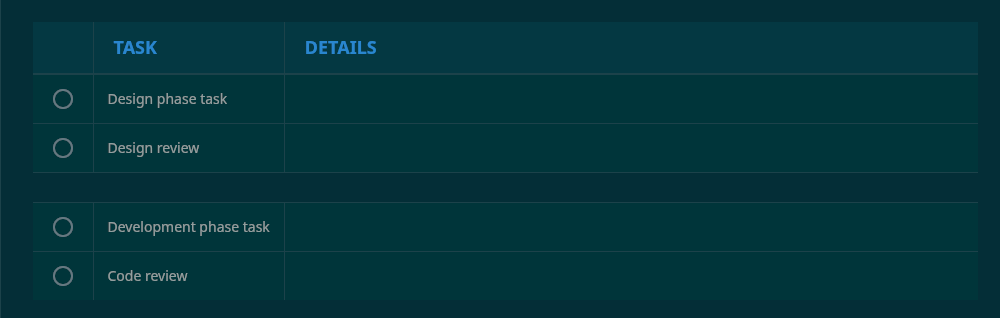
```checklist

| Task | Details |

[ ] Design phase task
[ ] Design review
---
[ ] Development phase task
[ ] Code review
```
Links and Formatting
Use standard Obsidian markdown syntax within cells:
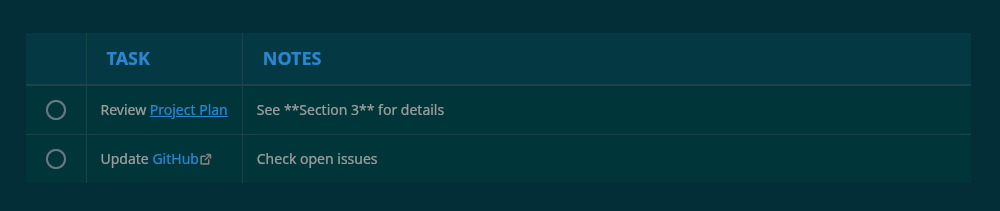
```checklist

| Task | Notes |

[ ] Review [[Project Plan]] | See **Section 3** for details
[ ] Update [GitHub](https://github.com) | Check open issues

```
⚙️ Configuration
Open Settings → Checklist Table to customize:
Language
Choose between English, German, or automatic system detection.
Default Columns
Set your preferred column headers (comma-separated). These will be used when inserting a new checklist block via command.
Always Show Controls
Toggle whether the progress bar and add button should always be visible or only appear on hover.
Command Palette
Access these commands via Ctrl/Cmd + P:
- Insert Checklist Block: Quickly insert a new checklist template at your cursor
Example Use Cases
Project Management
```checklist

| Phase | Task | Status | Owner |

[ ] Planning | Define requirements | In Progress | Alice
[x] Planning | Create timeline | Completed | Bob
[ ] Development | Setup environment | Not Started | Charlie

```
Study Planning
```checklist

| Subject | Topic | Progress |

[!] Math | Calculus review | Urgent
[ ] Physics | Quantum mechanics | Chapter 3
[x] Chemistry | Organic reactions | Finished

```
Shopping List
```checklist

| Item | Store | Notes |

[x] Milk | Supermarket | 2 liters
[ ] Bread | Bakery | Whole grain
[-] Eggs | Supermarket | Cancelled - already have

```
🛠️ Development
Building from Source
# Clone the repository
git clone https://github.com/openvuture-vredix/obsidian-checklist-table.git

# Install dependencies
npm install

# Build the plugin
npm run build

# Development mode with auto-rebuild
npm run dev
Project Structure
obsidian-checklist-table/
├── main.js          # Bundled plugin code
├── manifest.json    # Plugin metadata
├── styles.css       # Plugin styles
🤝 Contributing
Contributions are welcome! Please feel free to submit a Pull Request. For major changes:
- Fork the repository
- Create a feature branch (
git checkout -b feature/amazing-feature) - Commit your changes (
git commit -m 'Add amazing feature') - Push to the branch (
git push origin feature/amazing-feature) - Open a Pull Request
📝 License
This project is licensed under the MIT License - see the LICENSE file for details.
🐛 Bug Reports & Feature Requests
Found a bug or have an idea for a new feature? Please open an issue on the GitHub issues page.
💖 Support
If you find this plugin helpful, consider:
- ⭐ Starring the repository
- 🐛 Reporting bugs to help improve the plugin
- 💡 Suggesting new features
- 📣 Sharing it with other Obsidian users
🔗 Links
📜 Changelog
Version 1.0.0
- 🎉 Initial release
- Multiple task states (Open, Done, Cancelled, Important, Forwarded, Scheduled)
- Progress tracking with color-coded progress bar
- In-table task addition
- Multilingual support (English, German)
- Customizable columns and settings
- Mobile and desktop support
Made by Vredix
For plugin developers
Search results and similarity scores are powered by semantic analysis of your plugin's README. If your plugin isn't appearing for searches you'd expect, try updating your README to clearly describe your plugin's purpose, features, and use cases.