Library
pendingby Kir
Organize movies, series, and other media as visual cards with automatic metadata from OMDb.
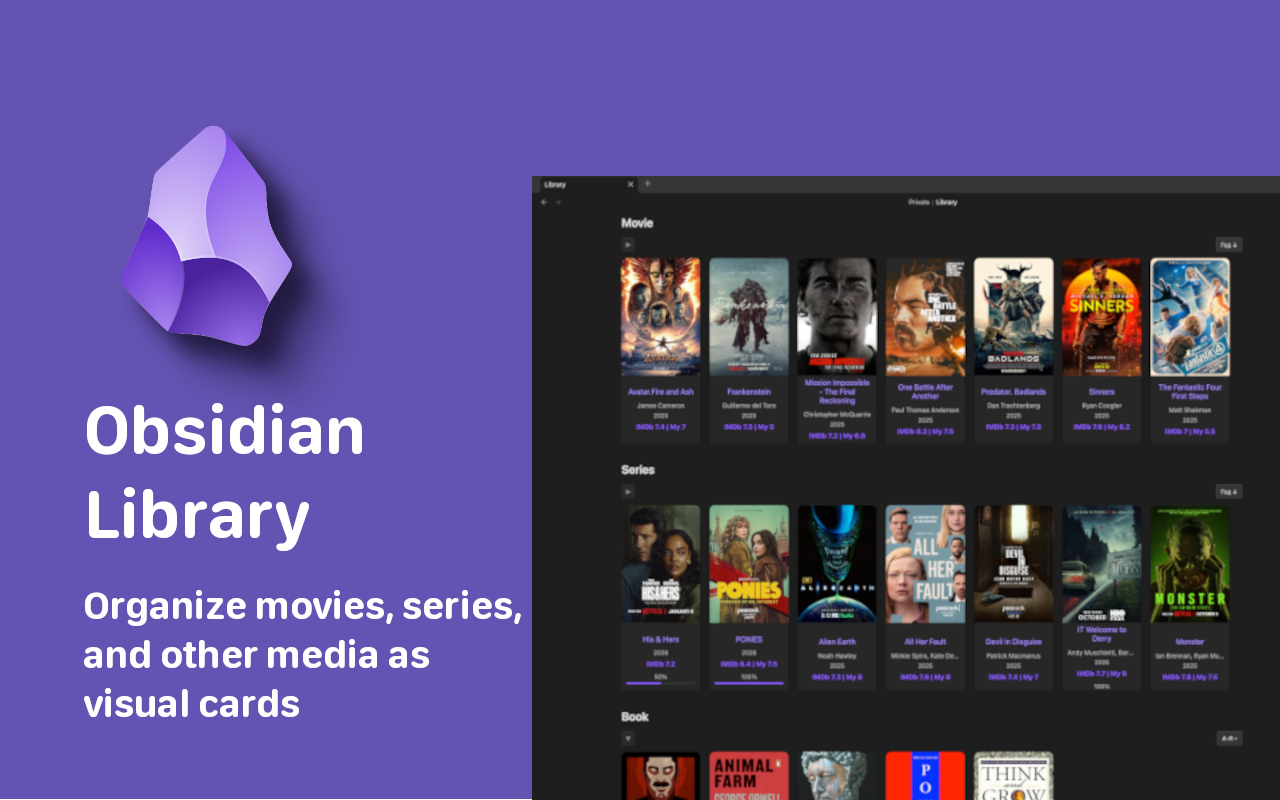
Obsidian Library




Organize your movies, series, and books into a stunning visual gallery directly within Obsidian.
Automatically fetch metadata, track your viewing progress, and manage your media collection with ease.
✨ Key Features
- 🖼️ Visual Card Grid — Transform simple markdown notes into a beautiful gallery of cover-art cards.
- 🤖 OMDb Integration — Automatically pull ratings, posters, genres, and directors using the OMDb API.
- 📺 Smart Series Tracking — Keep track of seasons and episodes for ongoing shows with auto-updates.
- 📊 Progress Indicators — Visual progress bars on cards and note headers to show exactly how much you've watched or read.
- 📑 Rich Note Headers — Every media note gets a beautiful, auto-generated header containing all key metadata.
- 🛠️ Custom Categories — Fully flexible! Create categories for Movies, TV Shows, Books, Games, or Anime.
- 🔀 Sorting — Sort your cards by name, year, rating, or date added — ascending or descending.
- 📁 Collapsible Sections — Collapse/expand each category in the library view.
- 🖥️ Wide Mode — Library note automatically switches to a full-width layout for a better overview.
- 🌍 Multilingual — Native support for English, Russian, German, Spanish, and French.
🚀 Quick Start
1. Installation
Find Library in the Obsidian Community Plugins browser, or install it manually via the GitHub Releases.
2. Basic Setup
- Go to Settings → Library.
- Set your Library file path (e.g.,
Library.md). - Add your Categories (e.g., Name:
🎬 Movies, Type:Movie). - (Optional) Enter your OMDb API Key for automated metadata fetching.
3. Create a Media Note
Create a new note and add the IMDb URL to the frontmatter — the plugin will automatically fetch all metadata:
---
Type: Movie
URL: https://www.imdb.com/title/tt1375666/
---
⚠️ Important: To trigger automatic metadata fetching, add the
URLfield with a link to the movie or series page on IMDb. The plugin extracts the IMDb ID from the URL and uses it to pull all data (title, year, genre, poster, rating, creator, etc.) via the OMDb API.You can also fill in
TypeandNamewithout a URL — the plugin will search OMDb by title. However, providing the IMDb URL guarantees the most accurate match.
📝 Frontmatter Schema
The plugin reads and writes to standard YAML frontmatter. You can edit these fields manually or let the plugin manage them automatically.
Movie
---
Type: Movie
Name: Inception
Year: 2010
Genre:
    - Action
    - Sci-Fi
Creator:
    - Christopher Nolan
Rating IMDB: 8.8
My Rating: 9
Cover: https://m.media-amazon.com/images/...
URL: https://www.imdb.com/title/tt1375666/
Progress: 1/1
Complete: true
Date: 01.03.2026
---
Series
---
Type: Series
Name: Stranger Things
Year: 2016
End Year: 2025
Season: 5
Genre:
    - Drama
    - Fantasy
    - Horror
Creator:
    - The Duffer Brothers
Rating IMDB: 8.7
My Rating: 9
Cover: https://m.media-amazon.com/images/...
URL: https://www.imdb.com/title/tt4574334/
Progress: 25/42
Complete: false
Date: 01.03.2026
---
📺 Series auto-update: When new episodes air, the plugin automatically updates the total episode count in
Progress(e.g.,25/42→25/50) and theSeasoncount, while keeping your watched count intact.
🛠 Commands
| Command | Description |
|---|---|
Fetch IMDb rating for current note | Manually trigger a full metadata update for the active note. Also runs automatically when you open a note. |
🤝 Contributing & Support
- 🐛 Found a bug? Open an Issue.
- 💡 Have a feature idea? Start a Discussion.
- ⭐ Love the plugin? Consider starring the repository to show your support!
For plugin developers
Search results and similarity scores are powered by semantic analysis of your plugin's README. If your plugin isn't appearing for searches you'd expect, try updating your README to clearly describe your plugin's purpose, features, and use cases.