At Inserter
pendingby Nick Puchko
Type @ to open a context menu for quick insertions — dates, and more.
At Inserter — Obsidian Plugin
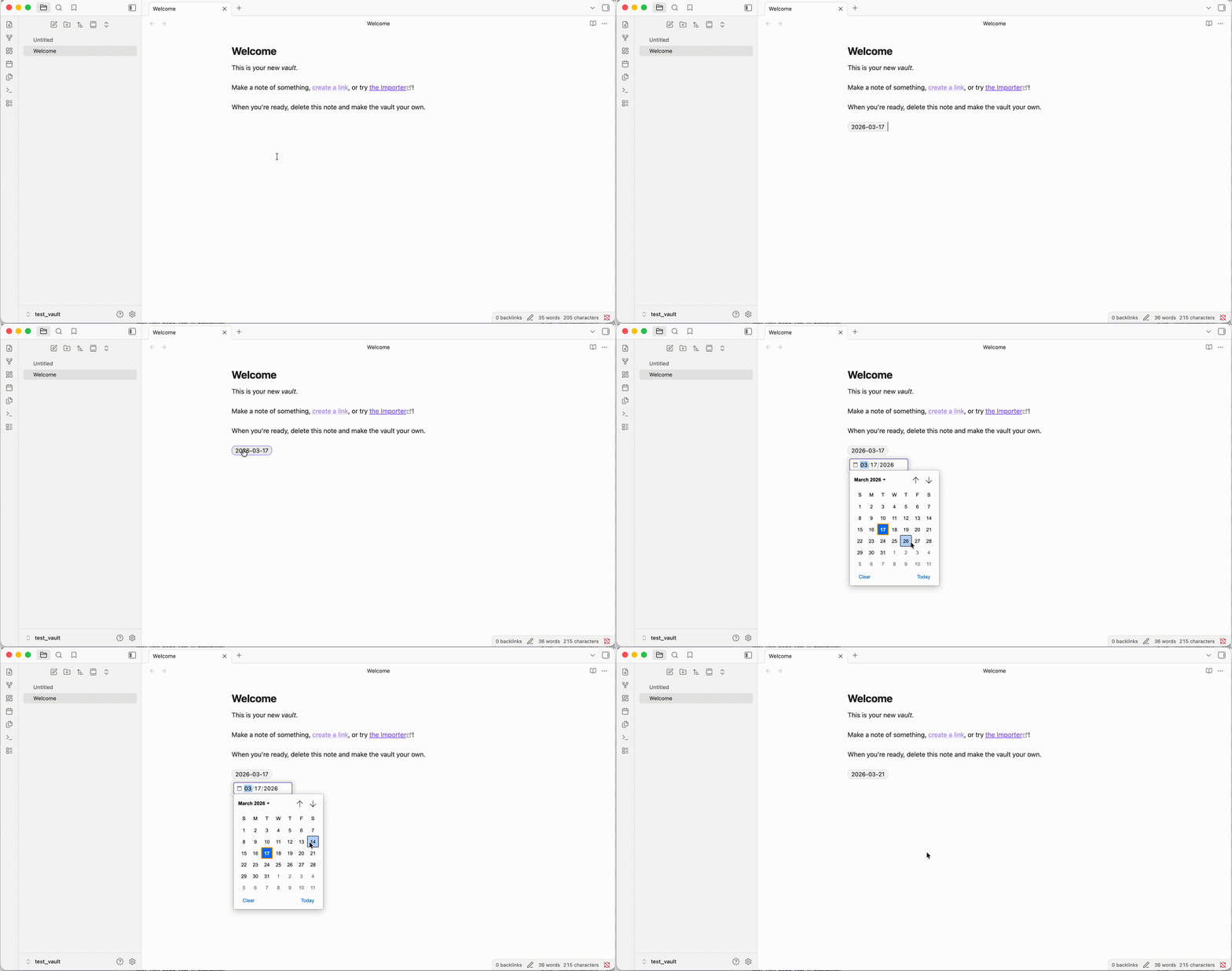
Type @ in the editor to open a context menu for quick date insertion. Dates are displayed as styled pills with a configurable format, and clicking a pill opens a date picker to change the value.
Demo
Features
- @ trigger — type
@to open a suggestion popup with date options (Today, Tomorrow) - Formatted date pills — dates (
YYYY-MM-DD) in your notes are rendered as visual pills with a customizable display format (e.g.,Mar 17, 2026,Monday 17/03/2026) - Click to edit — click any date pill to open a date picker and update the date in-place
- Source mode support — pills are only shown in Live Preview; Source mode shows raw
YYYY-MM-DD - Configurable trigger — change
@to any symbol you prefer - Toggle highlighting — enable/disable date pills via settings
Settings
| Setting | Description | Default |
|---|---|---|
| Trigger symbol | Character that opens the insertion menu | @ |
| Display date format | Format for date pills and popup preview | YYYY-MM-DD |
| Highlight dates | Render dates as styled pills in the editor | On |
Format tokens
YYYY year, MM month (01-12), DD day (01-31), MMM short month (Jan), MMMM full month (January), ddd short day (Mon), dddd full day (Monday)
Example: ddd, MMM DD YYYY renders as Tue, Mar 17 2026
Installation
From release (recommended)
- Download
main.js,manifest.json, andstyles.cssfrom the latest release - In your vault folder, create directory
.obsidian/plugins/at-symbol-inserter/ - Move the downloaded files into that directory
- Open Obsidian → Settings → Community plugins → enable At Inserter
Build from source
-
Clone the repo and build:
git clone https://github.com/NikolasSumrak/obisdian-at-plugin.git cd obisdian-at-plugin npm install && npm run build -
Copy the built files to your vault:
mkdir -p "/path/to/your-vault/.obsidian/plugins/at-symbol-inserter" cp build/main.js build/manifest.json build/styles.css \ "/path/to/your-vault/.obsidian/plugins/at-symbol-inserter/" -
Open Obsidian → Settings → Community plugins → enable At Inserter
For development (symlink)
ln -s /path/to/obisdian-at-plugin/build \
   "/path/to/your-vault/.obsidian/plugins/at-symbol-inserter"
Then run npm run dev for watch mode — changes rebuild automatically.
How it works
- The
@trigger uses Obsidian'sEditorSuggestAPI - Date pills use CodeMirror 6
ViewPluginwithMatchDecoratorand replace widget decorations - The underlying markdown always stores dates as
YYYY-MM-DD— the pill is purely visual - Clicking a pill uses the browser's native date picker to select a new date
For plugin developers
Search results and similarity scores are powered by semantic analysis of your plugin's README. If your plugin isn't appearing for searches you'd expect, try updating your README to clearly describe your plugin's purpose, features, and use cases.