Rainbow Tree
pendingby satoshikokubo
Colorize the file explorer with rainbow background colors and layered indent bars that show folder depth at a glance.
🌈 Rainbow Tree
Colorize your Obsidian file explorer with rainbow backgrounds and layered indent bars.
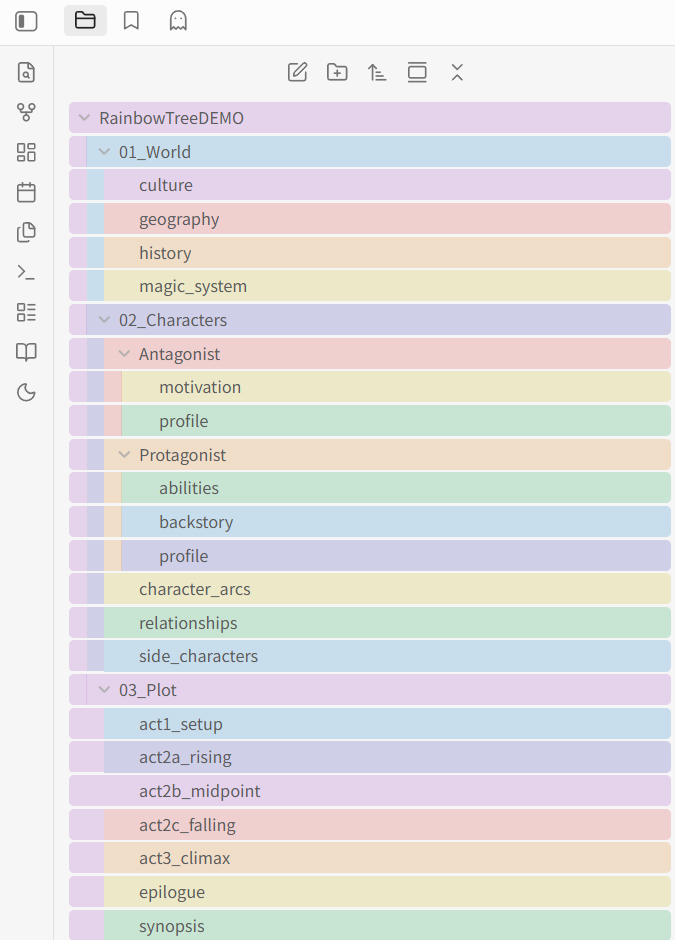
Rainbow Tree automatically assigns colors from a customizable palette to every folder and file in your file explorer. Nested items display stacked color bars on the left edge, making folder depth instantly visible.
Features
- Rainbow backgrounds — Each item gets a color from a 7-color rainbow palette (Red → Orange → Yellow → Green → Blue → Indigo → Violet)
- Layered indent bars — Child items show stacked bars on the left, each matching its ancestor's color
- Dark & Light theme support — Separate color definitions for each theme with automatic switching
- Two color modes — Stable (path-based, consistent across sessions) or Dynamic (optimizes for minimal adjacent color duplication)
- Fully customizable palette — Add, remove, or modify colors with independent dark/light pickers
- Per-folder color override — Right-click any folder to assign a custom color
- Adjustable bar style — Width (2–16 px), opacity (0.1–1.0), and gap (0–4 px)
- Smooth animations — Optional fade-in when expanding folders
- Japanese & English — Full i18n support
Installation
From Community Plugins (Recommended)
- Open Settings → Community Plugins → Browse
- Search for "Rainbow Tree"
- Click Install, then Enable
Manual Installation
- Download the latest release (
main.js,manifest.json,styles.css) from Releases - Create a folder:
<your-vault>/.obsidian/plugins/rainbow-tree/ - Copy the three files into that folder
- Enable the plugin in Settings → Community Plugins
Settings
| Setting | Default | Description |
|---|---|---|
| Enable Rainbow Tree | On | Toggle the entire plugin |
| Color mode | Stable | Stable: colors are path-based and consistent. Dynamic: minimizes adjacent duplicate colors |
| Bar Width | 16 px | Width of each color bar |
| Bar Opacity | 0.25 | Opacity of background colors and bars |
| Bar Gap | 3 px | Gap between stacked bars |
| Expand animation | On | Fade-in effect when expanding folders |
| Compact row spacing | Off | Reduce vertical gaps (experimental, may conflict with some themes) |
Color Modes
Stable Mode (Default)
Colors are determined by each item's path using a hash function. This means:
- Colors stay the same even when you scroll or collapse/expand folders
- Reopening the vault shows identical colors
- Best for users who want a consistent visual layout
Dynamic Mode
Colors are assigned by visual order, actively avoiding adjacent duplicate colors:
- The last visible child and the next sibling folder will have different colors
- Parent colors are excluded from child palettes
- Best for users who prioritize visual distinction between adjacent rows
Customization Tips
- Increase bar width (12–16 px) for a bold, colorful look
- Decrease opacity (0.1–0.15) for subtle tinting that doesn't distract
- Set bar gap to 0 for a seamless, flush appearance
- Right-click a folder to assign an override color — useful for marking important project folders
Compatibility
- Obsidian v1.5.0+
- Desktop (Windows, macOS, Linux) and Mobile (iOS, Android)
- Works with both dark and light themes
- Compatible with custom CSS themes (colors adapt to your background)
Development
git clone https://github.com/satoshikokubo/rainbow-tree.git
cd rainbow-tree
npm install
npm run dev    # watch mode
npm run build  # production build
Support
If you find Rainbow Tree useful, consider supporting development:

License
🌈 Rainbow Tree by satoshikokubo
For plugin developers
Search results and similarity scores are powered by semantic analysis of your plugin's README. If your plugin isn't appearing for searches you'd expect, try updating your README to clearly describe your plugin's purpose, features, and use cases.