Trouble Tags
pendingby Simon Späti
Scans the active file for TODO, FIXME, BUG, NOTE, and WARN tags and lists them in a sidebar panel.
Trouble Tags in Obsidian
An Obsidian plugin that scans the active file for inline tags (#TODO, #FIXME, #BUG, #NOTE, #WARN) and lists them in a sidebar panel. Click any entry to jump to that line.
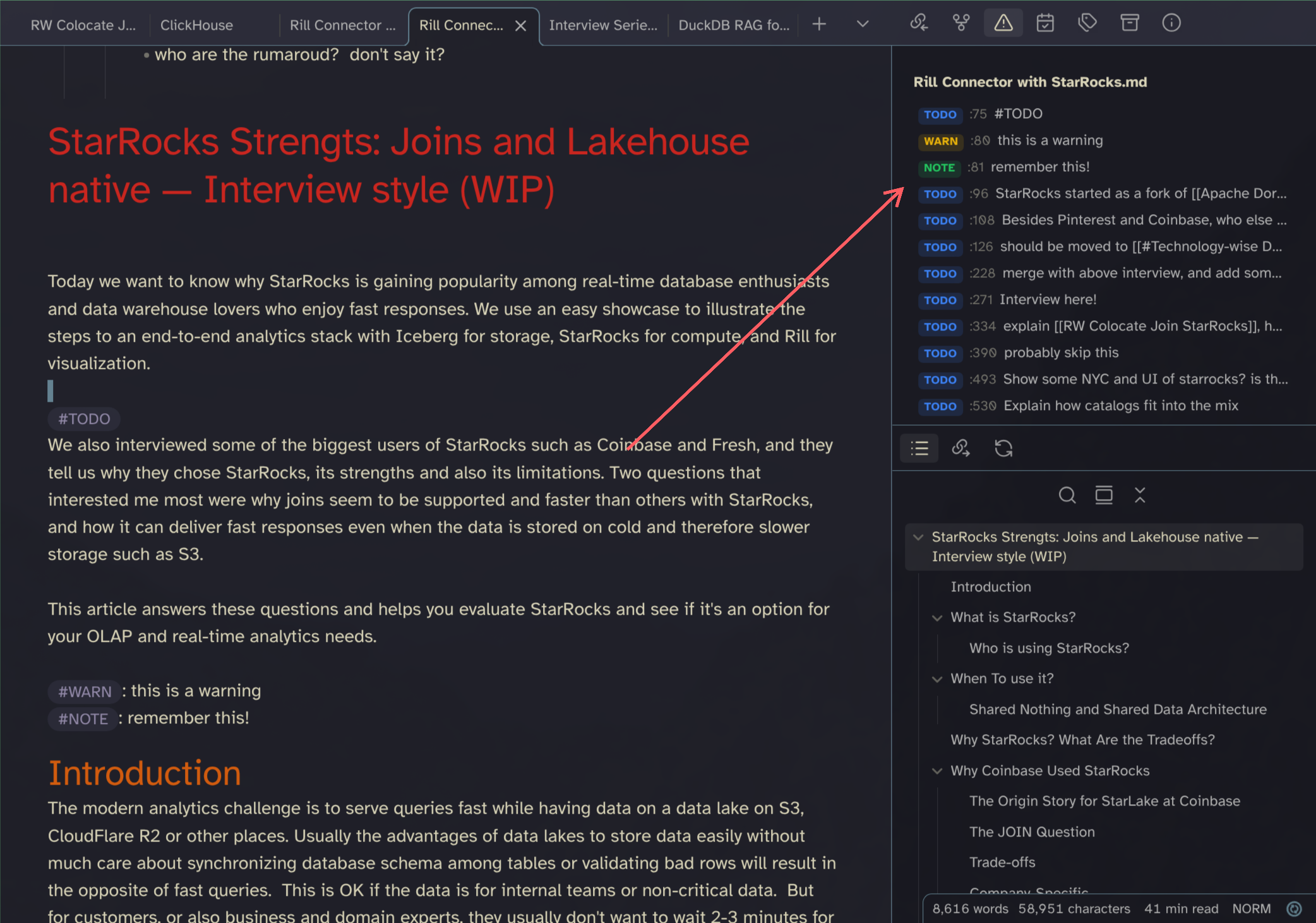
Inspired by trouble.nvim.
Usage
- Toggle panel: Click the ribbon icon or run "Toggle Trouble Tags panel" from the command palette.
- Click a row to jump to the corresponding line in the editor.
- The panel rescans automatically when you edit or switch files.
Install
Copy or symlink this folder into .obsidian/plugins/obsidian-trouble-tags/, then enable it in Settings → Community plugins.
Activate
Via command palette, search for Trouble.
Also check out my other Plugin: Obsidian Open Specific File
For plugin developers
Search results and similarity scores are powered by semantic analysis of your plugin's README. If your plugin isn't appearing for searches you'd expect, try updating your README to clearly describe your plugin's purpose, features, and use cases.