map-tips
pendingby tc
Interactive map annotation tool for marking locations and creating routes.
Map Tips - Obsidian Plugin
A powerful interactive map annotation plugin for Obsidian, allowing you to mark locations, create routes, and generate static map snapshots directly in your notes.
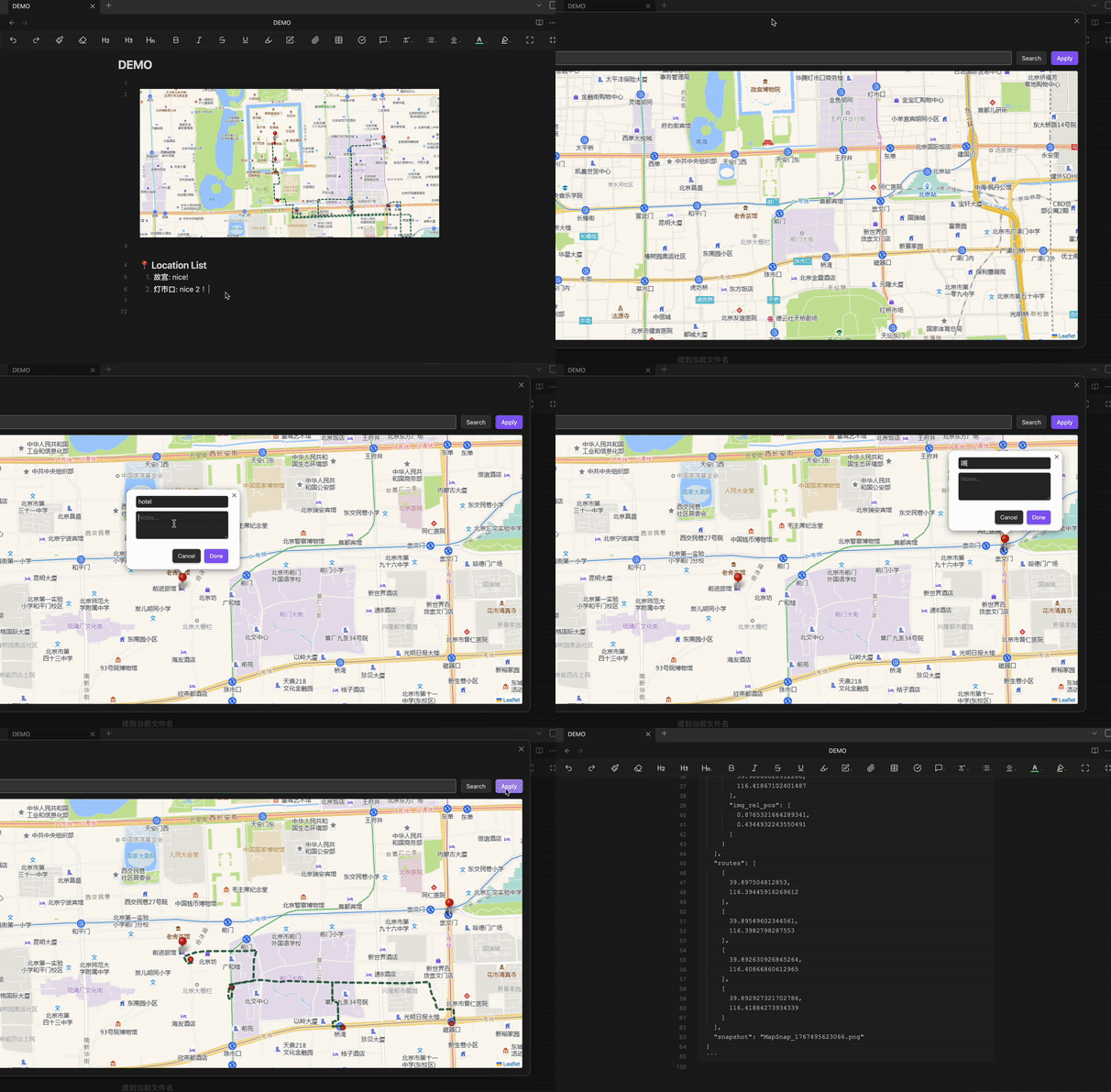
Map Tips demo
✨ Features
-
Interactive Map Editing: Create, edit, and manage location markers with titles and notes
-
Multiple Map Sources: Switch between OpenStreetMap and Amap (高德地图)
-
Route Planning: Right-click to add route points, automatically generate driving routes
-
Static Snapshots: Export map views as images with numbered markers
-
Double-click Editing: Double-click existing maps to edit them directly
-
Code Block Integration: Renders styled maps from JSON data blocks
-
Custom Icons: Use custom marker icons and shadows
-
Keyboard Shortcuts: Quick search with Enter key
🚀 Installation
Manual Installation
-
Download the latest release from GitHub
-
Extract to your Obsidian vault's
.obsidian/plugins/folder -
Enable "Map Tips" in Community Plugins
-
Restart Obsidian
From Obsidian Community Plugins (Future)
-
Open Settings → Community Plugins
-
Search for "Map Tips"
-
Install and enable
📖 Usage
Inserting a New Map
-
Right-click in the editor and select "Insert/Edit Map Tips"
-
Or use the command palette: "Map Tips: Insert new map"
Map Interface
-
Search: Enter an address or location name
-
Add Markers: Click on the map to add a marker
-
Edit Markers: Click existing markers to edit title/notes
-
Add Route Points: Right-click on map to add route waypoints
-
Save: Click "Apply" to insert map into your note
Editing Existing Maps
Double-click any map image or static map block to reopen the editor.
Static Map Code Blocks
The plugin generates code blocks like:
styled-map
{ "elements": [...], "routes": [...], "snapshot": "MapSnap_123456.png" }
These render as static maps with numbered markers.
⚙️ Configuration
Plugin Settings
-
Map Source: Choose between OSM (OpenStreetMap) or Amap
-
Icon Path: Path to custom marker icon (default:
.obsidian/plugins/map-tips/icons/default-pin.png) -
Shadow Path: Path to marker shadow image
-
Default Location: Set default map center coordinates
-
Route Styling: Customize route color, opacity, and weight
Recommended Icon Sizes
-
Marker icon: 39×39 pixels (anchor point: 20,41)
-
Shadow: 41×41 pixels
🛠 Development
Project Structure
text
map-tips/
├── manifest.json # Plugin metadata
├── main.ts # Main plugin logic
├── styles.css # Styling
├── data.json # Default settings
└── icons/ # Icon assets
Building from Source
bash
npm install npm run build
Dependencies
-
Leaflet.js (mapping library)
-
dom-to-image-more (screenshot generation)
🤝 Contributing
Contributions are welcome! Please feel free to submit a Pull Request.
📄 License
MIT License
🙏 Acknowledgements
-
Leaflet for the mapping library
-
OpenStreetMap for map tiles
-
Amap for Chinese map tiles
-
dom-to-image-more for DOM to image conversion
Map Tips - Obsidian 插件
一个强大的 Obsidian 交互式地图标注插件,允许您在笔记中直接标记位置、创建路线并生成静态地图快照。
Map Tips 插件核心功能演示
✨ 功能特性
-
交互式地图编辑:创建、编辑和管理带有标题和备注的位置标记
-
多地图源支持:可在 OpenStreetMap 和 高德地图 之间切换
-
路线规划:右键添加路径点,自动生成驾驶路线
-
静态快照:将地图视图导出为带编号标记的图片
-
双击编辑:双击现有地图可直接重新编辑
-
代码块集成:从 JSON 数据块渲染样式化地图
-
自定义图标:使用自定义标记图标和阴影
-
键盘快捷键:使用 Enter 键快速搜索
🚀 安装方法
手动安装
-
从 GitHub 下载最新版本
-
解压到 Obsidian 库的
.obsidian/plugins/文件夹 -
在社区插件中启用 "Map Tips"
-
重启 Obsidian
从 Obsidian 社区插件安装(未来)
-
打开设置 → 社区插件
-
搜索 "Map Tips"
-
安装并启用
📖 使用方法
插入新地图
-
在编辑器中右键点击并选择 "Insert/Edit Map Tips"
-
或使用命令面板:搜索 "Map Tips: Insert new map"
地图界面
-
搜索:输入地址或位置名称
-
添加标记:点击地图添加标记
-
编辑标记:点击现有标记编辑标题/备注
-
添加路径点:右键点击地图添加路线路径点
-
保存:点击"应用"将地图插入笔记
编辑现有地图
双击任何地图图片或静态地图块可重新打开编辑器。
静态地图代码块
插件会生成如下代码块:
styled-map
{ "elements": [...], "routes": [...], "snapshot": "MapSnap_123456.png" }
这些代码块会渲染为带编号标记的静态地图。
⚙️ 配置
插件设置
-
地图源:选择 OSM (OpenStreetMap) 或 高德地图
-
图标路径:自定义标记图标路径(默认:
.obsidian/plugins/map-tips/icons/default-pin.png) -
阴影路径:标记阴影图片路径
-
默认位置:设置地图默认中心坐标
-
路线样式:自定义路线颜色、透明度和粗细
推荐图标尺寸
-
标记图标:39×39 像素(锚点:20,41)
-
阴影:41×41 像素
🛠 开发
项目结构
text
map-tips/
├── manifest.json # 插件元数据
├── main.ts # 主插件逻辑
├── styles.css # 样式文件
├── data.json # 默认设置
└── icons/ # 图标资源
从源代码构建
bash
npm install npm run build
依赖项
-
Leaflet.js (地图库)
-
dom-to-image-more (截图生成)
🤝 贡献
欢迎贡献代码!请随时提交 Pull Request。
📄 许可证
MIT 许可证
🙏 致谢
-
Leaflet 提供地图库
-
OpenStreetMap 提供地图切片
-
高德地图 提供中国地图切片
-
dom-to-image-more 提供 DOM 到图片转换
For plugin developers
Search results and similarity scores are powered by semantic analysis of your plugin's README. If your plugin isn't appearing for searches you'd expect, try updating your README to clearly describe your plugin's purpose, features, and use cases.