Redline
approvedby Nicolas Sassi
Add PR-style review comments anchored to specific paragraphs, headings, images, code blocks, and tables. Comments live in a sibling .review.md sidecar so the source document stays clean. - This plugin has not been manually reviewed by Obsidian staff.
Redline
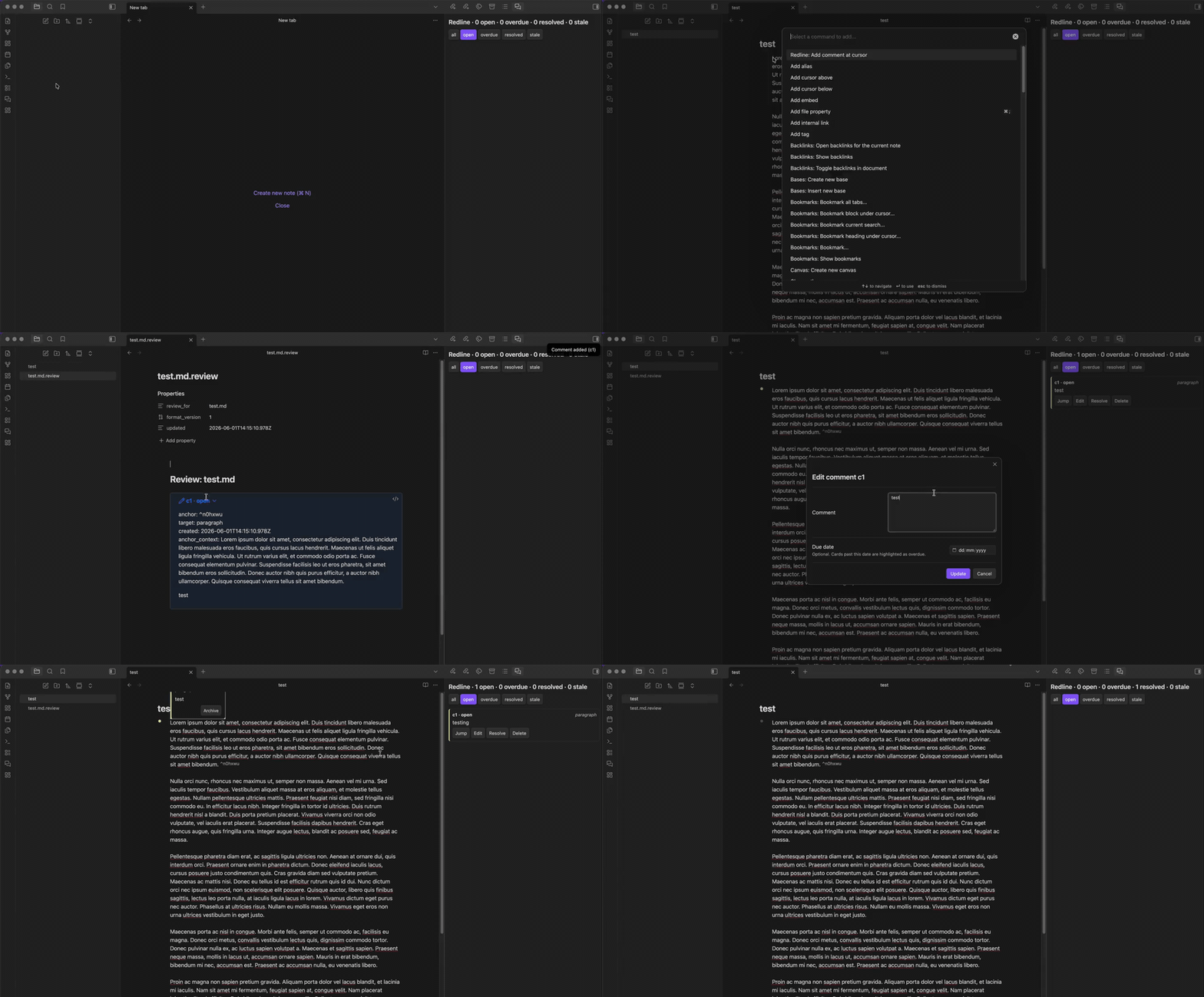
Add PR-style review comments to any document in your Obsidian vault. Anchor comments to specific paragraphs, headings, list items, images, code blocks, callouts, or tables — your source documents stay clean because comments live in a sibling .review.md sidecar file.
Demo
Why
Obsidian is great for writing long documents collaboratively (with yourself, your future self, or external tools), but it has no built-in equivalent to a GitHub pull-request review. This plugin adds that workflow:
- Read a document.
- Drop comments where something needs to change.
- Hand the document plus its
.review.mdsidecar to any tool — a human, a script, an AI assistant — that can act on the comments. - The tool resolves each comment by editing the source doc and flipping the comment status in the sidecar.
The plugin is intentionally protocol-based: it stores comments in a documented markdown sidecar format and does not bind to any specific downstream tool. Anything that can read markdown can participate.
Features
- Add review comment on any paragraph, heading, list item, image, code block, callout, or table.
- Block-reference anchoring: comments are pinned to Obsidian's native
^blockrefmarkers, so they survive document reflow. - Markdown rendered comment bodies in both the sidebar cards and the editor hover tooltip — bold, links, lists, code spans, inline images all just work.
- Edit existing comments from the sidebar; Cmd/Ctrl+Enter saves the modal.
- Hover anywhere in the anchored block to see the comment as a tooltip (paragraph-wide, code-block-wide, table-wide, callout-wide).
- Per-comment due dates with an overdue indicator (red border, dot, and an "overdue" sidebar filter).
- Gutter markers in the editor: amber for
open, gray forresolved, red forstaleoroverdue. - Review sidebar for the active document with filters (all / open / overdue / resolved / stale), jump-to-anchor, edit, toggle status, reattach, and delete.
- Cross-doc dashboard lists every
.review.mdin the vault with per-doc open / stale / overdue counts, sortable columns, and click-through to the source doc. - Stale anchor detection + Reattach — if the anchor block is edited away, the comment is flagged stale; saved anchor context lets you reattach with one click.
- Source-doc rename / move / delete are mirrored on the sidecar so reviews follow the document around (toggle in settings).
- Jump to next open comment — keyboard-friendly navigation through unresolved items.
- Per-document or central-folder sidecar storage (settings).
Installation
From the Obsidian community catalog (once published)
Settings → Community plugins → Browse → search "Redline" → Install → Enable.
Manual install
- Build (or download a release):
git clone <this-repo> cd redline npm install npm run build - Copy
manifest.json,main.js, andstyles.cssto<vault>/.obsidian/plugins/redline/. - Reload Obsidian → Settings → Community plugins → enable "Redline".
Usage
Add a comment
- Place your cursor on a paragraph (or select within it), or click an image/code-block/heading/etc.
- Open the command palette (
Cmd/Ctrl + P) → Redline: Add comment at cursor. - Type your comment (markdown is supported). Optionally pick a due date. Press Cmd/Ctrl+Enter to save.
The plugin will:
- Inject a
^blockrefanchor on the target block if it doesn't have one (reusing an existing anchor when present). - Create (or update)
<doc>.review.mdnext to your document. - Show an amber gutter dot next to the anchored line and a card in the sidebar.
Open the review sidebar
Click the speech-bubble ribbon icon on the left, or run Redline: Toggle sidebar.
Open the cross-doc dashboard
Click the layout-dashboard ribbon icon, or run Redline: Open dashboard. You get a sortable table of every doc that has open / stale / overdue comments — click a row to jump into that doc.
Resolve, edit, reattach a comment
In the sidebar:
- Resolve / Reopen — flips status between
openandresolved. - Edit — open the modal again to update the body or due date.
- Reattach — only shown for stale comments; uses the saved anchor context to find the original line and re-injects a fresh anchor.
Hand off to a downstream tool
The <doc>.review.md sidecar is a plain, documented markdown file. Any tool you trust to edit your documents — a script, an AI assistant, a coworker — can read the open comments and apply the requested changes.
Settings
- Sidecar location — alongside the source doc (default) or in a central
_reviews/folder. - Central folder name — vault-relative folder used when central layout is selected.
- Mirror source-doc lifecycle — when on (default), renaming, moving, or deleting a source doc also renames/moves/deletes its sidecar.
Commands
| Command | What it does |
|---|---|
| Redline: Add comment at cursor | Create a new comment anchored to the current block. |
| Redline: Toggle sidebar | Show/hide the review sidebar on the right. |
| Redline: Open dashboard | Open the cross-doc dashboard tab. |
| Redline: Jump to next open comment | Move the cursor to the next unresolved comment in the active doc. |
Development
npm install
npm run dev       # watch mode
npm run build     # production build
npm test          # vitest unit tests for parser + block-id logic
Tests cover the sidecar parser/serializer round-trip and the block-id injection logic. UI components are verified manually inside Obsidian.
License
MIT — see LICENSE.
For plugin developers
Search results and similarity scores are powered by semantic analysis of your plugin's README. If your plugin isn't appearing for searches you'd expect, try updating your README to clearly describe your plugin's purpose, features, and use cases.