Vault Cleanup Dashboard
approvedby lunan
Visual dashboard for intelligently cleaning orphaned files and attachments with scheduled auto-cleanup and file protection. - This plugin has not been manually reviewed by Obsidian staff.
Vault Cleanup Dashboard
An Obsidian plugin for intelligently cleaning up orphaned files and attachments in your vault.
Features
- Visual Dashboard: One-click access via ribbon icon with real-time scan status and statistics
- Smart Detection: Accurately identifies orphaned notes, attachments, and other files, including Canvas file links
- Selective Deletion: Preview and confirm files before deletion to prevent accidental loss
- Custom Recycle Bin: Deleted files are moved to a custom trash folder (default:
.vault-trash) for easy recovery - Scheduled Auto-Cleanup: Automatically scan and clean orphaned attachments at customizable intervals (in days)
- File Protection: Recently modified files are automatically protected (default: 7 days) to prevent accidental deletion
- Flexible Configuration: Supports whitelist folders, regex ignore patterns, custom attachment paths, and more
- Bilingual Interface: Full internationalization support with English and Chinese
How It Works
Orphan File Detection
A file is considered orphaned when it meets ALL of the following conditions:
- No inbound links: No other file links to it
- No outbound links: It doesn't link to any other file (including attachments - linking to an attachment means it's not orphaned)
- No canvas references: Not referenced in any Canvas file
Attachment Detection
A file is classified as an attachment if it matches your configured attachment paths:
| Path Type | Example | Matching Logic |
|---|---|---|
| Absolute path | attachments | File parent path or file path starts with it |
| Relative path | ./attachments | File path starts with attachments (default) or any parent directory name matches attachments (alternative algorithm) |
Excluded from Scanning
- Files in whitelisted folders
- Files matching ignore patterns (regex)
- Recently modified files (within protection period, default: 7 days)
- Files in
.obsidian/and other system folders
Screenshots
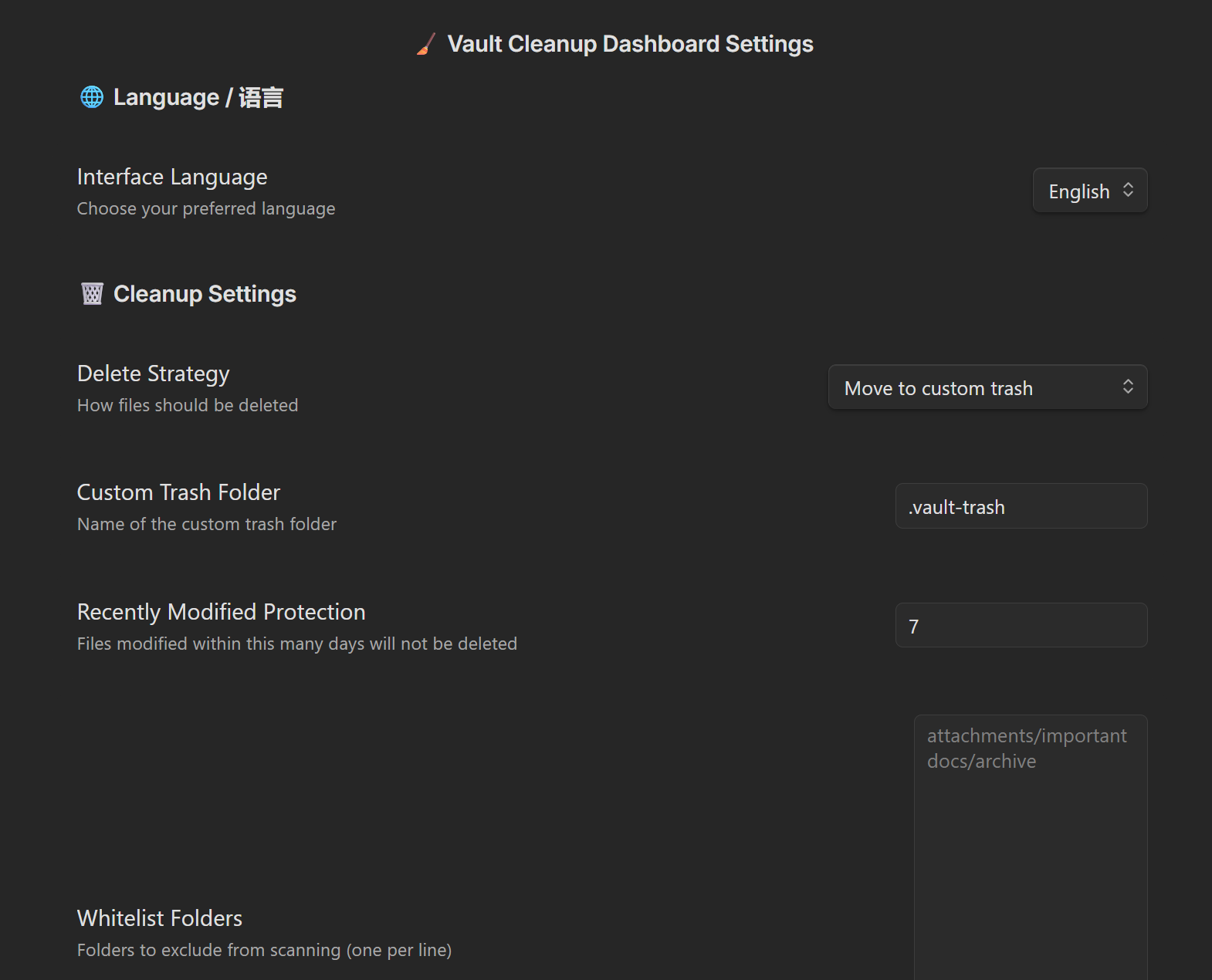
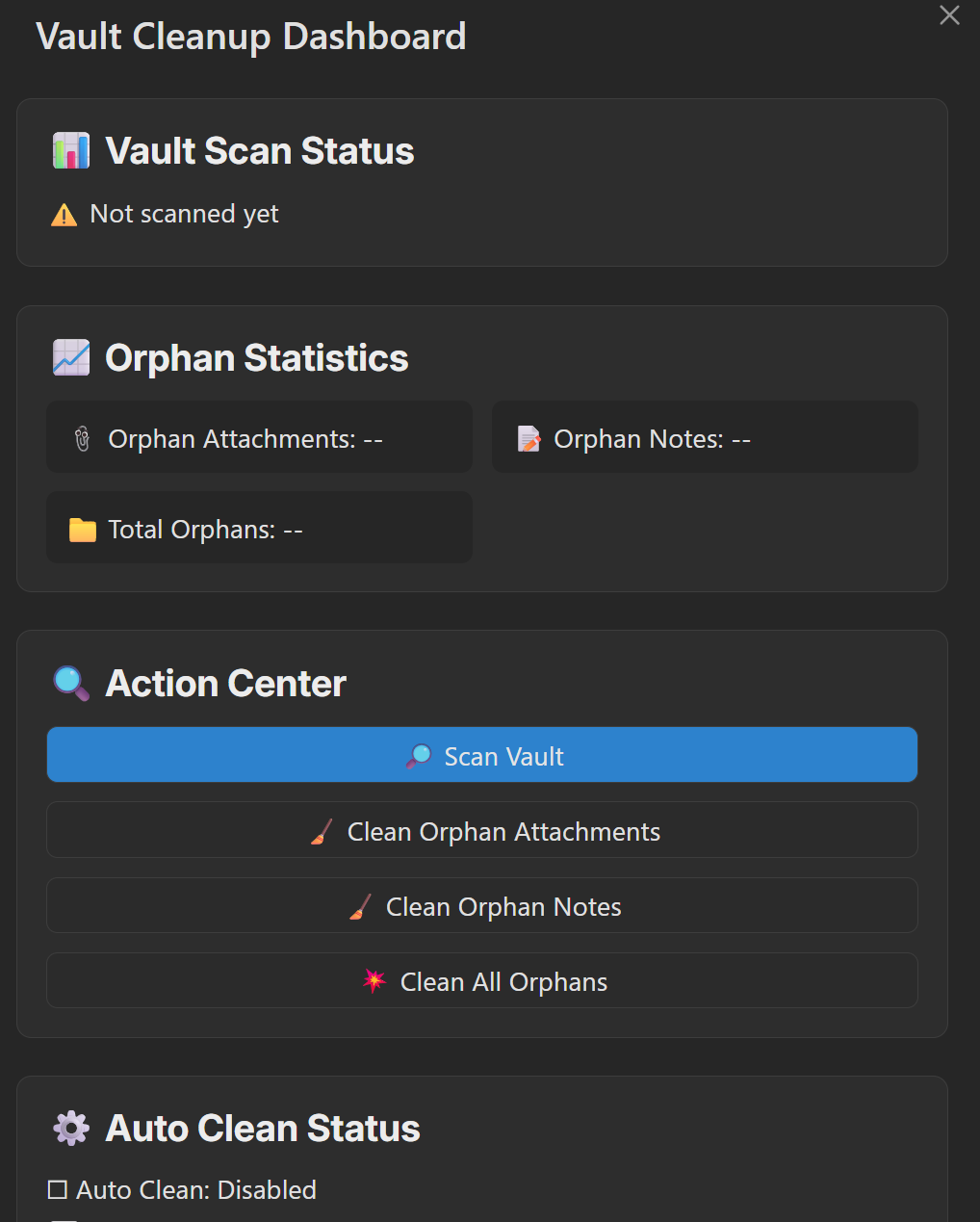
Usage
Quick Start
- Click the Vault Cleanup Dashboard icon in the sidebar to open the cleaning dashboard
- Click Scan Vault to find orphaned files
- Review statistics to see the number of orphaned files
- Choose to clean attachments, notes, or all orphaned files as needed
- Confirm the file list in the preview modal and execute cleanup
Command Palette
Quick access via Obsidian's command palette (Ctrl/Cmd + P):
- Open Dashboard - Open the visual cleaning dashboard
- Clean Orphaned Attachments - Scan and clean orphaned attachments only
- Clean Orphaned Notes - Scan and clean orphaned notes only
- Clean All Orphaned Files - Scan and clean all types of orphaned files
Installation
From Community Plugins (Recommended)
- Open Obsidian Settings → Community Plugins → Browse
- Search for "Vault Cleanup Dashboard"
- Click Install and Enable
Manual Installation
- Download the latest release from Releases
- Extract the plugin folder into your vault's
.obsidian/plugins/directory - Open Obsidian Settings → Community Plugins → Enable "Vault Cleanup Dashboard"
Configuration
Cleanup Settings
| Setting | Description | Default |
|---|---|---|
| Delete Strategy | Move to custom trash or permanent delete (dangerous) | Custom trash |
| Custom Trash Path | Folder location for deleted files | .vault-trash |
| Recently Modified Protection | Files modified within this many days are protected | 7 days |
| Whitelist Folders | Folders excluded from scanning (one per line) | None |
Auto-Cleanup Settings
| Setting | Description | Default |
|---|---|---|
| Enable Auto-Cleanup | Automatically clean orphaned attachments on schedule | Disabled |
| Cleanup Interval | Frequency of auto-cleanup execution (days) | 3 days |
| Check on Vault Open | Run auto-cleanup check when vault is opened | Enabled |
| Check on Plugin Load | Run auto-cleanup check when plugin is loaded | Enabled |
Note: Auto-cleanup only affects attachments and will not delete note files, ensuring your important content is safe.
Advanced Settings
| Setting | Description | Default |
|---|---|---|
| Override Attachment Folders | Custom attachment storage locations (one per line) | Follows vault settings |
| Ignore Patterns | Regex patterns; matching files will be excluded | None |
| Test Settings | Test if a path is ignored (red = ignored, green = kept) | - |
| Alternative Attachment Algorithm | Enable if attachments in subfolders are not detected | Disabled |
Development
Prerequisites
- Node.js (v16 or higher)
- npm or yarn
Setup
# Clone the repository
git clone https://github.com/wlunan/vault-cleaner.git
cd vault-cleaner

# Install dependencies
npm install
Development Commands
# Development mode with hot reload (watches for changes and rebuilds)
npm run dev

# Build for production
npm run build
Local Testing in Obsidian
Method 1: Using Test Vault (Recommended)
- Run
npm run devto start the development server - Open the
test-vaultfolder in Obsidian as a vault - Enable the plugin in Settings → Community Plugins
- Changes will auto-reload when you modify source files
Method 2: Copy to Your Vault
- Run
npm run buildto build the plugin - Copy the following files to your vault's
.obsidian/plugins/vault-cleaner/directory:main.jsmanifest.jsonstyles.css
- Enable the plugin in Settings → Community Plugins
- Run
npm run devfor auto-rebuild, then reload Obsidian to see changes
Method 3: Using hot-reload Plugin
- Install the hot-reload plugin in your vault
- Create a file named
.hot-reloadin your vault root - Run
npm run dev- changes will auto-reload without restarting Obsidian
Release
# Bump version (updates package.json, manifest.json)
npm run version

# Commit and tag
git add .
git commit -m "Release vX.Y.Z"
git tag vX.Y.Z
git push && git push --tags
Create a new release on GitHub with the built files (main.js, manifest.json, styles.css).
Project Structure
src/
├── main.ts              # Plugin entry point, registers commands and ribbon icon
├── dashboardModal.ts    # Visual cleaning dashboard
├── scanService.ts       # Orphan file scanning service
├── actionService.ts     # File operation service (delete/restore)
├── previewModal.ts      # Delete preview confirmation modal
├── autoCleanScheduler.ts # Scheduled auto-cleanup scheduler
├── settings.ts          # Settings interface
└── locales/             # Internationalization language packs
    ├── zh-CN.ts         # Chinese
    └── en-US.ts         # English
License
MIT
Acknowledgments
- This plugin is a fork of nuke-orphans-plugin, enhanced with a visual dashboard, scheduled auto-cleanup, file protection mechanisms, and more. Thanks to the original author for their excellent work.
- Thanks to all developers contributing to the Obsidian community.
For plugin developers
Search results and similarity scores are powered by semantic analysis of your plugin's README. If your plugin isn't appearing for searches you'd expect, try updating your README to clearly describe your plugin's purpose, features, and use cases.