by Marcel Schwarz
View and edit CSV files as a sortable, filterable table. Sorting never touches the file, and edits are written back byte-for-byte.
Rich CSV
An Obsidian view for .csv files: a real table you can sort, filter, search and edit —
that writes back only what you changed.
Obsidian shows a .csv as raw text. The two plugins that fix that are a five-year-old
0.0.1 whose own README warns that "data loss is a very real possibility", and a
maintained one that does everything except sort and filter — which is the one thing a
table is for. This is the third answer: the sorting, and the care with the bytes.
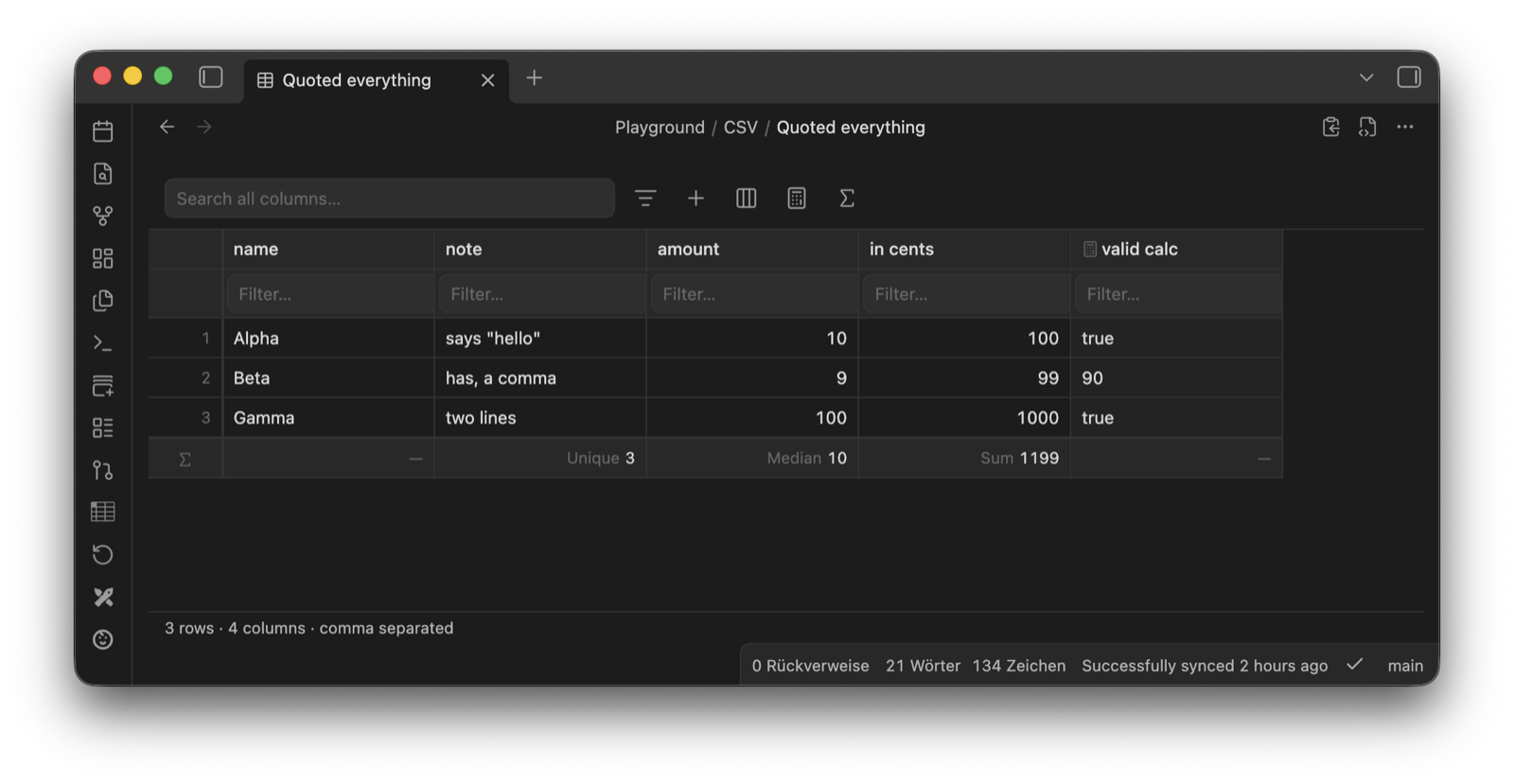
A small file with everything switched on at once: per-column filters, the summary row, and a
derived column — valid calc, marked with the ƒ(x) badge — that is computed for the view and
never written to the CSV.
Requires Obsidian 1.8.0 or later. Desktop and mobile.
The one thing to know
Sorting and filtering never touch the file. A sort is a way of looking at rows, not a
way of storing them — the same thing Bases does, and the same thing SORT … DESC did in the
Dataview query this replaces. Click a column header a hundred times and git diff stays
empty. The file's own row order, which is usually insertion order and usually means
something, is never lost.
When you do want that order written down, there is a Write order to file button, which appears in the toolbar only while a sort is on. That is a deliberate, one-off, undoable act — the difference between a tool that can reorder a file and one that reorders it behind you.
What is written is what you typed, and nothing else. Open a file, change one cell, save: the
diff is one line. That holds because the plugin keeps the original text of every field it
did not touch — the quoting, the delimiter, the line endings, the BOM, the trailing newline
— and re-emits it verbatim. a,b does not become "a","b" because you edited row 40.
And when that promise cannot be kept, the plugin says so instead of guessing: on open it re-serialises what it parsed and compares it to the file it read. If the two differ by a single byte, the table goes read-only and tells you why. A file it cannot round-trip is a file it will not write.
Install
From a release. Download main.js, manifest.json and styles.css from the
latest release and put all
three in <vault>/.obsidian/plugins/rich-csv/. Or point
BRAT at iCaotix/obsidian-rich-csv and let
it handle updates.
From source.
npm install
npm run build
npm run install-to-vault -- "/path/to/your/vault"
Then enable Rich CSV under Settings → Community plugins and open any .csv file.
One plugin per extension. Obsidian hands .csv to whichever plugin registered it; CSV
Lite, CSV Editor and csvzall all want the same one. Disable the others first.
What it does
- Sort by any column, ascending or descending, in memory only. Numbers sort as numbers, dates as dates, and empty cells always sink to the bottom in both directions — an empty cell is a missing value, not a small one.
- Sort by several columns at once.
Shift-click a second header for "by status, then by year"; each header shows which pass it is. Every column keeps its own type, so a text column and a number column in the same sort each behave the way they should. The column menu spells the same thing out for anyone not holding a keyboard. - Write that order into the file when you want it kept, with the button that appears beside the sort. Every row is reordered, including any the filter is hiding — the button persists an ordering and never removes a row. The sort clears afterwards, because the file is now in that order.
- Filter per column and search across all of them at once. The filters are kept in the
books.csv.formulas.jsonbeside the file, so they travel with it and can be read, synced and diffed; the search is kept nowhere, because a search is a question you are asking now rather than a setting. Neither goes anywhere near your data. - Filter by more than a word. A filter box that opens with a comparison is an expression:
> 80,< 2026-01-01,= done,!= done, the range10..20— open at either end,80..and..80—is empty,is not empty,!donefor "does not contain", and/^a.*z$/for a pattern. Join them withand,oror a comma, and quote a value that contains one of those. A box that opens with anything else is still plain text to look for, soSmith, Johnandblack and whitemean themselves. - Edit cells by double-clicking, or by typing on a selected one. Arrow keys move,
Entercommits and drops down,Tabcommits and moves right,Escapereverts,Deleteclears. On a phone one tap starts the edit, in the cell, with the row kept in view as the keyboard takes the bottom half of the screen. - Rows and columns. Insert, duplicate, delete, rename a header, move a column left or right — from the right-click menu on a row number or a column header.
- Derived columns. A column computed from the others —
[price] * [quantity],if([status] = "done", "✓", ""),days([ordered], [shipped])— shown after the file's own columns, sorted and filtered like any other, and never written to the CSV. The formula lives in a smallbooks.csv.formulas.jsonbeside the file, so the CSV keeps exactly the columns it had while the formula is still something you can see, sync and put in git. Read-only, for the same reason: there is no cell there to type into. - A summary row along the bottom: sum, average, median, min, max, range, and the counts — all, filled, empty, unique, and either as a percentage. One per column, chosen by clicking the footer cell, and computed over the rows the filter leaves, so narrowing the table and reading the total is one action. Nothing is written: a CSV whose last line is a totals row is a CSV every other tool reads as one more row of data.
- Undo inside the view,
Cmd/Ctrl+Z, back to how the file was when you opened it. - Frozen header and pinned columns. The header row and the first n columns stay put while the rest scrolls sideways.
- Raw source toggle. One click to the plain text and back, so a file that confuses the table is still repairable by hand — in the same tab, without another editor.
- Markdown tables both ways. Turn the pipe table under your cursor into a
.csvfile, or copy a whole CSV back out as a pipe table.
All of it works on a phone, with taller rows and one tap to edit. The column menu is a button in the header instead of a right-click, the row menu is a long press, columns resize by dragging the grip at the right-hand end of a header, and the table keeps clear of both the software keyboard and the floating navigation bar.
What it deliberately does not do
- No formulas in the file, no charts, no queries. A cell holding
=A2*B2is a cell every other reader of that CSV misreads, so nothing computed is ever written. Derived columns are the other side of that line: computed for the view, kept in a file of their own, invisible to the CSV. Charts and SQL over CSV are a different tool; csvzall does both. - No
.csvin Bases. Bases enumerates files and only files; a CSV-backed Bases view is not a thing that can be built, and the request for one has been declined on principle. Obsidian's own answer to a table is its CSV importer: one note per row, then a.baseover them. - No writing on sort. Only the explicit button writes an order, and it asks first. A setting that made every header click rewrite the file would be a footgun with a switch on it.
Options
Settings → Community plugins → Rich CSV.
| Setting | Meaning |
|---|---|
| Show row numbers | The narrow left column with the file's own row order in it. On by default — with a sort active it is the only way to see where a row really lives |
| Remember sorting and layout | Sort, pinned columns, column widths and type overrides, per file. On by default, kept in the plugin's data.json, never in your CSV. Filters, formulas and summaries are not covered: those live beside the file and stay either way |
| Confirm before deleting | Ask before a row or a column goes. On by default; undo works either way |
| Default column width | Pixels, for columns you have not resized. Drag a column's right edge to change one, double-click that edge to reset it |
| Follow the file's quoting style | When a file quotes every field, quote new values too. On by default; off means quoting only where the format requires it |
Two commands, both in the palette:
| Command | What it does |
|---|---|
| Convert Markdown table to a CSV file | Takes the pipe table under the cursor and writes a .csv beside the note. The note is left exactly as it was |
| Toggle between the table and the plain text | The same thing as the toolbar button, for a keyboard shortcut |
Docs
| Document | Contents |
|---|---|
| docs/csv-format.md | What counts as a number, a date, a delimiter — and exactly what round-tripping guarantees |
| docs/decisions.md | The choices that shaped the plugin, newest first |
| docs/formulas.md | Derived columns: what a formula can say, what happens to a blank, and where the formulas are kept |
| docs/dev-workflow.md | Building, running and releasing it |
| docs/roadmap.md | What could come next, and what deliberately will not |
Development
npm install
npm run dev     # esbuild watch → main.js
npm test        # the pure logic, runs in Node without Obsidian
npm run build   # typecheck + production bundle
npm run lint
Everything that can lose data — the parser, the serialiser, the type inference, the sort and filter pass, the formula evaluator, the summaries, the row and column operations, the stored state and the markdown-table conversion — has no Obsidian import in it and runs under plain Node. Edge cases in tests, appearance in the dev vault.
Status
1.0.0 — the format work is finished and covered by tests; the polish is where a young plugin's polish usually is. What the round-trip check guarantees, it has guaranteed since 0.1.0.
The view writes to your vault — that is what it is for — so the round-trip check above is not a nicety, it is the safety rail. Back up, or keep the vault in git, the same as you would with any editor.
What it writes, and nothing else: the .csv you are editing, a
<name>.csv.formulas.json beside it when you add a filter or a derived column, and the
plugin's own data.json for the per-file layout. It makes no network requests, collects no
telemetry, needs no account, and reads nothing outside the vault you opened it in.
Known limits:
- One header row, always. Row 0 is the header and does not take part in a sort. A file with two header rows, or none, will look wrong in the first row.
- No copy and paste of a cell range. The whole table copies as a Markdown table; a rectangle of cells does not yet. It is first on the roadmap.
- No
```csvcode block. Tabular data living inside a note is the other half of this idea and is not in this release — see the roadmap.
License
0BSD — use it, change it, ship it, no attribution asked for.
For plugin developers
Search results and similarity scores are powered by semantic analysis of your plugin's README. If your plugin isn't appearing for searches you'd expect, try updating your README to clearly describe your plugin's purpose, features, and use cases.