by nickparkes7
Turn note text into squiggles so you can write freely without stopping to reread or edit.
Scribble Mode
Turn your note text into squiggles so you can write without stopping to reread or edit.
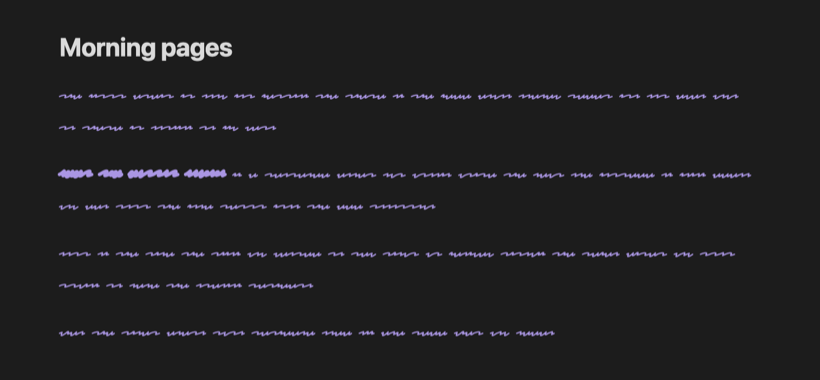
When you can read what you just wrote, it's hard not to fix it. Scribble Mode hides your words as you type, which makes it useful for writing sprints, morning pages and first drafts. Turn it off when you're done and everything is back to normal. Your notes are never changed.
Usage
Everywhere: run Scribble Mode: Toggle on or off from the command palette, or click the pen icon in the ribbon. While it's on, 〰 Scribble shows in the status bar; click it to turn scribble mode off. You can give the command a hotkey in Settings → Hotkeys.
One note: add scribble to the note's cssclasses property and that note
always shows as squiggles:
---
cssclasses: scribble
---
Only the note body turns into squiggles. The note title, properties and the rest of Obsidian stay readable, so you can still find your way around. Word count, the cursor and selection all work as usual.
Installation
Search for Scribble Mode in Settings → Community plugins → Browse.
To install it manually, download main.js, manifest.json and styles.css
from the latest release
and put them in <your vault>/.obsidian/plugins/scribble-mode/.
Development
npm install
npm run dev
npm run dev rebuilds main.js and styles.css as you edit. npm run build
makes a production build, and npm run lint runs the Obsidian ESLint rules.
The stylesheet is built from src/styles.css, with the fonts in fonts/
inlined as data URLs so the plugin works offline.
Credits
Scribble Mode uses Redacted Script by Christian Naths, licensed under the SIL Open Font License 1.1. Inspired by the scribble font in Ellipsus.
License
MIT. The bundled font keeps its own license (see above).
For plugin developers
Search results and similarity scores are powered by semantic analysis of your plugin's README. If your plugin isn't appearing for searches you'd expect, try updating your README to clearly describe your plugin's purpose, features, and use cases.