Scropt
Run scripts in Obsidian. Desktop only.
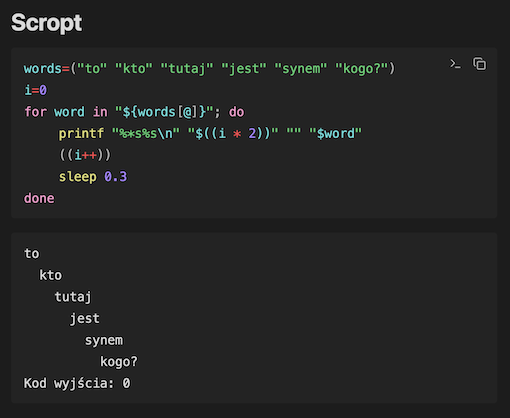
What it looks like
Installation
Install Scropt from Community plugins, or copy main.js and manifest.json into <vault>/.obsidian/plugins/scropt/ and enable it in Settings → Community plugins.
Usage
A run button appears in the top-right corner of every bash block. Click it to run the command; click again to stop it. Output appears below the block.
```bash
words=("to" "kto" "tutaj" "jest" "synem" "kogo?")
i=0
for word in "${words[@]}"; do
	printf "%*s%s\n" "$((i * 2))" "" "$word"
	((i++))
	sleep 0.3
done
```
Build
make build # builds the plugin
make deploy VAULT=/path/to/vault # copies the built plugin to `VAULT/.obsidian/plugins/scropt/`
Security
Scropt executes arbitrary shell commands taken from your notes. There is no confirmation dialog and no sandbox. Only run commands you understand and trust. Commands run with Obsidian's permissions.
License
MIT. See LICENSE.
Bundles ansi-regex, MIT © Sindre Sorhus.
For plugin developers
Search results and similarity scores are powered by semantic analysis of your plugin's README. If your plugin isn't appearing for searches you'd expect, try updating your README to clearly describe your plugin's purpose, features, and use cases.